EasyManua.ls Logo

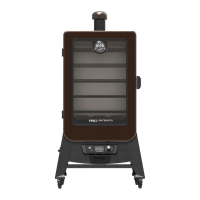
Pit Boss PLATINUM PBV5PL - User Manual

Pit Boss PLATINUM PBV5PL
92 pages
Print Icon
To Next Page IconTo Next Page
Loading...
300522
WARNING: Please read the entire manual before installation and use of this electric, pellet fuel burning appliance. Failure to follow these
instructions could result in property damage, bodily injury or even death. Contact local building or fire officials about restrictions and
installation inspection requirements in your area.
AVERTISSEMENT : Veuillez lire l'intégralité du manuel avant l'installation et l'utilisation de cet appareil électrique, à granules. Ne pas suivre ces
instructions peut entraîner des dégâts matériels ou des blessures corporelles graves pouvant aller jusqu'à la mort. Contactez les responsables
locaux de la construction ou des incendies au sujet des restrictions et des exigences d'inspection de l'installation dans votre région.
ADVERTENCI: Lea el manual completo antes de instalar y utilizar este aparato eléctrico para quemar pellets de combustible. Incumplir estas
instrucciones podría causar daños materiales, lesiones corporales, e incluso la muerte. Consulte a sus funcionarios locales de construcción y
control de incendios para informarse sobre las restricciones y los requisitos de inspección de instalaciones en su región.
   |    |   

 /  /  5
 /  /  10577, 10932
WOOD PELLET VERTICAL SMOKER
IMPORTANT, READ CAREFULLY, RETAIN FOR FUTURE REFERENCE.
MANUAL MUST BE READ BEFORE OPERATING!
FUMOIR VERTICAL À GRANULES DE BOIS
IMPORTANT, PRENEZ CONNAISSANCE DE CE DOCUMENT ET CONSERVEZ-LE POUR RÉFÉRENCE
ULTÉRIEURE VOUS DEVEZ LIRE CE GUIDE AVANT D’UTILISER LE BARBECUE !
AHUMADOR VERTICAL DE PELLAS DE MADERA
IMPORTANTE, LEA DETENIDAMENTE, CONSERVE PARA REFERENCIA FUTURA.
¡DEBE LEER EL MANUAL ANTES DE LA OPERACIÓN!
FOR OUTDOOR AND HOUSEHOLD USE ONLY. NOT FOR COMMERCIAL USE. RÉSERVÉ À L'USAGE
EXTÉRIEUR ET RÉSIDENTIEL UNIQUEMENT. NON DESTINÉ À UN USAGE COMMERCIAL.
SOLO PARA USO EN EXTERIORES Y EN EL HOGAR. NO ES PARA USO COMERCIAL.

Table of Contents

Questions and Answers

  • S
    Shawn LawrenceAug 16, 2025
    What does Err mean on Pit Boss PLATINUM PBV5PL with no pellets?
    • M
      Miss Victoria WellsAug 16, 2025
      If you're seeing an 'Err' error code on your Pit Boss Smoker and there are no pellets visible, it indicates a lack of fuel, poor fuel quality, an obstruction in the feed system, or a jammed auger. Check the hopper to ensure the fuel level is sufficient and replenish if low. If the wood pellets are of poor quality or too long, they may cause an obstruction in the feed system; in this case, remove the pellets and follow the care and maintenance instructions.
  • K
    kenneth67Aug 19, 2025
    What to do if Pit Boss PLATINUM PBV5PL Smokers Err code and ignitor icon are blinking?
    • A
      Andrew PetersonAug 19, 2025
      If your Pit Boss Smoker displays an 'Err' error code with the ignitor icon blinking, it suggests the ignitor isn't working properly or isn't making a connection. Remove the cooking components and inspect the ignitor. Visually confirm it's working by feeling for heat above the burn grate and ensuring it's aligned with the hole in the burn grate, open to light the pellets. If it's not operating properly the igniter needs to be replaced.
  • S
    Scott OneillAug 22, 2025
    How to fix a Pit Boss Smokers burn pot that won't light?
    • B
      Bailey TranAug 22, 2025
      If the fire in your Pit Boss Smoker burn pot won't light, it could be due to several reasons. The auger might not be primed, especially if the unit is new or the hopper was completely emptied; in this case, follow the Hopper Priming Procedure to fill the auger tube with pellets. Alternatively, the auger motor could be jammed; remove the cooking components and inspect the auger feed system to confirm that the auger is dropping pellets into the burn pot. Another possibility is ignitor failure; remove the cooking components, turn on the unit, and check if the ignitor is working by feeling for heat above the burn pot and visually confirming it protrudes approximately 13mm / 0.5 inches into the burn pot.
  • F
    frankpowersAug 25, 2025
    Why is my Pit Boss Smokers grill producing too much smoke?
    • N
      nfoleyAug 25, 2025
      Excessive or discolored smoke from your Pit Boss Smoker grill can stem from a few issues. Grease build-up is a common culprit, so follow the care and maintenance instructions. The quality of your wood pellets also matters; remove any moist pellets from the hopper, clean it out, and replace them with dry wood pellets. A blocked burn pot can also cause this issue; clear the burn pot of any moist wood pellets and follow the Hopper Priming Procedure. Finally, insufficient air intake for the fan can lead to excess smoke; check the fan to ensure it's working properly and the air intake isn't blocked, cleaning it if necessary.
  • A
    Amy LandryAug 27, 2025
    What does ErL error code mean on Pit Boss Smokers?
    • B
      Bianca PotterAug 27, 2025
      The 'ErL' error code on a Pit Boss Smoker indicates that the grill is failing to perform the start-up cycle. Check the proper positioning of cooking components. Ensure the hopper has sufficient fuel and that there is no obstruction in the feed system; remove pellets and follow the care and maintenance instructions. Inspect the grill probe to confirm if the actual temperature is correct and accurate, cleaning it if dirty. Check the ignitor positioning and that it is heating up properly. In extreme cold, the grill may require a second start. Also, check the fan to ensure it is working properly.
  • P
    Peter LunaAug 30, 2025
    What does ErH error code mean on Pit Boss Smokers?
    • E
      Eric MillerAug 30, 2025
      The 'ErH' error code on your Pit Boss Smoker indicates that the unit has overheated, possibly due to a grease fire or excess fuel. Press the Power Button to turn the unit off, and allow the grill to cool. Follow the care and maintenance instructions. After maintenance, remove pellets, and confirm positioning of all component parts. Once cooled, press the Power Button to turn the unit on, then select desired temperature.
  • L
    Leslie AllisonSep 2, 2025
    What to do if Pit Boss PLATINUM PBV5PL control panel has no power?
    • T
      tonya85Sep 2, 2025
      If there are no power lights on the control panel of your Pit Boss Smoker, first, ensure the unit is plugged into a working power source and reset the breaker. Make sure the GFCI is a minimum 10 Amp service. Also, check that all wire connections are firmly connected and dry. If the fuse on the control panel is blown, remove the hopper access panel and carefully pull the controller inside the hopper to release it. Check the fuse for a broken or blackened wire; if found, the fuse needs replacement. A faulty control panel may also be the reason, in such case it needs to be replaced.
  • C
    Candice FordSep 7, 2025
    How to prevent flare-ups on Pit Boss PLATINUM PBV5PL Smokers?
    • Y
      ytoddSep 7, 2025
      To prevent frequent flare-ups on your Pit Boss Smoker, try cooking at a lower temperature, keeping it under 176°C / 350°F when cooking greasy foods, as grease has a flash point. Also, grease build-up on cooking components can cause flare-ups, so follow the care and maintenance instructions to keep them clean.
  • M
    martinwilsonSep 10, 2025
    Why is the auger icon blinking on my Pit Boss PLATINUM PBV5PL?
    • J
      Jeffrey SmithSep 12, 2025
      If you see an 'Err' error code with the auger icon blinking on your Pit Boss Smoker, it typically means the auger isn't primed or the auger motor is jammed. If the unit is new or the hopper was completely emptied, the auger must be primed to allow pellets to fill the burn pot; follow the Hopper Priming Procedure. Alternatively, the auger motor might be jammed; remove the cooking components and inspect the auger feed system to visually confirm that the auger is dropping pellets into the burn pot.
  • A
    Anthony FisherSep 12, 2025
    What to do if Pit Boss PLATINUM PBV5PL Smokers Err code and fan icon are blinking?
    • J
      jennifer51Sep 13, 2025
      If your Pit Boss Smoker shows an 'Err' error code with the fan icon blinking, it indicates that the fan isn't working properly or isn't making a connection. Check the fan to ensure it is working correctly and the air intake isn't blocked. Also, inspect the fan wires for any damage. Clean the fan blades if they are dirty.

Summary

Safety Information

Dangers and Warnings

Essential safety precautions and potential hazards associated with the smoker's operation.

Disposal of Ashes

Wood Pellet Fuel Guidelines

Creosote Formation and Prevention

Carbon Monoxide Hazards

Safety and Compliance Listing

FCC Compliance Statement

Parts and Specifications

Assembly Instructions

Mounting Support Legs to Main Cabinet

Step-by-step guide to attaching the smoker's support legs to the main cabinet.

Securing Front Panel to Support Legs

Instructions for attaching the front panel to the smoker's support legs.

Mounting Support Panels

Guide for installing the smoker's support panels.

Securing the Support Bar

Steps to secure the support bar at the rear of the unit.

Mounting Power Cord Bracket

Instructions for attaching the power cord bracket to the smoker.

Placing the Grease Tray

Guidance on correctly positioning the grease tray for grease collection.

Attaching Hopper Clean-Out Door Knob

Steps to attach the knob for the hopper clean-out door.

Mounting the Hopper Handle

Instructions for installing the handle onto the hopper lid.

Mounting Control Panel Handle

Steps to attach the handle to the smoker's control panel.

Mounting the Back Handle

Instructions for installing the handle on the back of the smoker.

Securing the Chimney

Guide for assembling and securing the chimney stack and cap.

Installing the Lid Stopper

Steps for installing the lid stopper mechanism.

Inserting the Ash Clean-out Tray

Procedure for inserting the ash clean-out tray into the front panel.

Installing Cooking Components

Guide for placing cooking grids, heat deflector, and water pan.

Connecting to Power Source

Instructions for connecting the smoker to a standard or GFCI power outlet.

Operating Instructions

Smoker Environment Setup

Guidance on selecting an appropriate location for the smoker.

Cold Weather Cooking Tips

Advice for operating the smoker effectively in cold ambient temperatures.

Hot Weather Cooking Adjustments

Recommendations for cooking in warm weather to prevent flare-ups.

Smoker Temperature Ranges

Explanation of optimal temperature ranges for different cooking styles.

Understanding the Control Panel

Control Panel Overview

Diagram and basic description of the smoker's digital control panel.

Detailed Control Functions

Explanation of specific functions like Prime, Controller Knob, and status icons.

Control Panel Functions

Setting temperatures, using meat probes, and connecting to the Smoke iT™ app.

Operating Procedures

Hopper Priming Procedure

Steps to prime the auger for consistent pellet delivery.

First Use: Smoker Burn-Off

Procedure for initial burn-off before first cooking session.

Automatic Start-Up Procedure

Step-by-step guide for the automatic smoker start-up cycle.

Shutting Off Your Smoker

Instructions for safely powering down the smoker and initiating the cool-down cycle.

Care and Maintenance

Ash Clean-Out Process

How to clean out ashes from the burn pot.

Hopper Assembly and Cleaning

Maintenance of the hopper, including clean-out feature.

Probe Care and Maintenance

Guidelines for caring for meat and grill probes to ensure accuracy.

Inside Surfaces Cleaning

Recommended cleaning methods for the smoker's interior surfaces.

Outside Surfaces Cleaning

How to clean and maintain the smoker's exterior.

Using Wood Pellet Fuel

Cooking Guidelines

Tips and Techniques

Food Safety Practices

Essential tips for maintaining food safety during cooking.

Cooking Preparation Steps

Preparation advice for recipes and cooking sessions.

Grilling Tips and Techniques

Advanced techniques for enhancing flavor and cooking performance.

Troubleshooting Common Issues

Electrical Wire Diagram

Smoker Replacement Parts

Electrical Replacement Parts

Product Warranty Information

Warranty Exceptions and Limitations

Conditions that are not covered by the manufacturer's warranty.

Ordering Replacement Parts

Information on how to order replacement parts for the smoker.

Contacting Customer Care

Contact details for customer support and inquiries.

Warranty Service Procedures

Steps for initiating a warranty claim or service request.

Recipes for Smoked Foods

Smoked Halibut Recipe

Instructions for smoking halibut with specific wood pellet flavors.

Smoked Cornish Hens Recipe

Guide for smoking Cornish hens with recommended wood pellet flavors.

Smoked Beef Brisket Recipe

Instructions for smoking a beef brisket with specific pellet flavors.

Smoked Prime Rib Roast Recipe

Recipe for smoking a prime rib roast with suggested pellet flavors.

Smoked Ribs Recipe

Instructions for smoking pork ribs with chosen wood pellet flavors.

Smoked Stuffed Pork Tenderloin Recipe

Recipe for smoking stuffed pork tenderloin with recommended flavors.

Smoked Chicken Recipe

Guide for smoking chicken with specific wood pellet flavors.

Whole Smoked Turkey Recipe

Instructions for smoking a whole turkey with recommended flavors.

Smoked Sausage with Mango Chutney Recipe

Recipe for smoking sausage and serving with mango chutney.

Pit Boss PLATINUM PBV5PL Specifications

General IconGeneral
TypePellet Smoker
Temperature Range180°F to 500°F
Wi-Fi ConnectivityYes
Fuel TypeWood Pellets
MaterialSteel
Digital ControlYes
WheelsYes
Warranty5 Years

Related product manuals