Page 5Item 93884 For technical questions, please call 1-888-866-5797
Laser Controls
1.
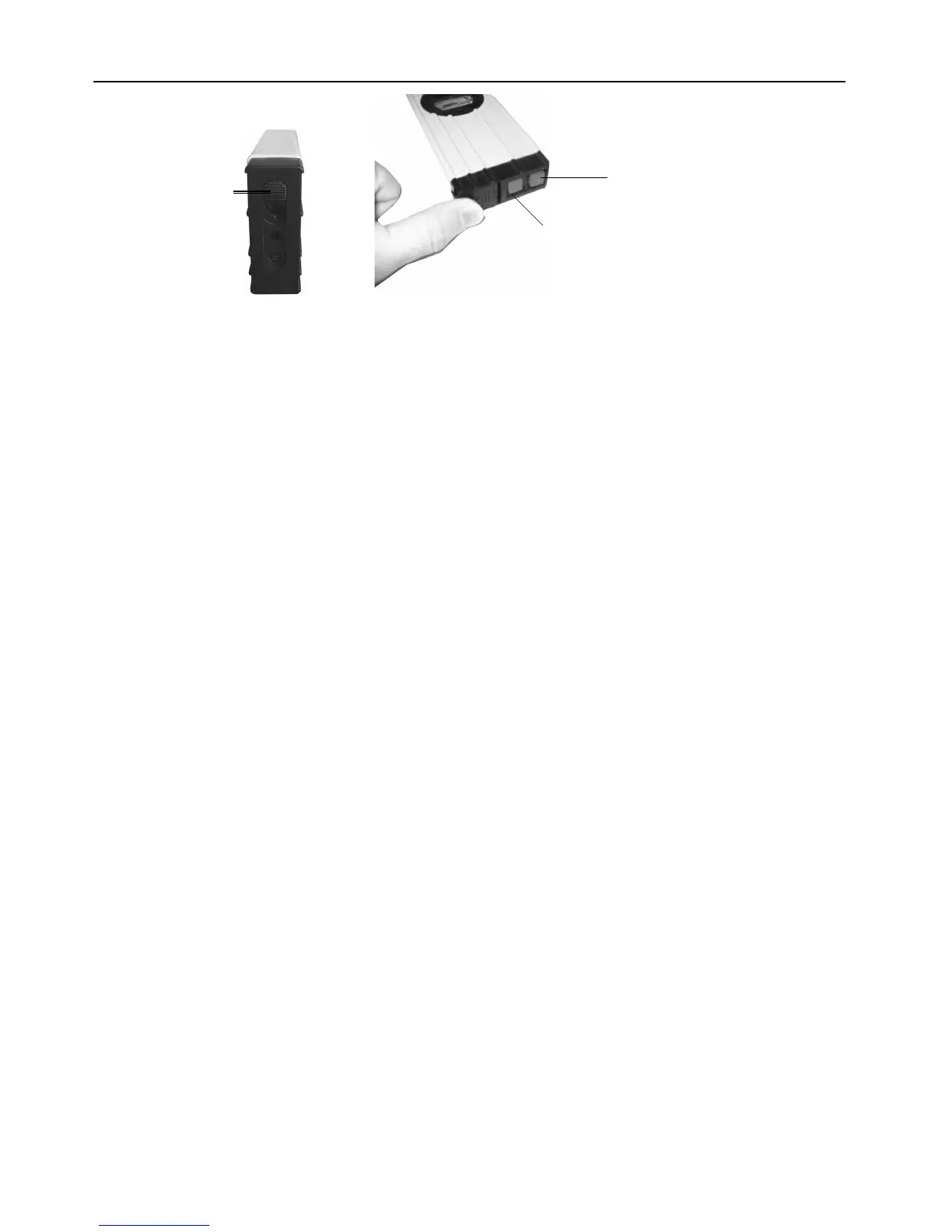
Horizontal/Dot Laser Button (12)
Vertical Laser Button (12)
Slide Switch (18)
Vertical Laser Button (12) - This button turns on the vertical laser line if the Slide Switch
(18) is in the upper position. The vertical laser is blocked while the Slide Switch (18) is in the
lower position.
2. Horizontal/Dot Laser Button (12) - This button turns on the horizontal laser line if the Slide
Switch (18) is in the upper position. It can be used along with the vertical laser line to make
a cross. When the Slide Switch (18) is in the lower position, the laser is a dot instead.
3. Slide Switch (18) - The Slide Switch (18) determines laser operation.
WARNING! Point the end of the level away from people’s eyes when adjusting
the Slide Switch (18). If the Slide Switch is in the lower position, it can conceal an
illuminated laser beam. If the
Slide Switch (18) is in the upper position, the Vertical Laser Button will project a vertical line
and the Horizontal/Dot Laser Button will project a horizontal line. When the Slide Switch
(18) is in the lower position, the Vertical Laser Button will be covered and the Horizontal/Dot
Laser Button will project a simple dot beam.
WARNING! To conserve battery power and prevent accidents, move the Slide Switch
(18) to the upper position and verify that both lasers are off after use.


 To Next Page