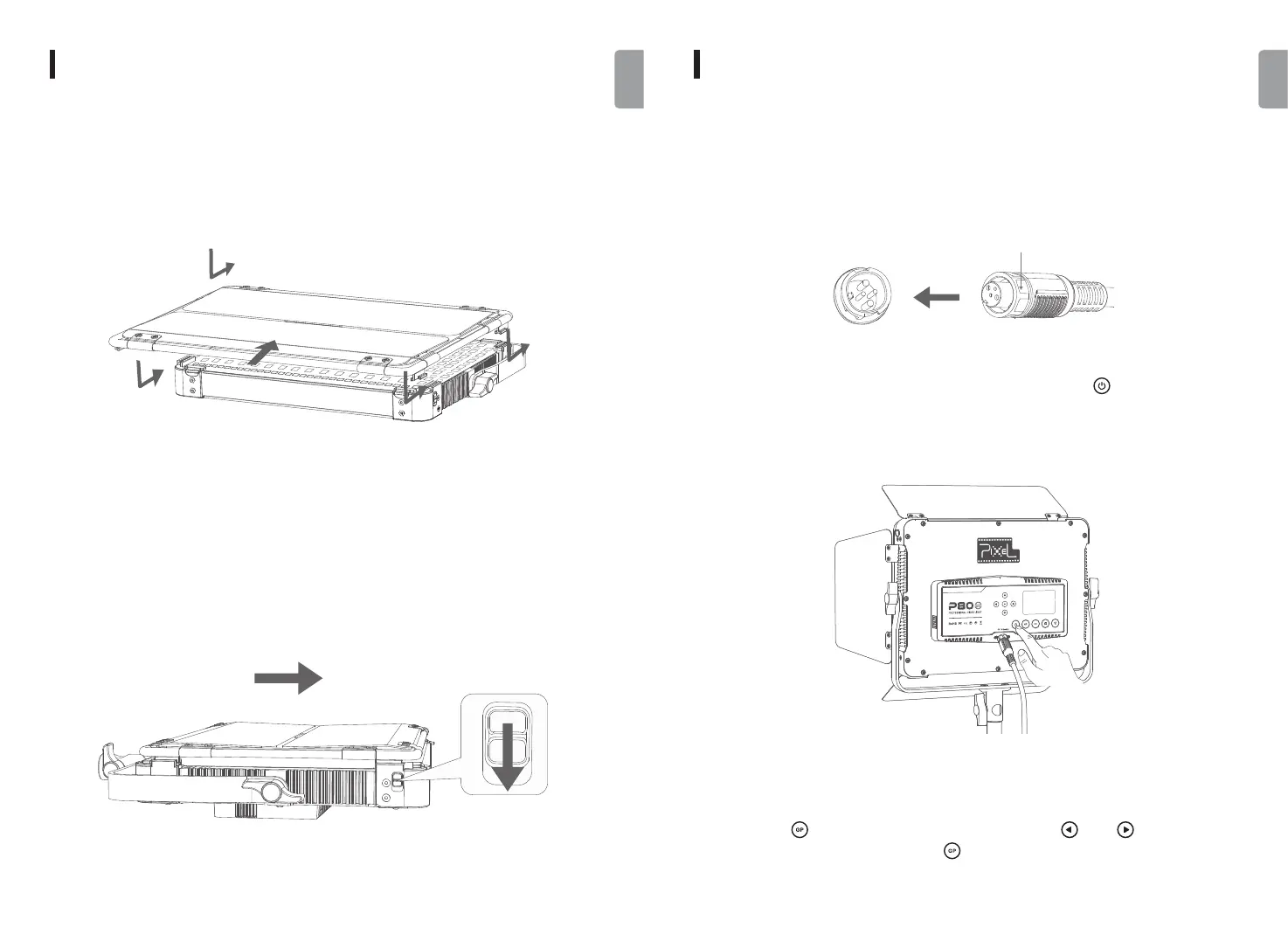
The installation and the removal of the metal barn doors
INSTALLATION
1. Power ON/OFF
1. When installing the metal barn doors, align its four clips with the light slots simultaneously,
then push the metal barn doors till its clips are tightened.
a. Please rotate the locking cap at the end of power cable to connect with and remove the
power adapter, and do not pull the power cable hard without unlocking the cap.
2. Press and hold the button on one side and pull out the metal barn doors on that side.
After pulling out, repeat the above actions on the other side to totally remove the metal
barn doors.
2. Group Setting
Short press the [ ] button to set group, then short press the [ ] and [ ] button to switch
group through A to F. And short press the [ ] button again to exit group setting.
USE
b. Connect with the power adapter and long press the power button [ ], the LED light will
turn on according to the relevant parameter values shown on the screen. Long press the power
button again, the light and the screen will turn off.
05 06
English
English
DC IN 24-33V Locking cap


 To Next Page