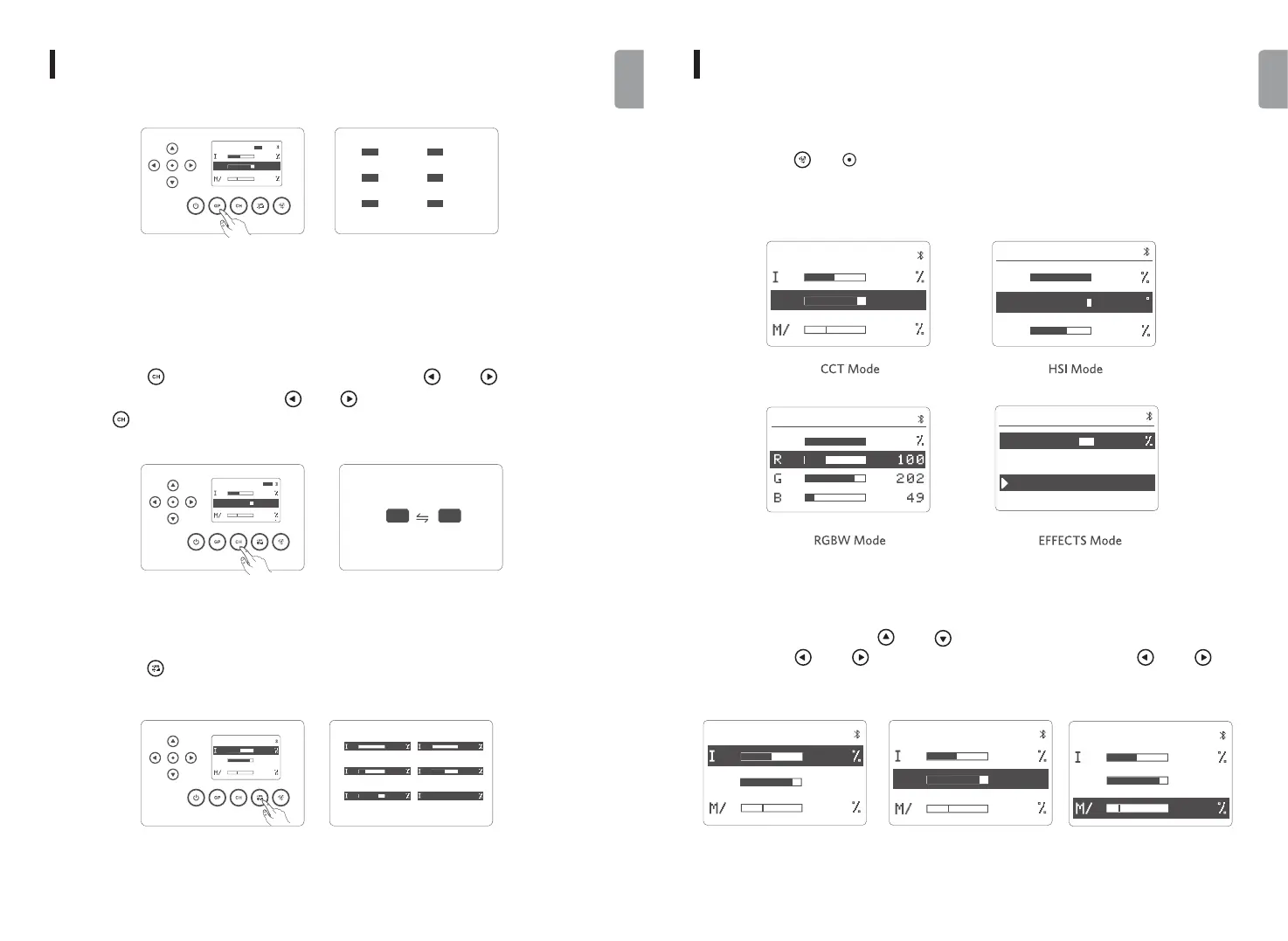
3. Wireless Channel
4. Fast Intensity Adjustment
Short press the [ ] button to fast adjust the intensity in 6 levels of 0%, 1%, 25%, 50%, 75%,
100%.
5. Working Mode Setting
Short press the [ ] or [ ] button to cycle through CCT mode, HSI mode, RGBW mode and
EFFECTS mode.
6. CCT Mode
In CCT mode, short press the [ ] and [ ] button to set intensity and color temperature.
Short press the [ ] and [ ] button to adjust values, and long press the [ ] and [ ]
button to fast adjust values.
Short press the [ ] button to set channel, then short press the [ ] and [ ] button to switch
channel through 1 to 48. Long press the [ ] and [ ] button to fast switch channels, and short
press the [ ] button again to exit channel setting.
USE USE
CH48
GPA
CH48
GPB
CH48
GPC
CH48
GPD
CH48
GPE
CH48
GPF
-
GPA
CCT
G
CCT
8
20
CH48
500
k
40
CH48CH01
-
GPA
CCT
G
CCT
8
20
CH48
500
k
40
-
GPA
CCT
G
CCT
8
20
CH48
500
k
50
0 1
25 50
75 01 0
CCT-Color Temperature M/G-Color Temperature
Compensation
I-Intensity
-
GPA
CCT
G
CCT
8
2
0
CH48
5
00
k
5
0
-
GPA
CCT
G
CCT
8
2
0
CH48
5
00
k
50
-
GPA
CCT
CCT
G
5
0
CH48
5
0
CCT
85
00
k
* Note
Set the same group of lights to the same channel when you need to control them simultaneously.
07 08
English
English
-
GPA
CCT
G
CCT
8
20
CH48
500
k
50
HSI
033
49
100
S
I
H
CH48GPA
I
EFFECTS
CH48GPA
75
Lightning1
Lightning2
I
100
RGBW
CH48GPA


 To Next Page