No.
1
2
3
4
5
6
7
EFFECTS
Lightning1
Lightning2
Cinema Simulation
Police Van Simulation
Ambulance Simulation
Fire Truck Simulation
RGB Cycle at Fast Speed
Meaning No.
EFFECTS
Meaning
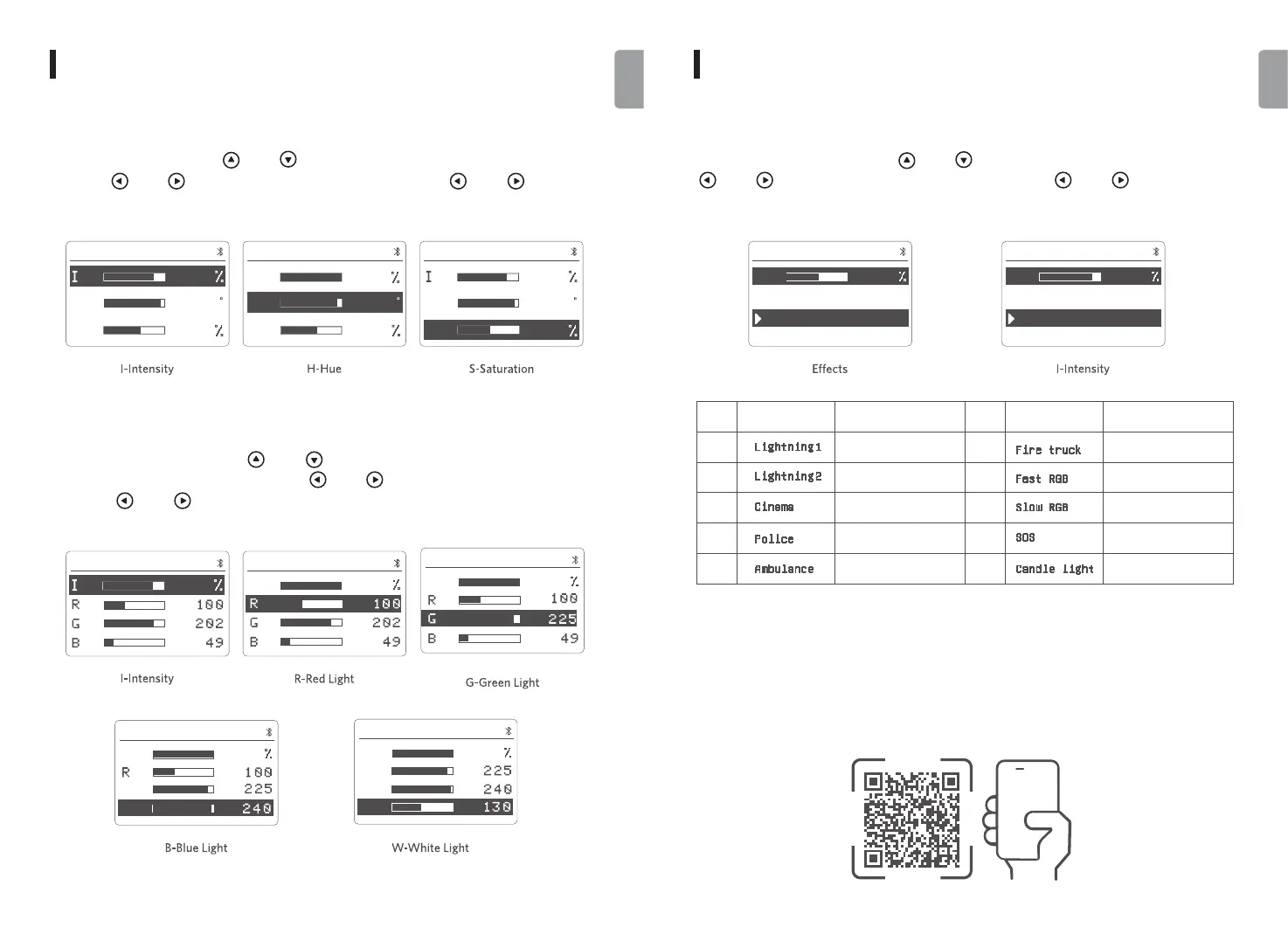
In EFFECTS mode, short press the [ ] and [ ] button to choose effect. Short press the
[ ] and [ ] button to adjust intensity, and long press the [ ] and [ ] button to fast
adjust intensity.
9. EFFECTS Mode
USE
7. HSI Mode
In HSI mode, short press the [ ] and [ ] button to set intensity, hue and saturation. Short
press the [ ] and [ ] button to adjust values, and long press the [ ] and [ ] button to
fast adjust values.
8. RGBW Mode
In RGBW mode, short press the [ ] and [ ] button to set intensity, red color, green color,
blue color and white color. Short press the [ ] and [ ] button to adjust values, and long
press the [ ] and [ ] button to fast adjust values.
USE
HSI
0
33
49
S
H
CH48GPA
8
0
HSI
0
33
49
1
00
S
I
H
CH48GPA
HSI
0
33
6
0
S
H
CH48GPA
8
0
I
EFFECTS
CH48GPA
8
0
Lightning1
Lightning2
I
EFFECTS
CH48GPA
6
0
Lightning1
Lightning2
Cinema
Lightning 1
Lightning 2
Cinema
Police
Ambulance
Fire truck
Fast RGB
9
10
SOS
Candlelight Simulation
8
RGB Cycle at Low Speed
Slow RGB
SOS
Candle light
09 10
English
English
10. Use the PIXEL LCS App
You can download the PIXEL LCS app from the iOS App Store, Google Play, etc, or scan the QR
code below to get the app. Turn the app on and search to pair with the light via Bluetooth, and
adjust parameters when successfully paired. Please visit https://www.pixelhk.com for more
details of your Pixel lights.
RGBW
CH48GPA
8
0
I
1
00
RGBW
CH48GPA
I
1
00
RGBW
CH48GPA
I
1
00
RGBW
CH48GPA
G
B
I
1
00
RGBW
CH48GPA
G
B
w


 To Next Page