Need help?
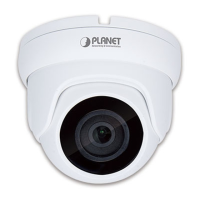
Do you have a question about the Planet ICA-HM620 and is the answer not in the manual?
Steps for unpacking, removing dome cover, applying lubricant, and reattaching the cover.
Instructions for wall mounting, creating cable entry, and passing cables through the mount.
Connecting power wires, AC adapter, and network cables for initial setup.
Setting computer IP, connecting via web browser, and logging into the speed dome.
 General
| Camera Type | IP Camera |
|---|---|
| Max. Resolution | 1920 x 1080 |
| Lens Type | Fixed |
| Focal Length | 3.6 mm |
| Night Vision | Yes |
| Day/Night | Yes |
| Power Supply | DC 12V |
| Weatherproof | IP66 |
| Sensor Type | CMOS |
| Resolution | 1920x1080 |
| Megapixel | 2.0 |
| Lens | 3.6mm |
| IR Distance | 30m |
| IR Range | 30m |
| Protocols | TCP/IP, HTTP, DHCP, DNS, DDNS, RTP, RTSP, RTCP, PPPoE, SMTP, NTP |
| Video Compression | H.264 |
| Frame Rate | 30fps |
| Power Consumption | 5W |


 To Next Page