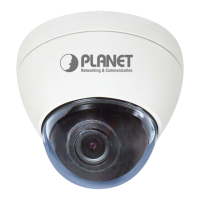
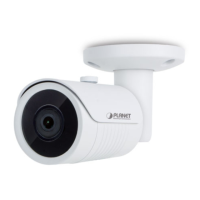
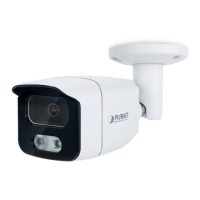
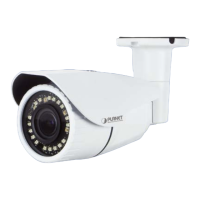
This document is a Quick Installation Guide for the PLANET H.265 Smart IR PoE IP Camera, specifically the ICA-x80 series. It provides essential information for setting up and managing these IP cameras.
Function Description
The ICA-x80 series comprises H.265 Smart IR PoE IP Cameras designed for various surveillance applications. These cameras support Power over Ethernet (PoE), simplifying installation by allowing both power and data transmission over a single Ethernet cable. The "Smart IR" feature likely refers to intelligent infrared illumination, which adjusts the intensity of IR LEDs to prevent overexposure in night vision, ensuring clear images in low-light or no-light conditions. The H.265 video compression standard offers efficient video encoding, reducing bandwidth and storage requirements while maintaining high video quality. The series includes different models with varying resolutions, form factors (bullet and dome), and advanced features like full-color imaging, artificial intelligence (AI), and remote focus/zoom capabilities.
Important Technical Specifications
The ICA-x80 series includes several models with distinct specifications:
- ICA-3280: H.265 1080p Smart IR Bullet IP Camera.
- ICA-4280: H.265 1080p Smart IR Dome IP Camera.
- ICA-3480F: H.265+ 4MP Full Color Bullet IP Camera. This model features 4-megapixel resolution and full-color imaging, likely enabling color video even in low-light conditions. The "H.265+" indicates an enhanced version of H.265 compression, offering even greater efficiency.
- ICA-4480F: H.265+ 4MP Full Color Dome IP Camera. Similar to the ICA-3480F but in a dome form factor.
- ICA-A3280: H.265 1080p Smart IR Bullet IP Camera with Artificial Intelligence. This model integrates AI capabilities, which could include features like object detection, facial recognition, or intrusion detection, enhancing surveillance intelligence.
- ICA-A4280: H.265 1080p Smart IR Dome IP Camera with Artificial Intelligence. Similar to the ICA-A3280 but in a dome form factor.
- ICA-M3580P: H.265 5 Mega-pixel Smart IR Bullet IP Camera with Remote Focus and Zoom. This high-resolution model offers 5-megapixel imaging and the convenience of remote focus and zoom, allowing for precise adjustments after installation without physical access to the camera.
- ICA-M4580P: H.265 5 Mega-pixel Smart IR Dome IP Camera with Remote Focus and Zoom. Similar to the ICA-M3580P but in a dome form factor.
All models support IEEE 802.3af PoE, meaning they can be powered by an 802.3af compliant PoE switch. The default network type for the ICA-x80 series is DHCP Client, and if no DHCP server is present, the default IP address is 192.168.0.20 with a subnet mask of 255.255.255.0.
Usage Features
The cameras are designed for easy installation and management.
- Package Contents: Each camera package includes the IP Camera, a Quick Start QR Code Sheet, a Screw Package, a Waterproof Connector Package, and a Drill Template, providing all necessary components for physical installation.
- System Requirements: Workstations running Windows XP/2003/2008/Vista/7/8/10/11, MAC OS X, Linux, or UNIX are compatible, provided they have TCP/IP protocols and an Ethernet NIC. An IEEE 802.3at PoE switch is required to supply power to the ICA-x80 series. Standard UTP cables with RJ45 connectors are used for network connection.
- Web Management: The cameras are managed via a web browser. It is recommended to use Google Chrome for accessing the web interface. The initial setup involves connecting the camera to a PoE Ethernet switch and a manager PC within the same IP subnet.
- IP Address Discovery: The "PLANET Search Tools" utility can be downloaded from the PLANET website to discover cameras on the local area network and modify their IP parameters. This tool simplifies the process of finding and configuring the cameras, especially when a DHCP server is not available or the default IP needs to be changed.
- Login: The default username and password for accessing the web interface are both "admin."
- Configuration: After logging in, users can access the main web screen to configure various settings, including TCP/IP, DDNS, PPPoE, FTP, QoS, and 802.1X, as well as basic camera settings like P2P, Email, Video, Image, Events, and Storage.
Maintenance Features
- Default Configuration Recovery: The ICA-x80 series includes a hardware-based reset button. Pressing this button for approximately 10 seconds will reset the network type to the default DHCP Client (with IP 192.168.0.20 if no DHCP server is present) and restore the login password to its default value ("admin"). This feature is crucial for troubleshooting forgotten passwords or incorrect network configurations. This reset functionality is specifically noted for models ICA-3280, ICA-4280, ICA-3480F, and ICA-4480F.
- Customer Support: PLANET provides comprehensive customer support, including an online FAQ resource, user manuals available on their website, and a support team accessible via email. QR codes are provided for downloading Android and iOS apps, suggesting mobile management capabilities for the cameras.

 Need help?
 General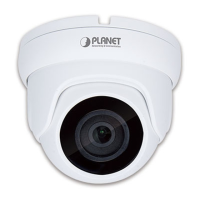

 To Next Page