Need help?
Do you have a question about the Planet ICA-4500V and is the answer not in the manual?
Guidelines for safe installation and use of electrical equipment.
How the camera adapts to lighting conditions using IR-Cut and illuminators.
Details WDR and 3DNR for clear images in challenging lighting.
Features for detecting camera tampering and specific audio events.
Two-way audio support and PoE for flexible power and installation.
Key camera, video compression, and audio features.
Network compliance, installation ease, and management features.
Technical details for image device, lens, illumination, and IR.
Effective pixels, compression, resolution, frame rate, and streaming protocols.
Standards, protocols, security, users, and system integration details.
Power, consumption, operating temp/humidity, weight, dimensions.
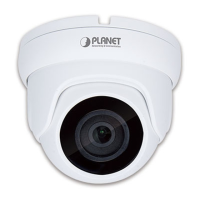
Identifies key camera components like Lens, IR LED, Light Sensor, and PIR.
Explains DC Power, RJ-45, Audio, Mic, and Video output interfaces.
Pinout and function details for DI/DO and RS-485 terminals.
Detailed pin assignments and functions for the terminal block.
Details on network, power, audio, video, and reset connections.
Connecting to network via Ethernet and power supply options.
Explanation of PoE technology for power delivery via network cable.
Using IP Wizard II to find cameras on the LAN.
The process of searching for and viewing connected cameras.
Changing IP-related parameters for the wired interface.
Introduction to UPnP for easy device discovery and configuration.
Steps to enable UPnP functionality in Windows XP.
Adjusting IE security to allow ActiveX controls for camera access.
Specific settings for Internet Explorer 6 on Windows XP.
Specific ActiveX settings for IE7 on Windows XP.
Specific ActiveX settings for IE7 on Windows Vista.
Viewing MAC address and configuring DHCP for automatic IP assignment.
Manual configuration of network parameters.
How DDNS helps map domain names to changing IP addresses.
Configuring DDNS server, host, username, and password.
UPnP for network compatibility and NAT traversal.
Defining rules to allow or deny access based on IP addresses.
Configuring email alerts for IP address changes.
Configuring SMTP server, port, authentication, and email addresses.
Adjusting white balance and exposure for optimal image quality.
Fine-tuning image parameters like hue, brightness, contrast, and sharpness.
Configuring 3D De-Noise and Wide Dynamic Range for image clarity.
Setting up privacy masks to obscure specific areas of the video feed.
Procedures for adding/deleting privacy mask windows and adjusting their properties.
Configuring camera protocol, address, and baud rate for PTZ control.
Tools for modifying or deleting preset positions for PTZ cameras.
Programming the camera to move sequentially through preset positions.
Setting device title, software version, and LED controls.
Setting up time synchronization using PC or NTP server.
Restoring default settings, including network or all parameters.
Procedures for backing up, restoring, and upgrading firmware.
Detailed steps for firmware upgrades, including critical warnings.
Explains 2Mega and 5MEGA modes and selecting video profiles.
Modifying parameters like resolution, rate control, and max frame rate.
Configuring bit rate control methods and target frame rates.
Specifying ROI windows for maximum resolution profiles.
Setting AOI windows for non-uniform image quality distribution.
Selecting audio type, mode, and adjusting input/output gain.
 General
| Model | ICA-4500V |
|---|---|
| Sensor Type | CMOS |
| Type | IP Camera |
| Day/Night | Yes |
| Video Compression | H.264 |
| Ethernet | 10/100Mbps |
| Memory Card Slot | MicroSD |
| Power Supply | DC 5V, 1A |
| Night Vision | Yes |
| Connectivity | Ethernet |


 To Next Page