18
6.RecoveringBacktoDefaultConguration
IP address has been changed or admin password has been
forgotten –
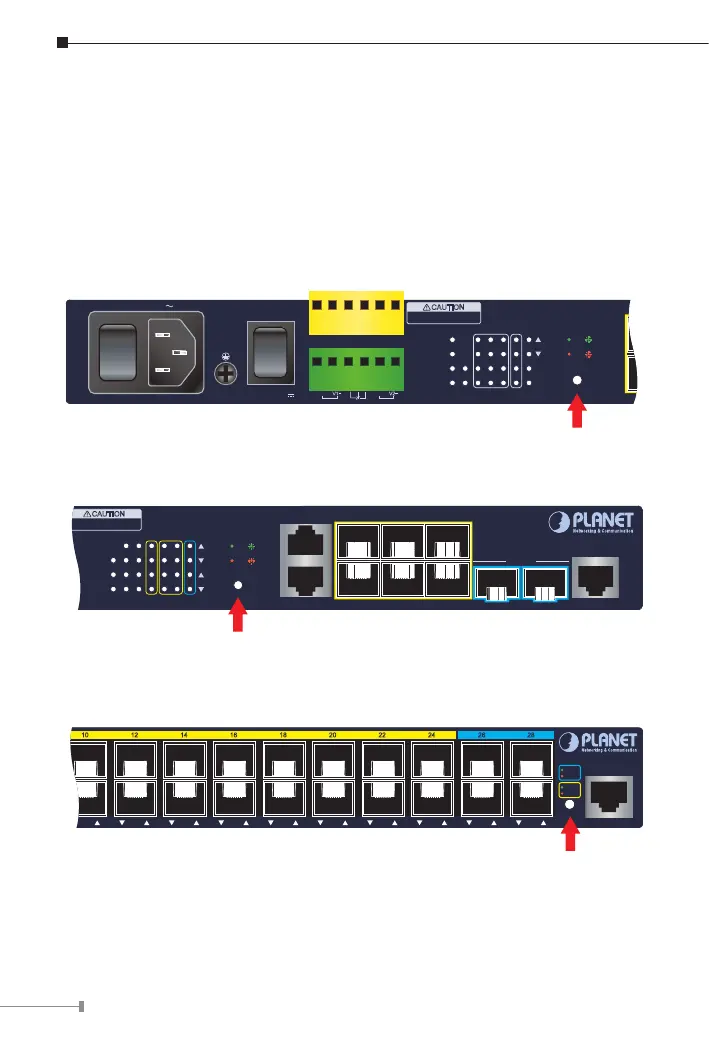
To reset the IP address to the default IP address “192.168.0.100”or reset the
login password to default value, press the hardware-basedreset button on the
front panel for about 10 seconds. After the device is rebooted, you can log in
the management Web interface within the same subnet of 192.168.0.xxx.
1
2
3
4
5
6
7
8
RingPWR
DC 1
R.O.
DC 2
Alarm
ACTLNK
ACTLNK
1G/2.5G
100
Reset
10
9
50/60Hz
ON
AC POWER
OFF
DC POWER
ON
OFF
Alarm
GNDGNDDO 1DO 0DI 1DI 0
DC 2DC 1
V1+ V2+
100-240V
, 0.2A max.
DC Input: 36-60V
,
0.4A max.
100/1G 2.5G
CAUTION
Please refer to user’s manual before
connect the DC wire.
Max. Fault Alarm Loading: 24V, 1A
Reset Button
Figure 6-1: MGSD-10080F Reset Button
1
2
3
4
5
6
7
8
RingAC
DC 1 R.O.
Alarm
I/O
DC 2
ACTLNK
ACTLNK
1G/2.5G
100/10G
Reset
10
9
1G 2.5G 10G
CAUTION
Please refer to user’s manual before
connect the DC wire.
MGS-6320-2T6S2X
Console
115200,N,8,1
109
7
8
5
6
3
4
1
2
10G SFP+
Reset Button
Figure 6-2: MGS-6320-2T6S2X Reset Button
10 12 14 16 18 20 22 24 26 28
2726252423222120191817161514131211109 28
Console
Reset
115200, N, 8, 1
MGSW-28240F
1G/2.5G
100
10G
1G/2.5G
Reset Button
Figure 6-3: MGSW-28240F Reset Button



 To Next Page
 Loading...










