- 43 -
4.4.2 EAP-TLS Authentication
Get Digital Certificate from Server
The following procedures are based on obtaining a certificate from Windows 2000 Server which acts as a
CA server. Furthermore, you must have a valid account/password to access the server.
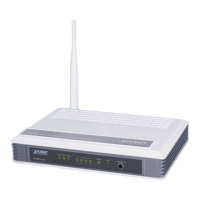
1. Active web browser, enter “http://192.168.1.10/certsrv” in the Address field which 192.168.1.10 is the
IP address of our server. This will directly access to Certificate Service of a Windows 2000 server. A
dialog box will prompt you to enter user name and password.
2. Enter a valid user name and password, then click “OK” to continue.
3. Select “Request a certificate”, and click “Next” to continue.


 To Next Page