User Manual of WBS-512AC
-25-
“Wireless5.8G_WDS”
AP BSSID/Mark
Press the “Scan” button to find the WDS BSSID to connect
Encryption
Select open or WEP for the wireless encryption. The default is None
Key in the correct password for BSSID of WEP
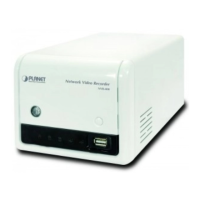
Figure 5-9 Super WDS Mode
The page includes the following fields:
Object Description
Wi-Fi Status Select ON (Green) or OFF (Gray) to enable or disable wireless LAN
SSID
It is the wireless network name. The default SSID is “PLANET_5G”
Hide your SSID
Select ON (Green) or OFF (Gray) to hide wireless LAN or not
Bandwidth Select the operating channel width, “20MHz” or “40MHz” or
“80MHz”
Channel
Select the operating channel you would like to use. The channel
range will be changed by selecting a different domain.
Encryption Select the wireless encryption. The default is “None”


 To Next Page