
 Need help?
Do you have a question about the Plantronics BackBeat FIT 3200 Series and is the answer not in the manual?
Controls for the primary earbud (pairs to phone), including play/pause, track selection, call management, and voice assistant activation.
Controls for the secondary earbud (connects to right earbud), including volume adjustment and power functions.
Instructions on how to power on the charging case for the first use by holding the case button.
Steps to pair the earbuds with a phone for the first time, including LED indicators and Bluetooth settings.
Procedure to enter pairing mode with the headset powered off by holding the right earbud.
Instructions for charging the earbuds by placing them in the case and charging the case itself.
Guidance on selecting the correct eartips for a good seal and optimal audio experience.
Instructions to download and use the BackBeat app for enhanced earbud features and customization.
Details on automatic and manual power on/off functions for the earbuds, including notes on right earbud control.
Explanation of how functions and audio transfer to the left earbud if the right earbud loses power.
Instructions on how to increase or decrease volume using the touch sensor on the left earbud.
How to play/pause audio, skip tracks, and select previous tracks using the right earbud.
How to answer or end a call by clicking the right earbud.
How to activate virtual personal assistants like Siri or Google Now by holding the right earbud.
Explanation of the DeepSleep mode for power conservation and how to exit it.
Guidance on switching the primary earbud via the app for optimal Bluetooth performance.
Contact information and website for customer support and help with the product.
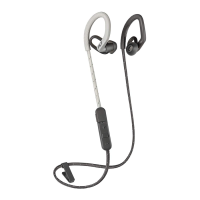
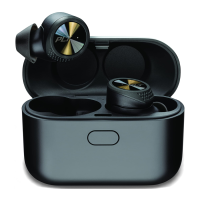
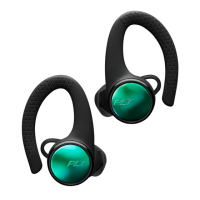
The Plantronics BackBeat FIT 3200 Series are true wireless earbuds designed for an active lifestyle, offering a blend of robust audio performance, secure fit, and intuitive controls. These earbuds are engineered to provide a seamless listening experience, whether you're working out, commuting, or simply enjoying your favorite audio.
The BackBeat FIT 3200 Series earbuds function as a personal audio device, connecting wirelessly via Bluetooth to your smartphone or other compatible audio sources. They deliver high-quality sound for music, podcasts, and calls. Each earbud features a touch sensor and a physical button, allowing for a variety of controls without needing to access your connected device. The right earbud typically serves as the primary earbud, handling the main Bluetooth connection to your phone and most call/playback controls. However, the accompanying BackBeat app allows users to switch the primary earbud to the left, offering flexibility based on personal preference or device placement.
The earbuds come with a compact charging case that not only protects them but also extends their battery life. The case itself can be charged via a USB connection, ensuring your earbuds are ready whenever you are. An intelligent DeepSleep mode helps conserve battery when the earbuds are out of range of a paired device, automatically powering them down after a period of inactivity to maximize standby time.
To begin using the earbuds, the charge case must first be powered on by pressing and holding its button for two seconds. The earbuds automatically power on when removed from the case. For first-time pairing, the right earbud enters pairing mode, indicated by a flashing red and white LED. Users then select "PLT BBFIT31XX Series" from their device's Bluetooth settings. Subsequent use involves simply taking the earbuds out of the case, and they will automatically connect to the last paired device. Manual power on/off is also possible by holding the earbud button for two seconds (on) or four seconds (off).
Playback controls are primarily managed through the right earbud. A single click on the right earbud plays or pauses audio. Double-clicking skips to the next track, while triple-clicking goes back to the previous track. Volume adjustments are handled by the left earbud's touch sensor: a tap increases the volume, and a touch and hold decreases it. It's important to note that some track selection functionalities may vary depending on the application being used, especially with web-based apps.
For incoming calls, a single click on the right earbud answers or ends the call. If a second call comes in, clicking the right earbud once ends the current call, and clicking it again answers the new call.
The earbuds support virtual personal assistants (VPAs) such as Siri and Google Now. Users can activate their device's VPA by clicking and holding the right earbud for two seconds, allowing for hands-free commands and queries.
Achieving the best audio experience with the BackBeat FIT 3200 Series heavily relies on a proper fit. The earbuds come with three different sized eartips to ensure a good seal with the ear canal, which is crucial for sound quality and bass response. Users are encouraged to try each eartip size to find the best fit for each ear, as individual ear canal sizes can vary. The stabilizing loop is designed to tuck securely into the ear, providing stability during strenuous activities. The process involves removing the current eartip by pushing and rotating it left, then aligning and rotating the new eartip right to lock it in place. Listening to music while trying different eartips helps in determining the optimal fit and sound.
The free BackBeat app for iOS/Android significantly enhances the user experience. Through the app, users can:
The earbuds are charged by placing them into their charge case. The case itself is charged by plugging it into a computer or a USB charging device. For the fastest charging, a wall charger is recommended. LEDs on the earbuds and case indicate their charging status: earbuds show "On" when charging and "Off" when fully charged, while the case flashes when charging and turns "Off" when fully charged. If the charge case has no power, it must be charged separately before it can charge the earbuds.
To conserve battery, the earbuds enter DeepSleep mode after 120 minutes if they are powered on but out of range of their paired device. They will power off completely after 7 days in this state. To exit DeepSleep mode, users can either power on each earbud individually (after 120 minutes) or perform a full power cycle (power off and then on) after 7 days. This feature helps ensure the earbuds retain charge even if accidentally left on and disconnected.
In the event that the primary (right) earbud loses power, all functions and audio automatically transfer to the secondary (left) earbud, ensuring uninterrupted listening or call management. This provides a level of redundancy and reliability for continuous use.
 General
| Wearing Style | In-ear |
|---|---|
| Microphone | Yes |
| Voice Assistant Support | Yes (Siri, Google Assistant) |
| Type | Wireless |
| Bluetooth Version | Bluetooth 5.0 |
| Battery Life | Up to 8 hours |
| Water Resistance | IP57 |
| Wireless Range | Up to 30 ft / 10 m |
| Charging Time | 2 hours |
| Frequency Response | 20 Hz - 20 kHz |
| Colors | Black, Blue |





 To Next Page