Making and Receiving Calls with Cisco® Unified Communications Integration for Cisco WebEx Connect®
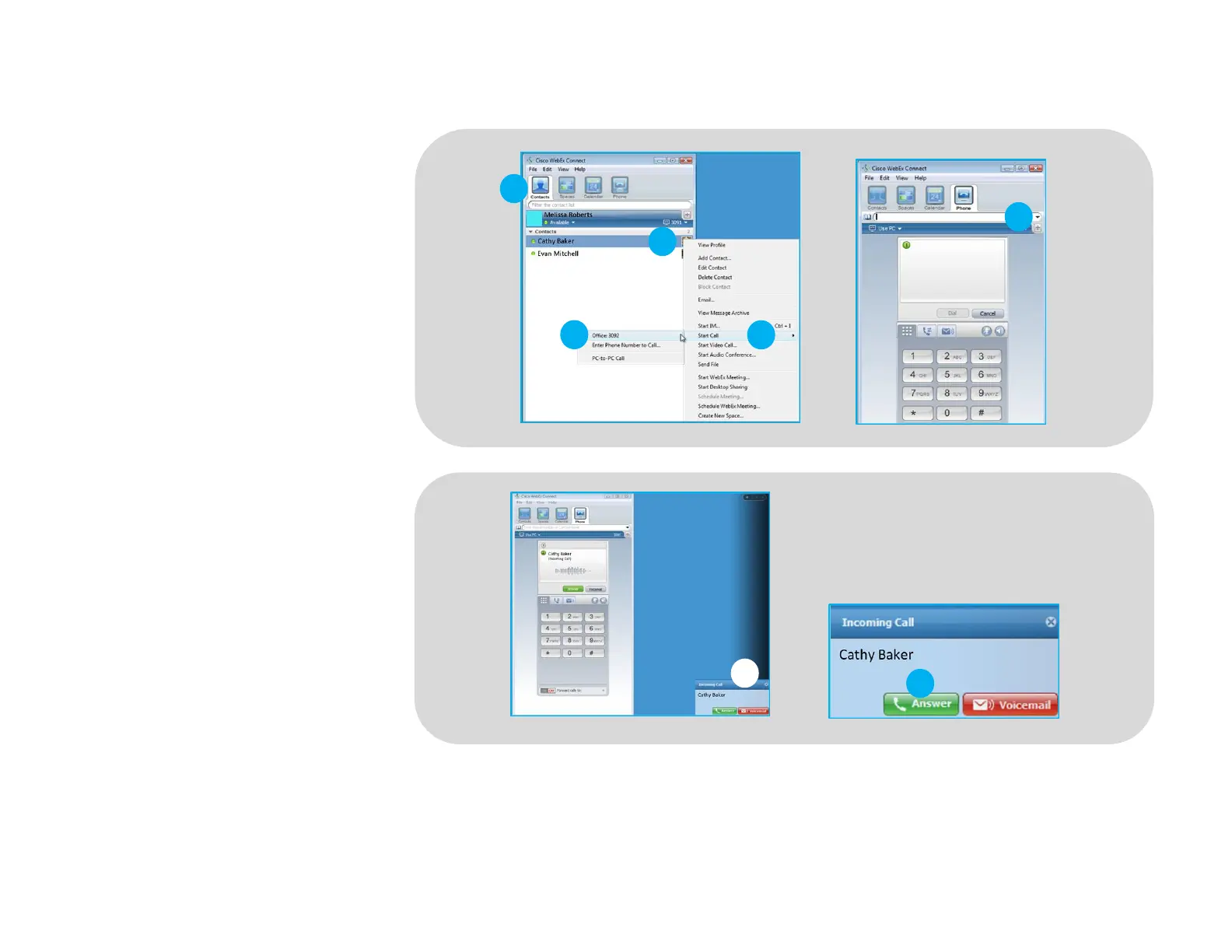
To call an existing contact, select the
Contact Tab (1) and select the contact
you would like to call. Right click on their
picture (2), select Start Call (3) and
choose a number (4).
You can also enter a phone number
manually using the search box located
near the top of the Cisco WebEx Connect
main screen (5).
When a call is placed, a call notification
will appear in the Cisco WebEx Connect
main screen, and the audio will be
routed to your headset.
When you receive a call, a notification
window will appear in the lower right
corner of your computer screen (6).
To answer the call, use the controls on
your headset or click the green Answer
button (7) in the call notification
window.
©2012 Plantronics, Inc. All rights reserved. Plantronics, Blackwire, C310 and C320 are trademarks or registered trademarks of Plantronics, Inc. Cisco and Cisco WebEx Connect are registered trademarks of Cisco Systems, Inc. and/or affiliates in the U.S.
and other countries. Published 03.12






 To Previous Page