7
Headset set-up
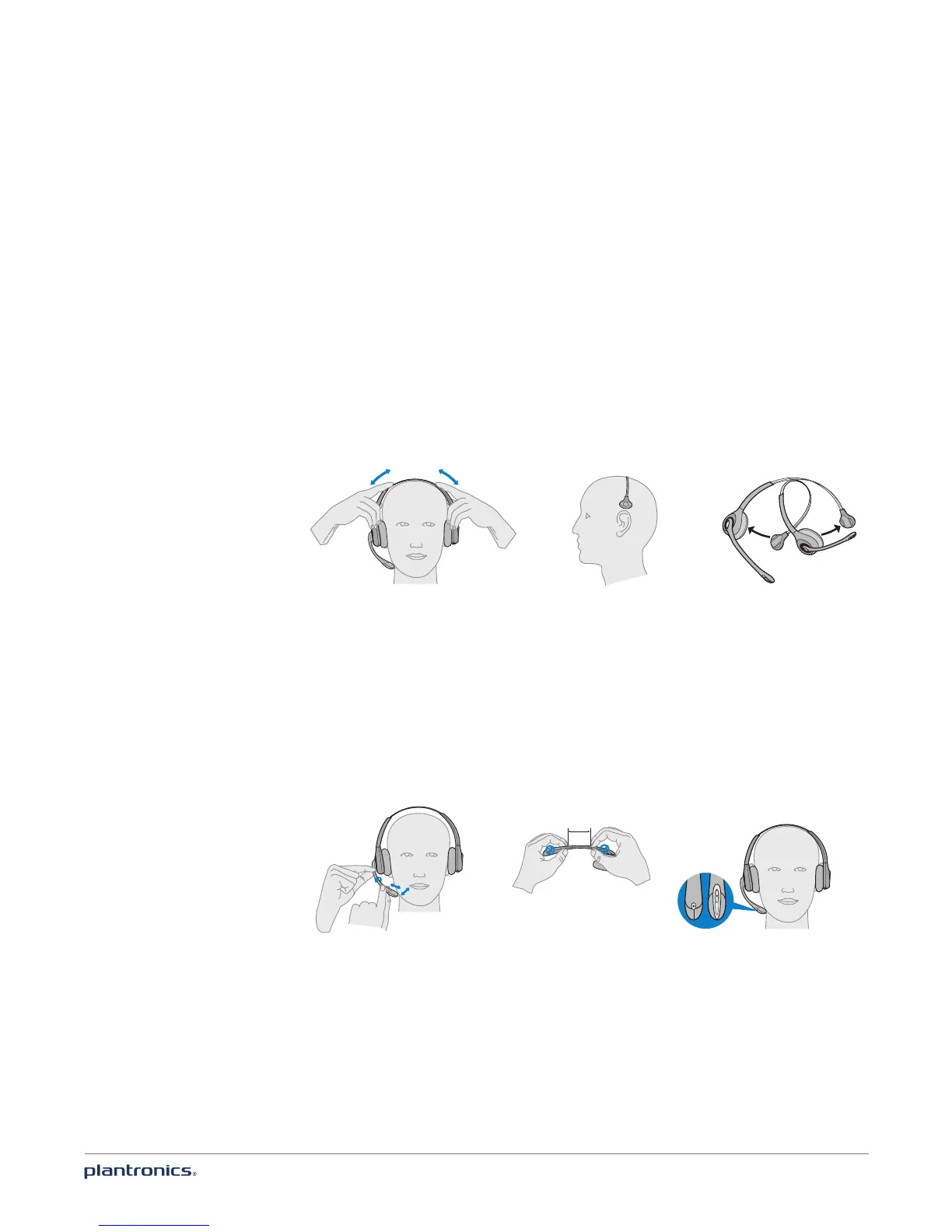
Your headset comes fully assembled. You can adjust the headband for a bet-
ter fit and the mouthpiece for optimal performance.
Adjust the headband
1 To adjust the headband, lengthen or shorten the band until it fits comfortably. The click-stop
feature keeps the headband securely adjusted.
2 Position the headset so that the leather ear cushion(s) sit comfortably over the centre of your
ear(s). For the C510 headset, position the stabiliser T-bar above your ear.
3 For a tighter fit, gently pull the opposite end of the headset inwards as shown.
Adjust the mouthpiece
1 Carefully bend and shape the boom with both hands as shown. Avoid bending or twisting the
boom near the microphone or earpiece.
2 Position the click-stop turret and boom so that the microphone is two finger widths from the
corner of your mouth.
2"
50.8
mm
front back









 To Next Page