3
Questions? For fast, efficient Technical Support call: 800-544-4660 Ext. 5538
InStall ear tIP & adjuSt fIt
S T E P
Fit the Headset
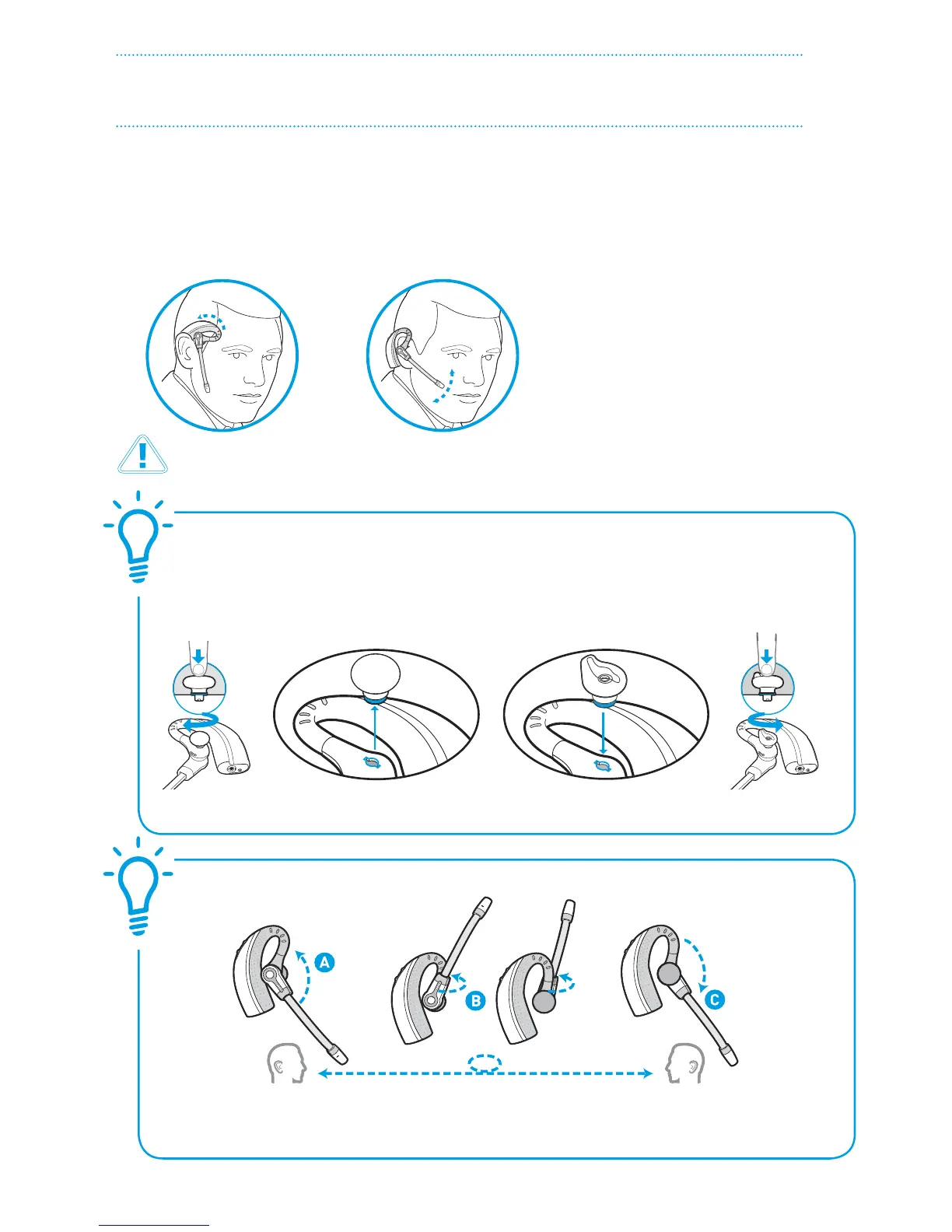
Slide the headset over and behind your ear, then press gently toward your ear. Rotate the
microphone boom until it is pointed toward your mouth. If the ear tip is uncomfortable,
install a dierent ear tip. See below.
To Convert for Wearing on Left Ear
A. Rotate microphone
boom up
B. Turn microphone
boom around
C. Rotate microphone
boom down
1
For your safety and comfort, the ear tip should never be inserted into the ear canal.
Choose the style and size of Ear
Tip that ts most comfortably.
Align Ear Tip tabs with notches
in headset.
Push in rmly and
twist counter
clockwise.
To Install a Dierent Ear Tip
Remove the pre-installed ear tip by
pushing in and turning the ear tip
clockwise, then pull rmly.
To view an interactive set-up guide online, visit www.plantronics.com/cs70setup and click on Adjusting Fit.









 To Next Page