4
1
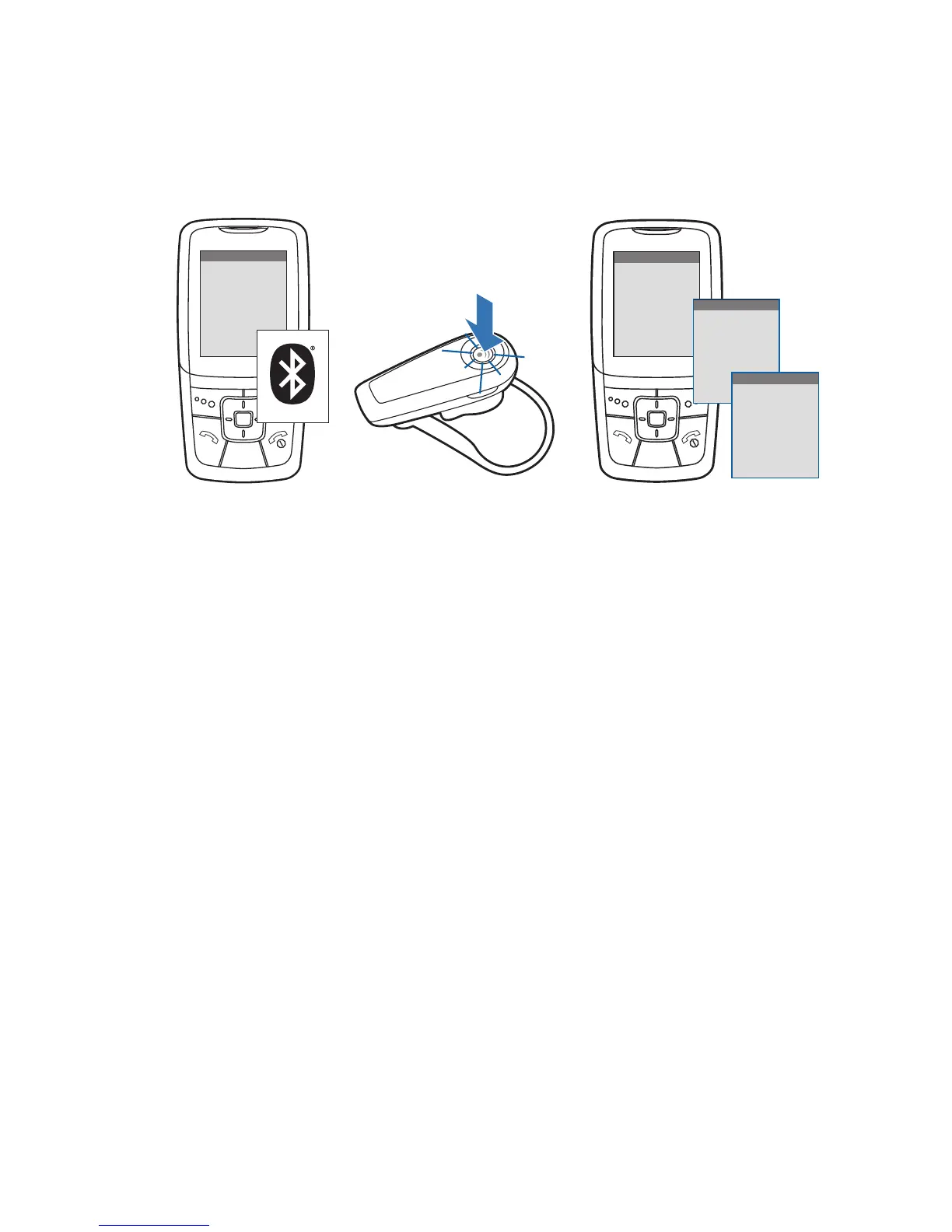
How to Pair Your Phone With Your Headset for the First Time
1 Turn on the Bluetooth feature on your phone.
For most phones, select Settings/Tools > Connections >
Bluetooth > On. See your phone’s user guide for more information.
2 Turn the headset on.
Press and hold the call control button until the indicator light
continues to fl ash red and blue. The headset is now in pairing mode.
If you don’t see the red/blue fl ash, press and hold the call control
button to turn your headset off, and then press and hold the call
control button again until you see the red/blue fl ash.
3 Use the commands on your phone to locate your headset.
For most phones, select Settings/Tools > Connections > Bluetooth >
Search > 2XXPlantronics. See your phone’s user guide for
more information.
When prompted for the passkey, enter 0000.
Pairing is successful when the indicator on your headset fl ashes
blue. Your headset is now connected and ready to use.
Pairing Your Headset—First Time
3
SETT INGS
SETT INGS
Time and Date
Phone Settings
Bluetooth
Sound Settings
Network Services
Security
Reset Settings
BLUETOOTH
BLUETOOTH
Discover/
Search
8BK;JEEJ>
8BK;JEEJ>
(NNFbWdjhed_Yi
PASSKEY
0000
2






 To Next Page