3
5
6
1
4
2
1
7
Make sure your child knows how to steer, how to start and stop the vehicle and knows the rules for safe
driving. The vehicle can be driven at a maximum of 3~5 km/h.
ADVANCED USE - High speed Drive
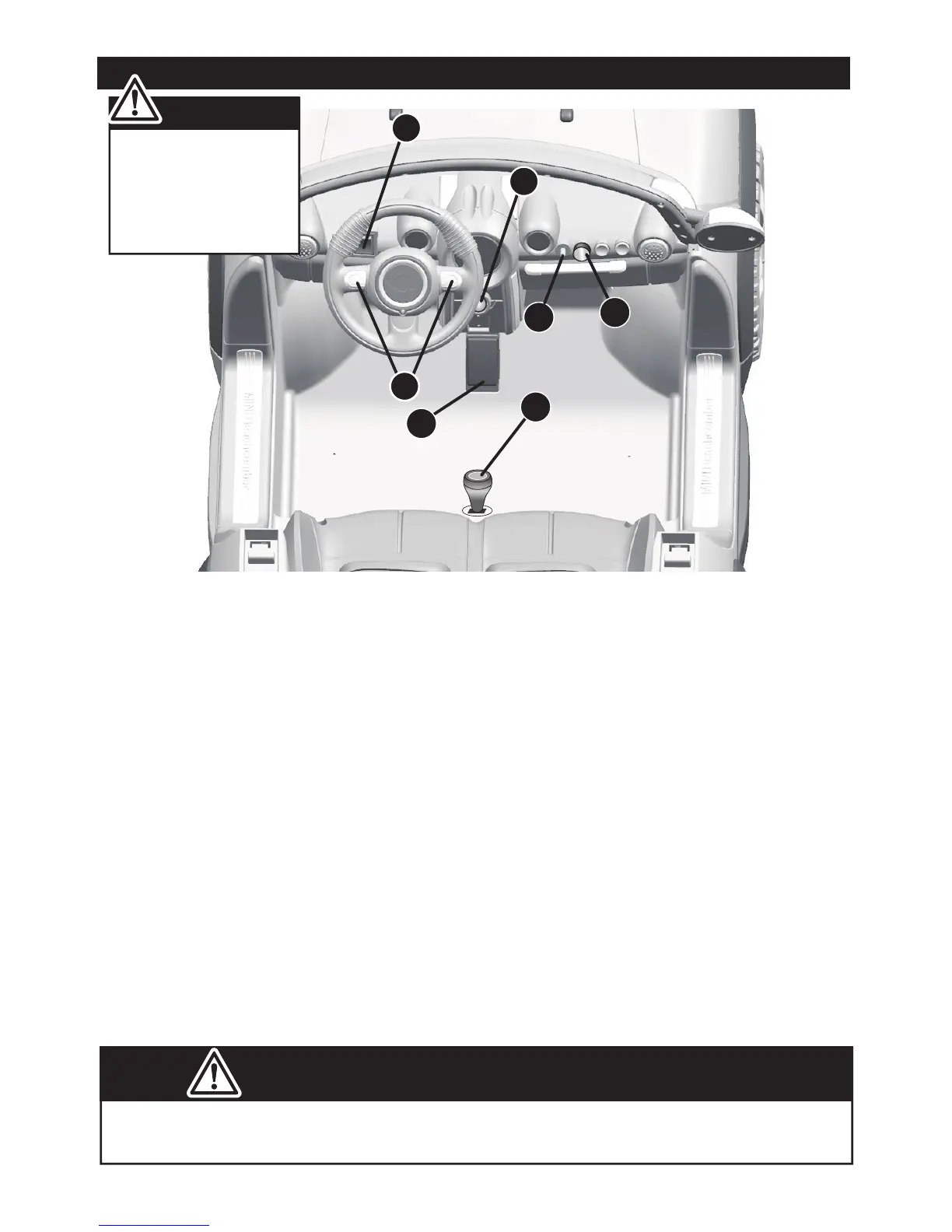
1. Power Switch: Turns the vehicle on and off.
2. Forward/reverse switch: Changes the direction that vehicle moves from forward to
reverse.
● To move the car forward, rock the switch to “forward” position.
● To move the car backward, rock the switch to “reverse” position.
3. Sounds buttons: Press for sounds playing.
4. Volume knob (OPTIONAL): Turn the knob clockwise to increase the volume; Turn the
knob counterclockwise to decrease the volume.
5. Foot pedal: Applies power (speed) to the vehicle.
● To move the car, press the pedal down.
● To brake or slow down, release pressure from the pedal.
6. 3.5 mm Audio input connector (OPTIONAL)
Use Your Ride-on │ 18
Always stop vehicle
when changing the
speed or direction to
avoid damage the
gears and motor.
IMPORTANT!
7. High/Low speed switch (OPTIONAL): The switch operates the vehicle to move in
low or high speed.


 To Next Page