- 4 -
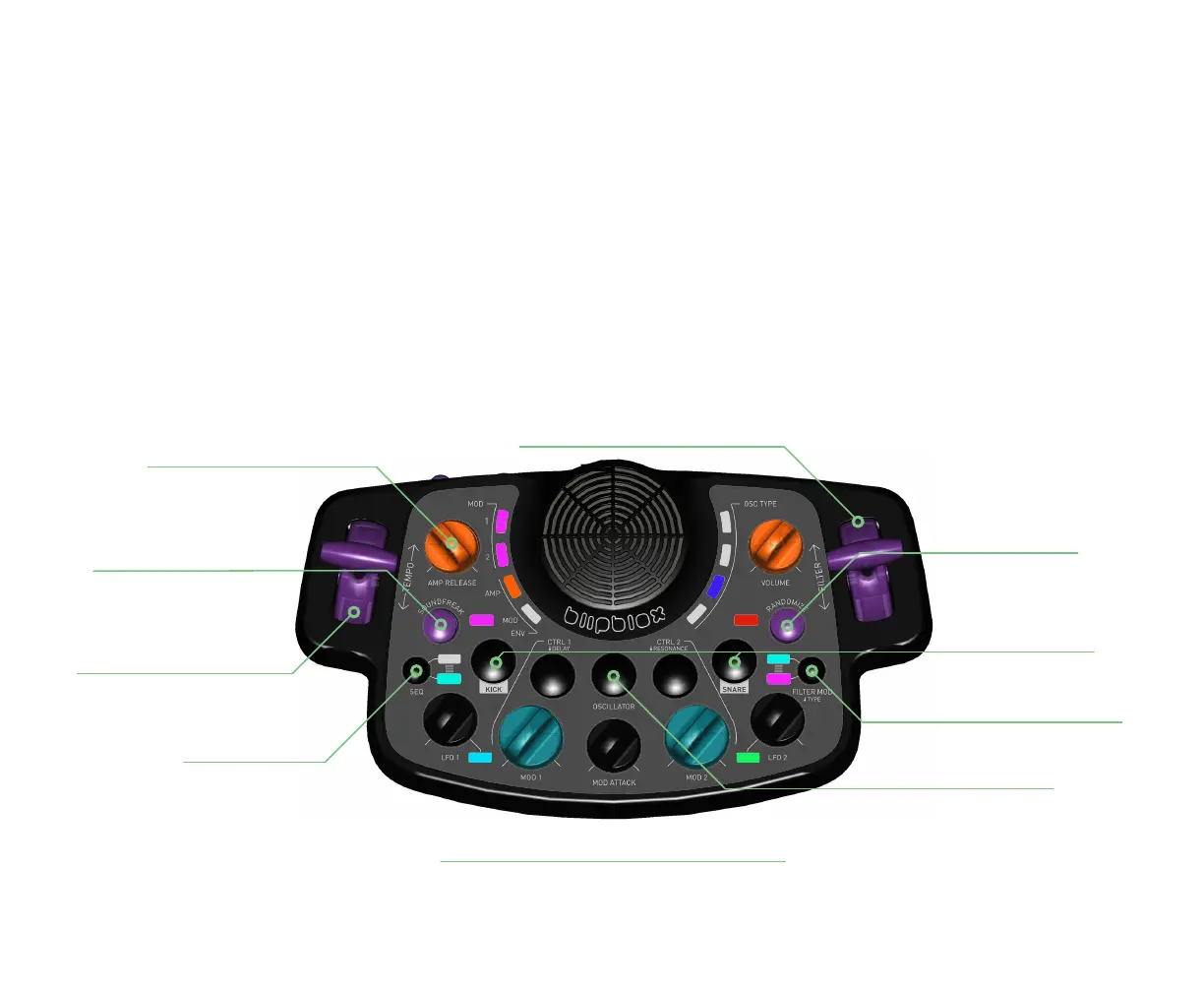
SEQ(encer)
changes the melody
RANDOMIZER
resets to a fresh sound
FILTER
sculpts the sound by removing frequencies
SOUNDFREAK
scrambles notes from sequencer
CTRL 1, LFO 1, MOD 1, MOD ATTACK, MOD 2, LFO 2, CTRL 2
your sound design toolbox
AMP(lifier) RELEASE
makes the notes longer -- or shorter
OSCILLATOR
selects the core synthesizer sound
KICK and SNARE
add beats to your groove
TEMPO
controls how fast your song plays
FILTER MOD TYPE [press + hold]
toggles between high, low and bandpass
BASICS OF SYNTHESIZER PLAY
The After Dark was designed to be used right out of the box, without any prior knowledge of synthesizers. But
knowing a few key controls will help you get started with making interesting sounds.
The most important of these is the SEQ which stands for sequencer. A sequencer creates the notes or melodies and
is the best place for you to start. Click the SEQ button until you nd a melody you like. The After Dark will continue to
play the melody until you click it again. You may also notice that every other melody includes a drum beat.
Once you have your melody selected, you are ready to start sculpting your rst sounds using the other controls
outlined below.



 To Next Page