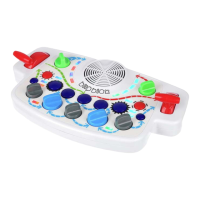
- 6 -
(7) KICK button plays a kick drum.
(8) CTRL 1 button selects the input for the oscillator’s rst modulation. Each press cycles through: Modulation
Envelope, LFO 1, LFO 2, and Knob Only modulation.
r DELAY, press and hold button while adjusting FILTER lever to change the amount of delay eect.
(9) OSCILLATOR button selects the sound wave from 16 available oscillator types.
(10) CTRL 2 button selects the input for the oscillator’s second modulation. Each press cycles through: Modulation
Envelope, LFO 1, LFO 2, and Knob Only modulation.
r RESONANCE, press and hold button while adjusting FILTER lever to change the amount of lter resonance.
(11) SNARE button plays a snare drum.
(12) RANDOMIZE button randomizes all the parameters that make the synthesizer sound except sequencer and
drums. Pressing this button also stores the most recent settings and parameters.
r Press and hold RANDOMIZE button to return to the most recent settings and parameters.
(13) FILTER MOD button selects the modulation input for the lter. Each press cycles through: Modulation
Envelope, LFO 1, LFO 2, and Lever Only modulation.
r TYPE press and hold button to toggle between the three lter types: low-pass, band-pass and high-pass.
(14) LFO 1 knob changes the speed of Low Frequency Oscillator number 1.
(15) MOD 1 knob controls how much modulation is applied to the oscillator’s rst modulation input.
(16) MOD ATTACK knob controls how quickly the Modulation Envelope ramps up. Clockwise turn ramps up the
envelope slowly. Counter-clockwise turn ramps up the envelope quickly.
(17) MOD 2 knob controls how much modulation is applied to the oscillator’s second modulation input.
(18) LFO 2 knob changes the speed of Low Frequency Oscillator number 2.


 To Next Page