7
INSTALLING AND SETTING UP THE SCANNER
Please follow the step-by-step procedures described below to install the Plustek
scanner.
Attention
Choose a Proper Site First!
Always place your scanner on a level,
smooth and strong surface before
proceeding the scanner setup or any
scanning task.
Tilted or uneven surface may cause paper-
feeding errors, scanner damage or personal
injury.
Avoid using the scanner in a dusty
environment. Dust particles and other
foreign objects may damage the unit.
S
S
t
t
e
e
p
p
1
1
.
.
C
C
o
o
n
n
n
n
e
e
c
c
t
t
i
i
n
n
g
g
t
t
h
h
e
e
S
S
c
c
a
a
n
n
n
n
e
e
r
r
t
t
o
o
Y
Y
o
o
u
u
r
r
C
C
o
o
m
m
p
p
u
u
t
t
e
e
r
r
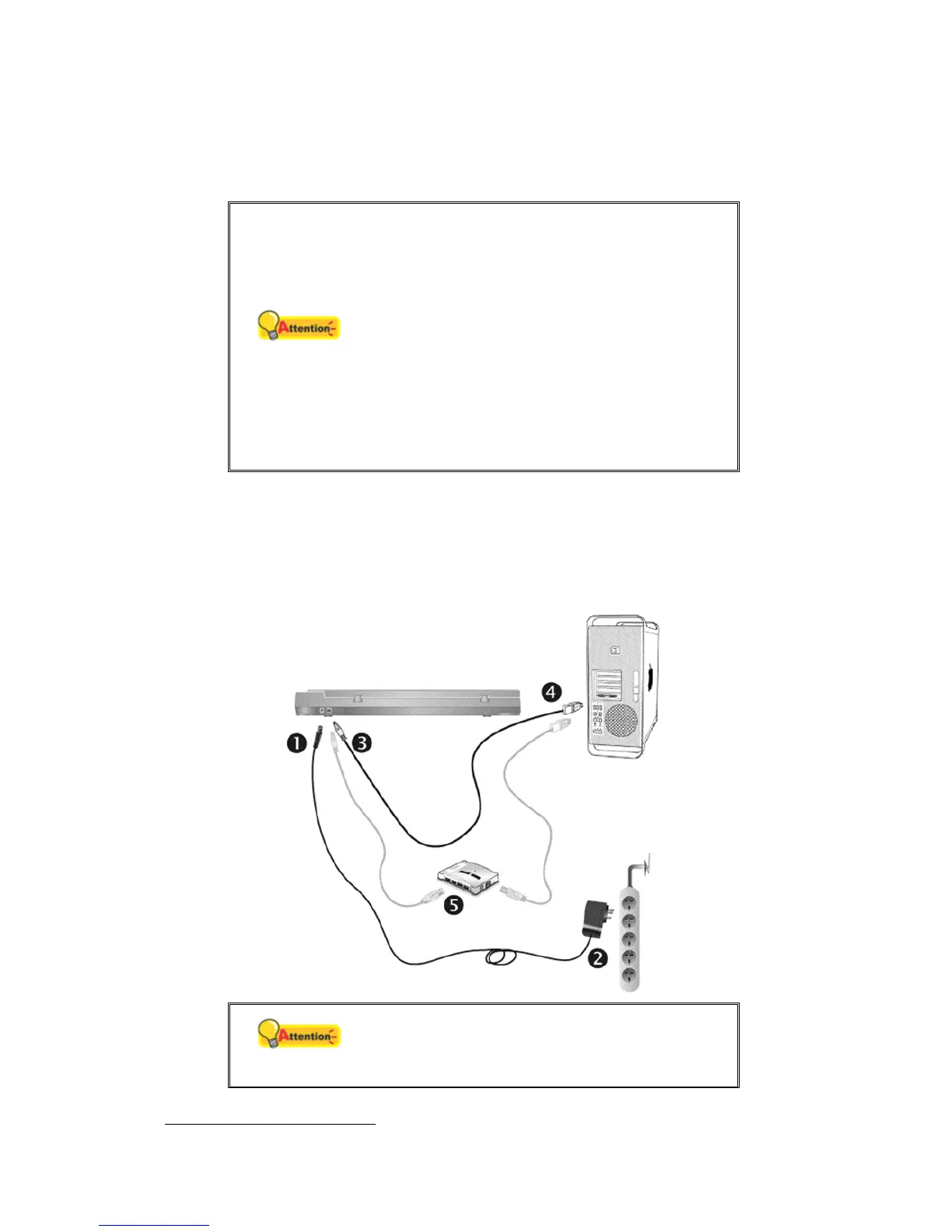
If your scanner does not have the USB hub function
5
, please follow the
below connection steps:
Attention
Please make sure the scanner is turned OFF
before you plug or unplug the scanner power
adapter.
5
This function may or may not be available depending on the scanner model you purchase.











 To Next Page