9
* Note: The time can be set from 15 to 15 minutes, and
the temperature from half to half a degree. For example,
you can set the time to 07:15 or 07:30 or 07:45 and the
temperature to 22.0°C or 22.5°C or 23.0°C.
Note: Briefly press the PRG key to confirm a setting. Press
the MENU key to exit.
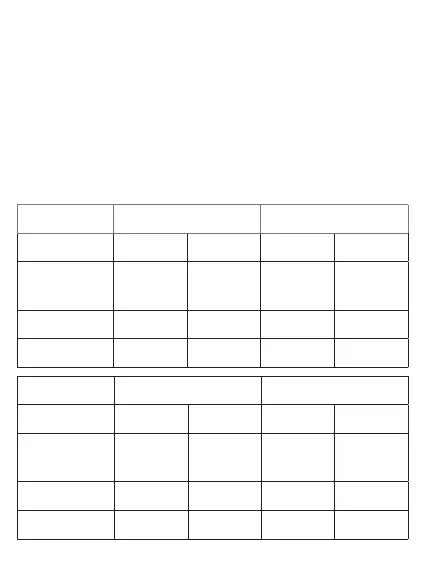
Default settings
Period 1 2
Hour Temp. Hour Temp.
12345
(Mon-Fri)
07:00 22°C 08:30 19°C
6 (Sat) 08:00 22°C 08:30 22°C
7 (Sun) 08:00 22°C 08:30 22°C
Period 3 4
Hour Temp. Hour Temp.
12345
(Mon-Fri)
17:00 22°C 17:00 19°C
6 (Sat) 17:00 22°C 22:00 19°C
7 (Sun) 17:00 22°C 22:00 19°C


 To Next Page