QuickStartGuide/Ръководствозабързстарт/SchnellstartAnleitung/Guíadeiniciorápido/QuidedeDémarrageRapide/Gyors
üzembehelyezésiútmutató/GuidaRapida/
Skróconainstrukcjaobsługi/Ghidrapiddeconfigurare
4/79
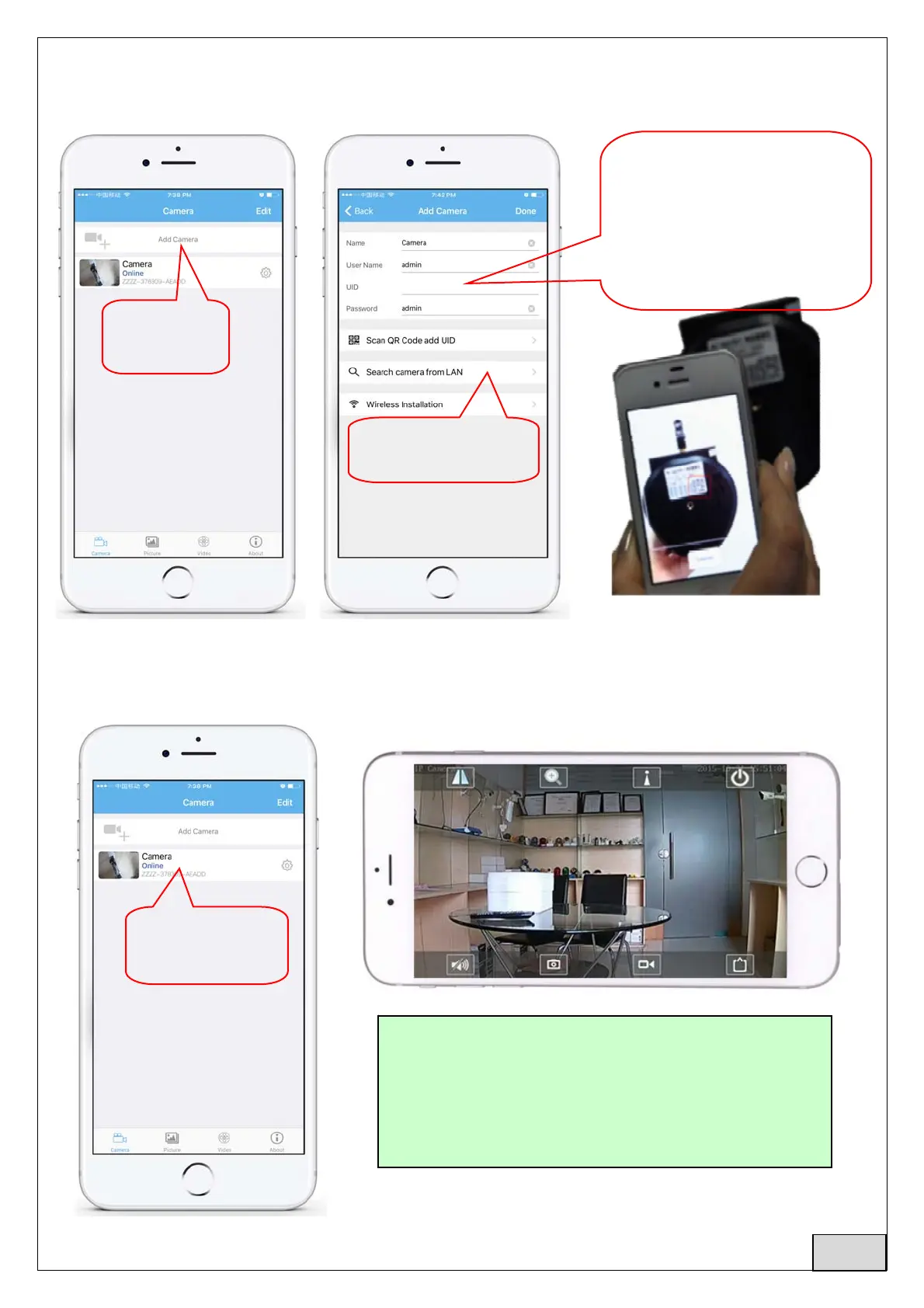
3.2 RunAPPandAddCamerafolowingtheprocedurebelow.Afterthisstep,renameyourcamera,
andfinishprocedure
CheckandenterDefaultUsernameandPassword:admin/admin
3.3 Afteraddingthecamera,clickonlinecameratoviewreal‐timeimage
1.click“Add
Camera”
2.Click”Search
camerafromLAN”
clickhereto
monitor.
OryoucanentertheUIDby
scanningtheQRcodeonthe
camera'slabel,asshown
below(ifavailable)orinput
camera’sUIDmanuallyfrom
cameralabel(ifavailable)
DetailedinstructionsforCamHiappare
availableintheCD,andontheproduct’s
webpagewww.pni.ro
English



 To Next Page