QuickStartGuide/Ръководствозабързстарт/SchnellstartAnleitung/Guíadeiniciorápido/QuidedeDémarrageRapide/Gyors
üzembehelyezésiútmutató/GuidaRapida/
Skróconainstrukcjaobsługi/Ghidrapiddeconfigurare
5/79
4. ViewcamerafromPC
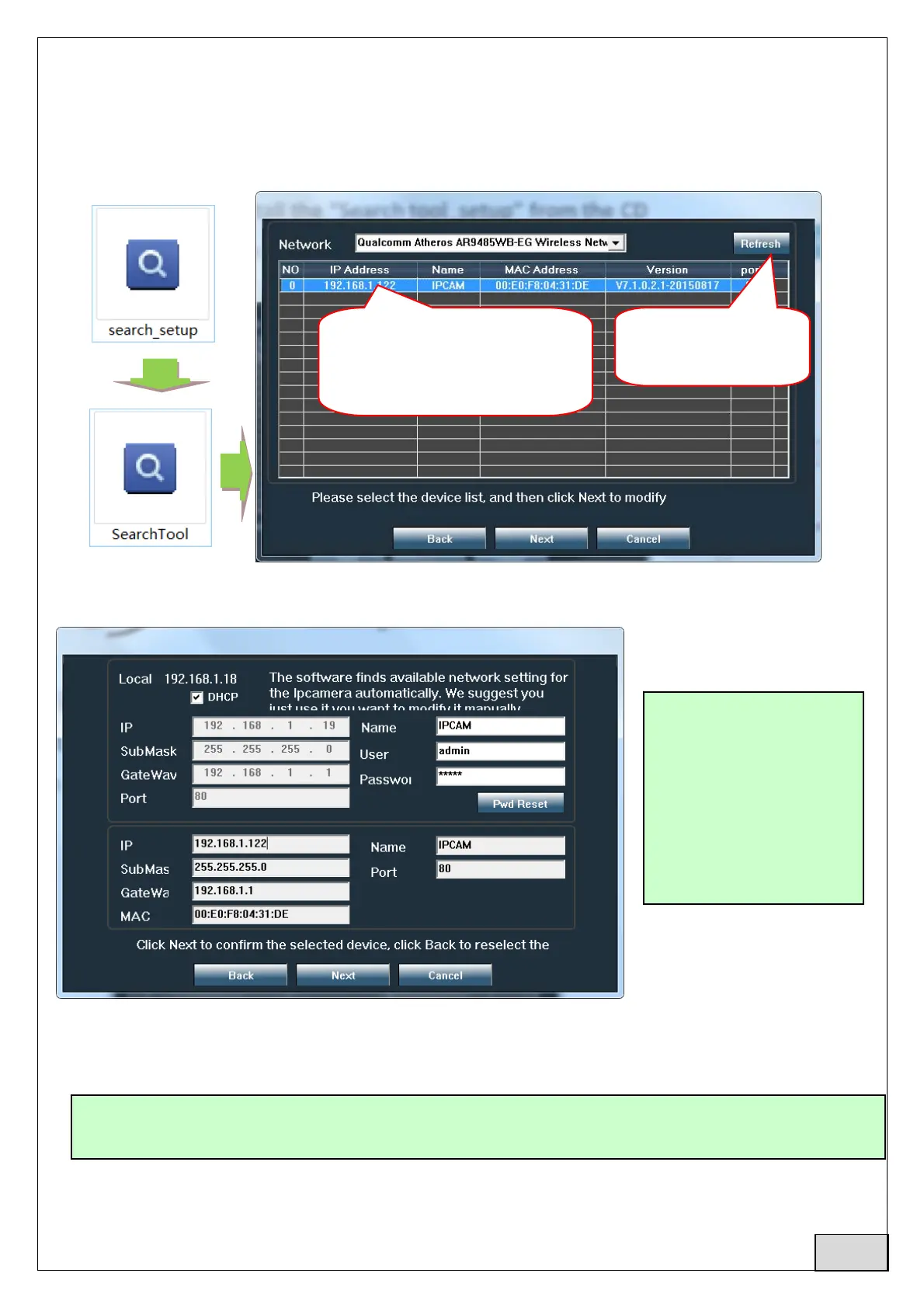
4.1Forproductconfigurationinstall“Searchtool”softwarefromtheCD.Runsoftwareandsearch
camerainLAN(CameraandPCmustbeconnectedinthesamenetwork/router)
Click“Next”andyoucanmodifynetworkparametersofthecamera,acordingtoyournetworksettings.
YoucanuseDHCPsettingforfasterconfiguration.
4.2 InordertoaccessremotelyIPcamerathroughInternetinstallanduse"HiP2PClient"softwarefrom
CD(forPC/LaptopwithWindows).Thesoftwareallowstheinitialsearchandconfigurationof
camerainthelocalnetworkandtheadvancedconfigurationofthecamera’sparameters.
Note:ThecameracanalsobeaccessedfromIEbrowserbyenteringIPandportofcamera:
http://XXX.XXX.XXX.XXX:80wherexxistheIPaddressfoundinSearchTool.
Defaultusername:
admin
Defaultpassword:
admin
2.doubleclickcamera
informationtoaccesscamera
inInternetExplorerBrowser
1.Click"Refresh"to
findthecamera
HiP2PClientsoftw areinstallationpackagesandinstructionsareavailableonCDoronseller’s
webpagewww.pni.ro
English



 To Next Page