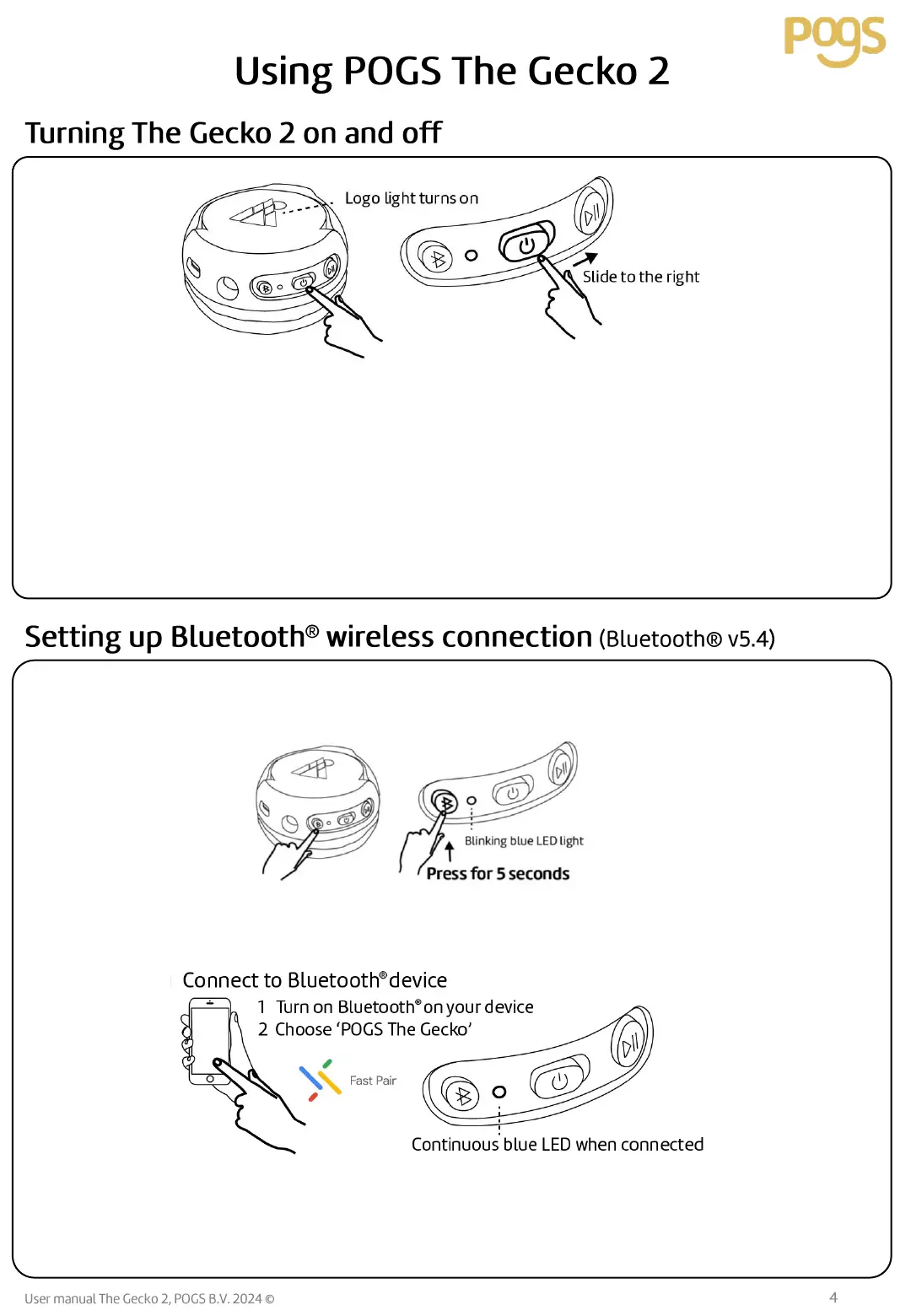
Move the slider to the right to turn on The Gecko 2. The logo light will turn on and you will hear the
sound of morning birds. The Bluetooth® pairing light (blue LED) will start blinking slowly and your
POGS will search for a known device for up to 25 seconds . If a known device is found nearby, it will
connect automatically. If no known device is found within 25 seconds, the Bluetooth® pairing mode will
be activated and the blue LED light will blink fast.
You control the volume on your headphones with your connected device.
Move the slider button to the left to turn off the headphones. The LED logo light will switch off. When
turning them off, you will hear the night sound of an owl.
To activate Bluetooth
®
pairing mode to pair a new device, press the Bluetooth
®
pairing button and hold
for 5 seconds. The blue Bluetooth
®
pairing LED light will start to blink fast.
To connect to your Bluetooth
®
device, select ‘POGS The Gecko’ on your device. The blue Bluetooth
®
pairing LED light will be on continuously when connected. Audio sounds will be heard when connected
and disconnected.
For Android devices, Google Fast Pair prompt will appear on the device to allow for quick connection.
To disconnect, press Bluetooth
®
pairing button for 5 seconds. Or disconnect headphones using your
Bluetooth
®
device.



 To Next Page