EasyManua.ls Logo

Polaroid 65 Series - Page 60

Polaroid 65 Series
217 pages
Go to English
Print Icon
To Next Page IconTo Next Page
To Previous Page IconTo Previous Page
Loading...
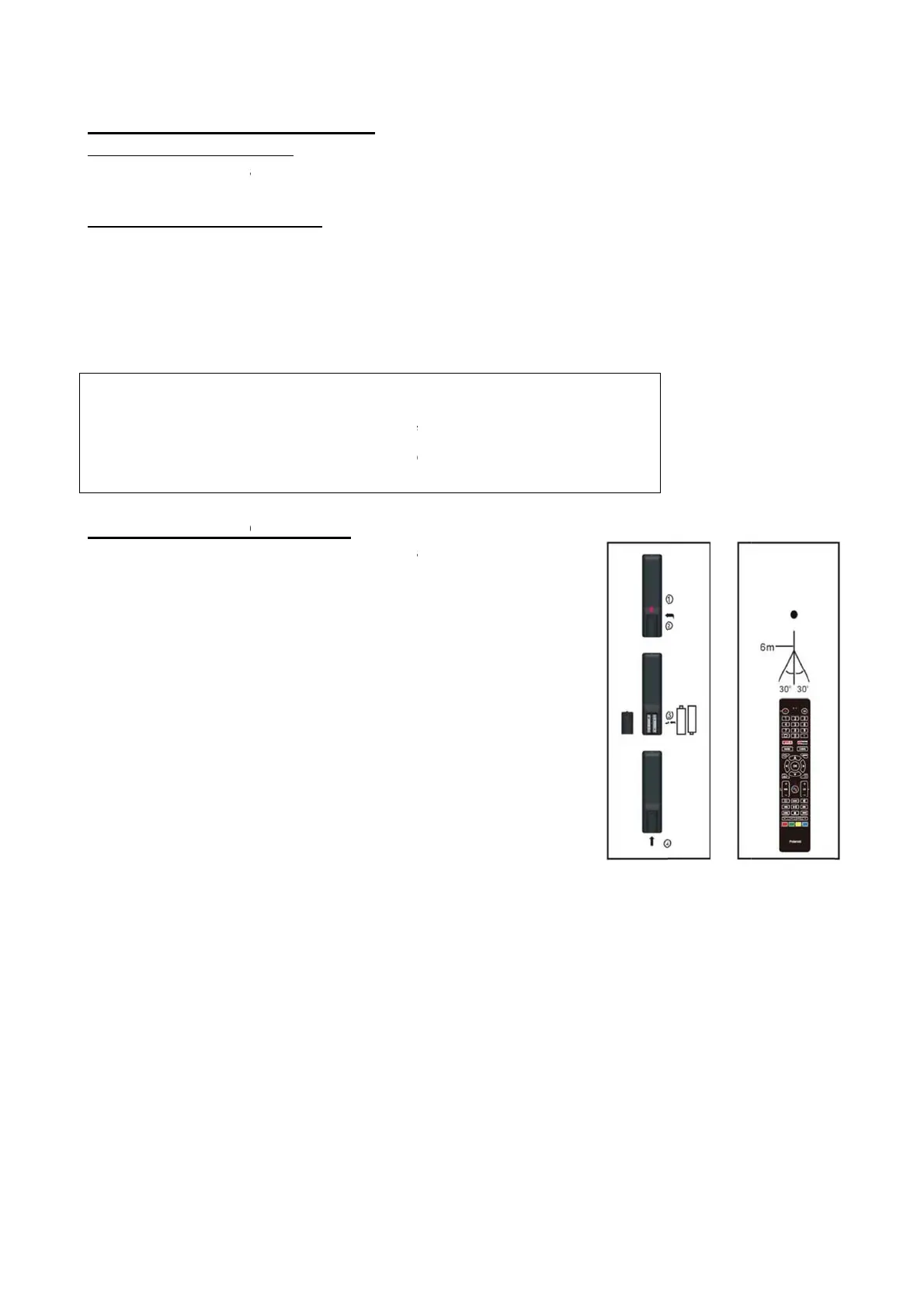
REMOTE
C
BATTERY
Install th
e
indicated
SERVICE
- The bat
t
control is
- If the re
m
batteries.
- Use two
NOTE:
Do n
o
may d
If the
remo
v
REMOTE
C
Point the
r
remote c
o
player (Fi
g
NOTES:
- The o
p
brigh
t
- Do no
- Do no
remo
t
- Do n
o
opera
C
ONTROL
INSTALLA
T
e
batteries
a
in the batt
e
LIFE OF B
A
t
eries nor
m
used.
m
ote contr
size AAA
d
o
t drop, st
e
amage th
e
remote co
n
v
e the batt
e
C
ONTROL
O
r
emote co
n
o
ntrol sens
g
2).
p
erating di
t
ness of th
e
t point bri
g
t place obj
t
e control
s
o
t use this
r
ting the re
m
PREPARA
T
T
ION
a
s the foll
o
e
ry compa
A
TTERIES
m
ally last f
o
ol fails to
w
d
ry batteri
e
e
p on or ot
h
e
parts or l
e
n
trol is no
t
e
ries.
O
PERATI
O
n
trol from
n
or and wit
h
stance ma
e
room.
g
ht light at
ects betw
e
s
ensor.
r
emote co
n
m
ote cont
r
T
ION
o
wing pict
u
rtment (Fi
g
o
r one year
w
ork even
w
s.
h
erwise im
p
e
ad to malf
t
going to b
O
N
n
o more th
a
h
in about 6
y
vary acc
o
remote co
n
e
en the re
m
n
trol while
r
ol of any
o
10
u
res. Be su
r
g
1).
although t
w
hen it is
o
p
act the r
e
f
unction.
b
e used for
an about 6
6
0°of the f
r
o
rding to t
h
ntrol sens
o
m
ote contr
o
simultane
o
o
ther equip
r
e + and –
t
his depen
d
o
perated n
e
e
mote cont
a long tim
e
m from th
e
r
ont of the
h
e
o
r.
o
l and the
o
usly
ments.
t
erminals a
d
s on how
o
e
ar the pla
y
rol. This
e
,
e
a
re positio
n
o
ften the r
e
y
er, replac
e
n
ed as
e
mote
e
the

Other manuals for Polaroid 65 Series

Related product manuals