16
BASIC OPERATION
INITIAL SETUP
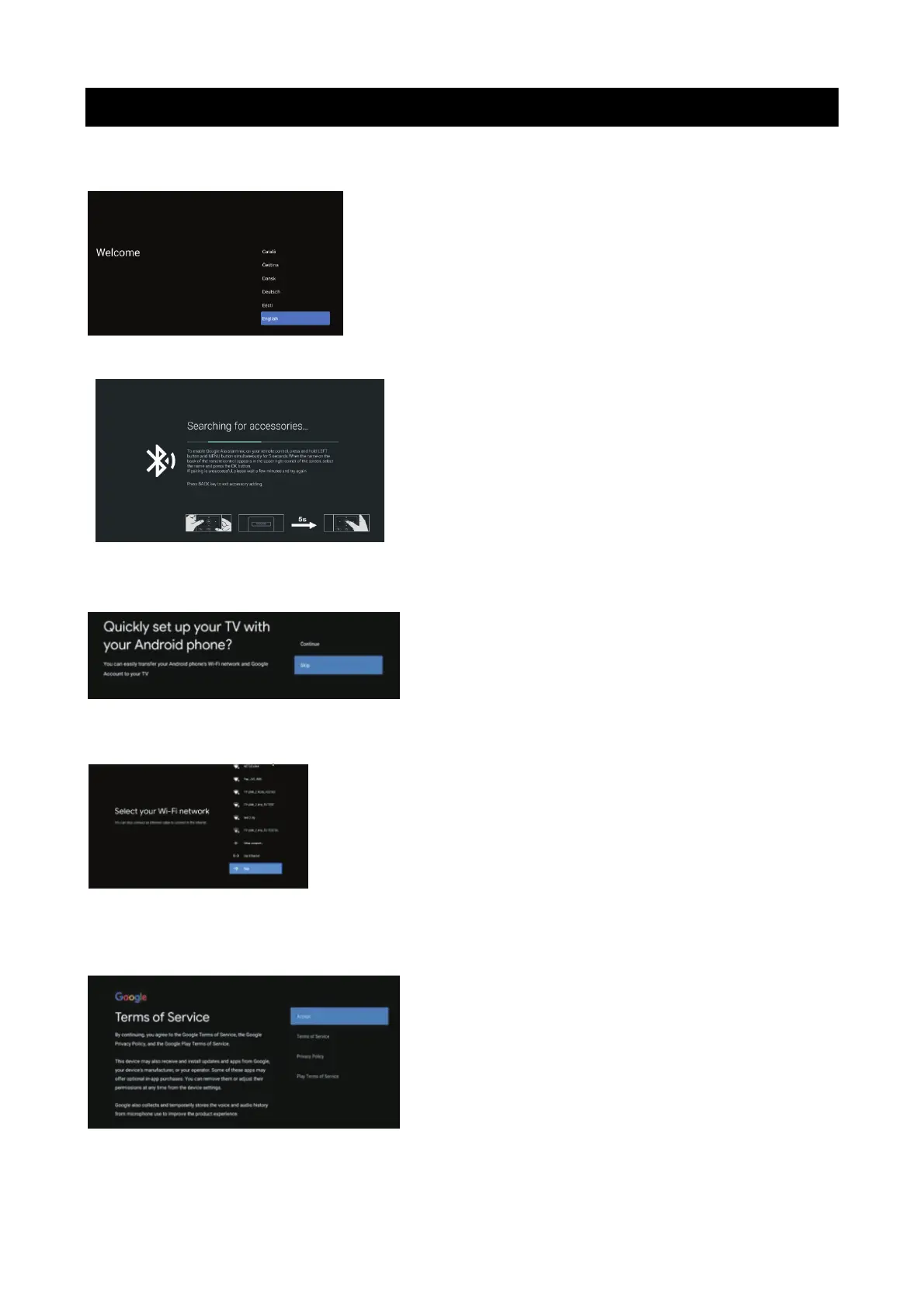
The first you turn your TV,the setup wizard will guide you through setting up basic settings. Please
according to the text tip to first time setup
Press ▼▲ to select the system language and press OK to confirm the language.
.
This function is used for the remote control pair code. After the code is successful,you can use the
Bluetooth remote control to operate the TV.
If you don't need to use the Bluetooth remote control, you can press the BACK button to skip this step.
Connect your Android phone to your TV,select Continue to continue the connection,and choose
Skip to skip this step.
Press▼▲ to select the WIFI to connect. Press OK and enter the password to confirm the connection is
successful.
You can also try use Ethernet and skip select network.
By accepting the Google Terms of Service to improve the product experience,select “accept” to
accept this condition.



 To Next Page
 Loading...