VOL. CH.
INPUT
ATV/DTV
INFO P.MODE
SLEEP
SUBTITLE
CH LIST
GUIDE
3
2
1
12
4
56
7
10
11
7
2
1
16
5
69
14
15
4433
78
10
12
13
11
ENGLISH
11
Chapter 1 Introducing the LCD TV
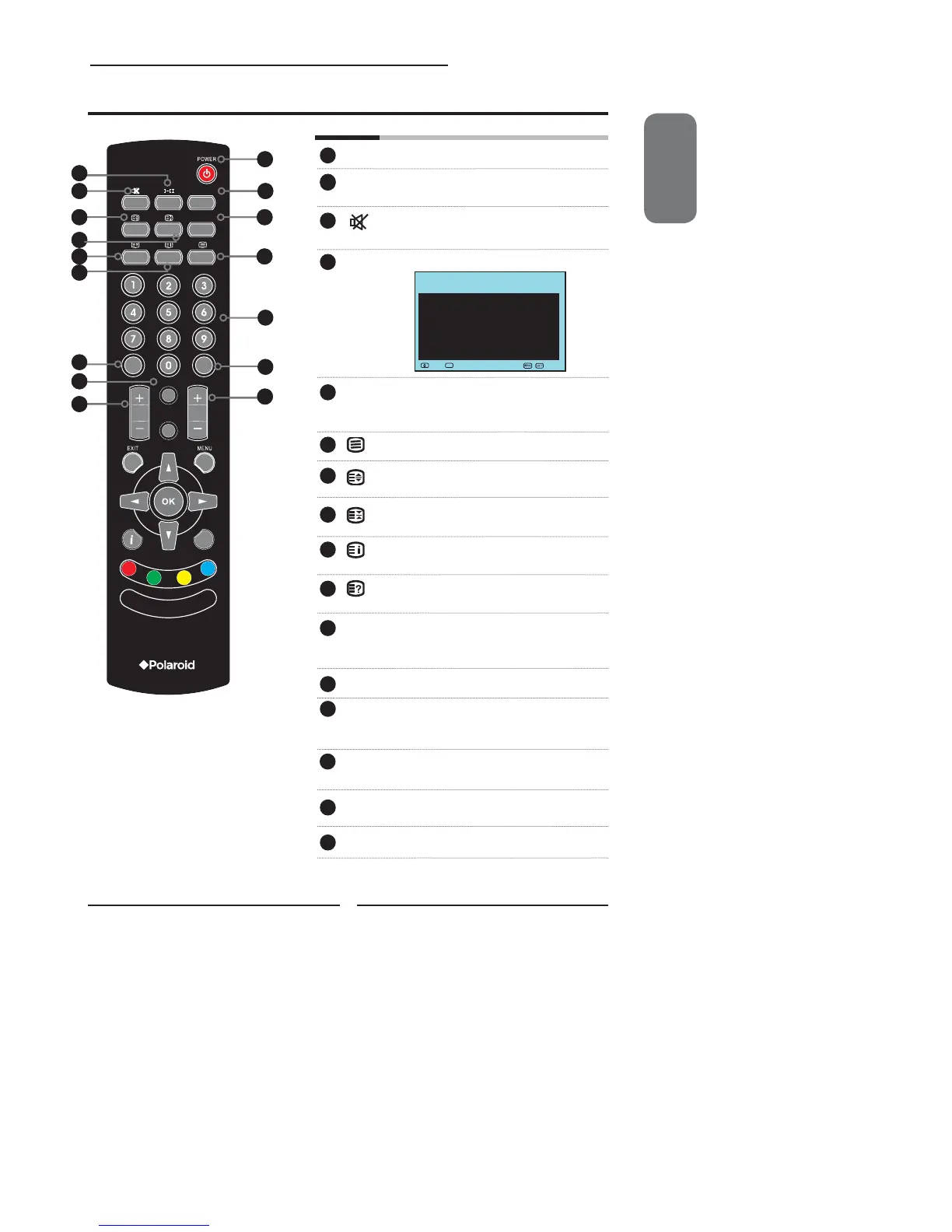
POWER Change TV in and out of standby mode
I-II Cycles through the TV sound options
(NICAN) : MONO/DUAL/STEREO
Mutes and restores your LCD TV
sound.
CH LIST Display all channel list &name.
SUBTITLE Press the SUBTITLE key to display the
subtitle which is broadcast with the
program on the screen.
Turns on and off the Teletext function.
Displays the top, bottom or all of page,
to easily read in TELETEXT mode.
Freezes a multi-page passage on
screen in TELETEXT mode.
Reveals hidden information such as the
answer to a quiz in TELETEXT mode.
Displays the main index in TELETEXT
mode.
0-9 Pressing a number selects a channel.
Following selection, channel activates
automatically in 3 seconds.
SLEEP Cycles through the LCD TV sleep time.
GUIDE In DTV mode, pressing GUIDE displays
the Electronic Program Guide on the
screen
ATV/DTV Pressing enter ATV(analogue) or
DTV(digital) mode.
VOL.+- Increases and decreases volume.
CH.+- Scans up and down the channels.
1
2
2
3
4
5
6
7
8
9
10
11
12
Your Remote Control
15
13
16
14
C
► 1 BBC1
2 BBC2
3 ITV
4 CH4
5 CH5
6
7
Move Select Exit
Channel list
OK


 To Next Page
 Loading...