30
Chapter 3 Using the OSD Features
Use the ▲▼ buttons to select an option of the sub-menu, and press the OK button. While in
adjustment mode, and use the ◄► buttons to change the value of the item.
Press the EXIT button to exit the menu.
TV SETUP MENU:
Allows you to edit and label channels.
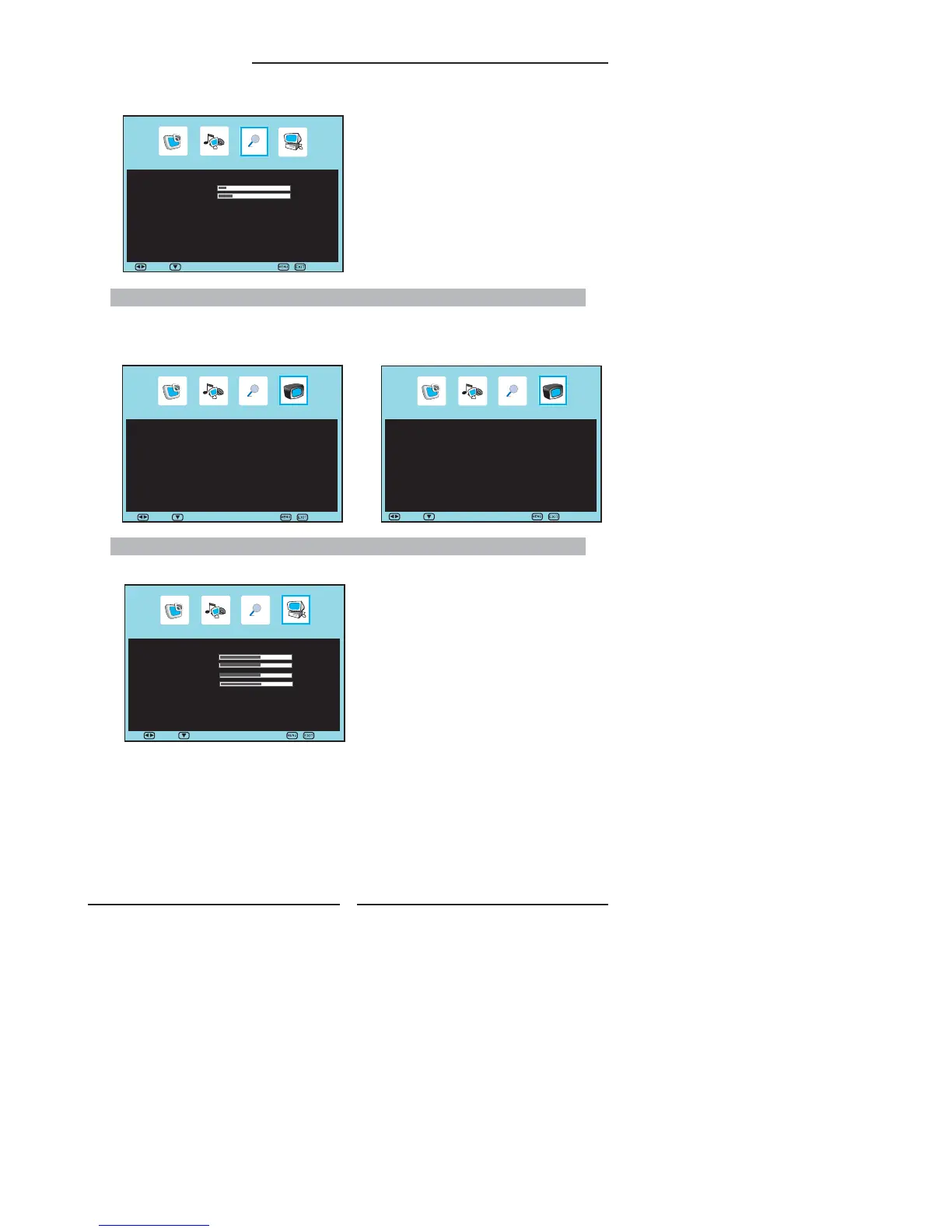
▪ If the signal source is VGA, the OSD Setup Menu
appears as:
OSD Setup
Language ◄ English ►
Time Out 15
Transparency 25
Sleep timer ◄ Off ►
Reset ►
▪ If the signal source is TV, the TV Setup Menu appears as:
VGA SETUP MENU:
Allows you to setup the system function in VGA mode.
VGA Setup
Auto Adjust ►
H-Position 50
V-Position 50
Clock 50
Phase 32
Move Select Exit
▪ If the signal source is DTV, the TV Setup Menu
appears as:
C
DTV Services
Channel List ►
Configuration ►
Parental ►
EPG ►
Move Select Exit
Move Select
Exit
C
TV Setup
APS ►
Fine Tune ◄ 0 ►
Add / Erase ◄ Add ►
Channel Name ◄ ►
Channel Swap 3 ► 3
Manual Search ►
Channel Reset ►
Move Select Exit


 To Next Page
 Loading...