EasyManua.ls Logo

Polaroid PL808BM - User Manual

Polaroid PL808BM
16 pages
Print Icon
To Next Page IconTo Next Page
Loading...
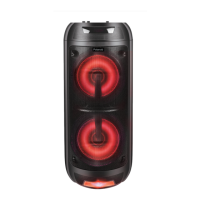
Boom All-Around Speaker
User Manual
PL808BM

Questions and Answers

  • R
    Richard DeckerAug 6, 2025
    Why is my Polaroid PL808BM remote control not working?
    • R
      Richard EdwardsAug 6, 2025
      If the remote control for your Polaroid Speakers isn't working, try these steps: First, move closer to the speaker and aim the remote directly at the sensor on the front of the unit. Next, check that the battery is installed correctly. If it still doesn't work, replace the battery.
  • J
    Jessica BrownAug 12, 2025
    What to do if Polaroid PL808BM are not responding?
    • C
      christopherrichardsonAug 12, 2025
      If your Polaroid Speakers are not responding, try turning the power switch off and then back on.
  • J
    Jonathan TylerAug 20, 2025
    How to fix general sound issues with Polaroid Speakers?
    • A
      amccannAug 20, 2025
      If you're experiencing general sound issues with your Polaroid Speakers, first ensure the speaker is set to the correct mode and the volume knob isn't set to off. Increase the volume using the volume knob or by pressing the VOL + button on the remote. In Bluetooth mode, verify that the speaker is paired with the correct Bluetooth device. In AUX mode, ensure the audio cable is connected to the AUX port and the external device's volume is turned up. For FM mode, make sure you are in FM mode and press the button to search for FM channels.
  • B
    Bryan MitchellAug 27, 2025
    What to do if my Polaroid Speakers have no power?
    • G
      Gabrielle LewisAug 27, 2025
      If your Polaroid Speakers aren't powering on, make sure that the battery is charged or the power adapter is properly connected.

Summary

Welcome

Unpack and Prepare

Whats in the box

Lists all items included in the product packaging for initial setup and verification.

Product Overview

Speaker Overview

Details the external features and components of the speaker from front and rear views.

Control Panel

Describes the top view of the speaker's control panel and its numbered functions.

Remote Control

Setup

Instructions on how to insert batteries into the remote control for operation.

Remote Overview

Visual guide to the remote control buttons and their corresponding functions.

Operation

Charging and Power On

Steps for charging the speaker and turning the device on/off using the power knob or button.

Control Panel Operations

How to use the speaker's control panel for playback, volume, and mode selection.

Battery Status

How to check the speaker's battery level via the LED display and when to charge.

LED Light

Instructions on how to control the front and back LED lights on the speakers.

Bluetooth Mode

Steps for pairing the speaker with a Bluetooth device and playing music wirelessly.

AUX Mode

How to connect external devices using an audio cable via the AUX port.

USB Mode

How to play music from a USB device inserted into the speaker's USB port.

TF (Micro SD) Card Mode

Instructions for playing music from a TF (Micro SD) card inserted into the speaker.

FM Mode

How to tune into FM radio stations and scan for channels using the speaker.

TWS (True Wireless Stereo)

Guide to connecting two speakers wirelessly for stereo sound playback.

Microphone

How to connect and use a microphone with the speaker, including volume and echo adjustments.

Troubleshooting

Specifications

Compliance and Responsible Disposal

Packaging

Guidelines for the environmentally friendly disposal and recycling of product packaging materials.

Product

Advice on the environmentally friendly disposal of the product at its end of life.

Compliance

Statement of compliance with Australian safety standards for the product.

Polaroid PL808BM Specifications

General IconGeneral
BrandPolaroid
ModelPL808BM
CategorySpeakers
ConnectivityBluetooth
WaterproofNo
FeaturesBuilt-in microphone

Related product manuals