Installation Guide http://www.autostart.ca/ P. 11
Valet mode. Make sure the remote car starter is able to properly enter and exit valet mode. When setting the
remote car starter into valet mode, pressing the lock button will lock the doors without activating the starter kill.
(Refer to the user guide for further information on valet mode.)
Idle mode. Make sure the vehicle properly enters and exits idle mode.
Most comebacks are the result of misunderstandings about how a product works or performs. Take the
time to properly explain all functions and features to the customers before they leave the premises.
Doing this will save time and money.
Diagnostics via parking lights
Diagnostic table for shutdown.
Parking lights flashes Cause
1
x Runtime has expired.
2
x Shutdown by remote.
x Ready mode is activated.
3
x Failed start.
4
x Brake shutdown.
10
x Hood shutdown.
Flash for 30sec
x Panic mode
Flash for 60sec
x Alarm triggered
Diagnostic table for start failure.
Parking lights flashes Cause
1
(Manual transmission
only)
x Ready mode is not activated.
x Tach signal is not learned.
1 slow
2 quick
x The system is set to valet mode.
3
(Automatic transmission
only)
x The parking brake is active.
x Yellow loop is connected.
4
x Brake wire is active
6
x A tach signal is detected before Ignition.
10
x Hood wire is active.
Note: The installer can also use the PRG-1000 to diagnose shutdown and remote start failures. Refer to the
PRG-100 manual guide.
P. 2 http://www.autostart.ca Installation Guide
Entering Programming Mode
Using the Hood Pin
Using the Antenna Programming Assistance Button
(A.P.A.B.) (Optional)
x Press and hold the hood pin for 4 seconds. x Make sure the hood is closed.
x Release the hood pin.
The parking lights will turn ON.
x Turn the ignition key to the IGNITION ON (RUN) position.
x While the parking lights are ON, press the hood pin once
more and release immediately.
The parking lights will turn ON and stay ON for 20
seconds.
x Within 5 seconds, press the programming button on the
antenna twice for 1 second each time.
The LED will come ON solid.
x You now have 20 seconds to select one of the sub-
menus.
x You now have 20 seconds to select one of the sub-
menus.
Note: To exit programming mode, close the hood.
Note: To exit programming mode, press on the antenna
button once (the LED will come ON) and release.
Manual or Automatic Transmission
This module may be installed on vehicles with manual or automatic transmissions. It is originally configured for manual
transmissions. If the vehicle you are working on is automatic, it is mandatory to make a few quick and easy modifications before
the unit is connected. In the event that the configuration requires changes afterwards, a complete reset will be
necessary before those changes become effective.
To install this unit in a vehicle with a manual transmission:
1. Make sure the Yellow loop on the PC board is connected.
2. Connect the Orange handbrake wire located on the 12-pin harness to the vehicle handbrake switch.
3. Connect the Blue/White (+) door input OR
the Grey (-) door input wire located on the 12-pin harness to the
vehicle door pin wire, which monitors all the doors of the vehicle (only use 1 of the 2 door trigger inputs).
4. Make sure the Purple TACH wire is plugged in – the TACH wire MUST be hooked up when the module is set for
a manual transmission.
5. Make all your regular connections.
6. Power up the unit by first inserting the 5-pin connector, then the 6-pin connector and finally the 12-pin connector.
The parking lights will flash 4 times.
7. When learning the transmitter, the parking lights will flash 5 times quickly.
8. Upon the first successful remote start, the system will lock the transmission settings to manual mode.
To install this unit in a vehicle with an automatic transmission:
1. Cut the loop on the pc board (Yellow wire).
2. Make sure the Orange handbrake wire is not
connected to any of the vehicle circuits.
3. Make all the regular connections.
4. Power up the unit. The parking lights will flash 4 times.
5. When learning the first transmitter, the parking lights will flash 5 times quickly then give 2 slow flashes.
6. Upon the first successful remote start once the yellow loop has been cut, the system will lock the
transmission settings to automatic mode.
Note: If upon pressing the
START button, the parking lights give 3 slow flashes, make sure that the Orange handbrake wire is
not connected and that the yellow loop is cut and isolated.
Resetting the Module
WARNING! By resetting the module, all programmed values are erased i.e.: tach, transmitter as well as
programming options. The programming options are returned to their default values.
1. Enter programming mode (see on page 2).
2. Once having reached the programming mode, quickly press and release the brake pedal until the parking lights flash 8
times (you will need to press the brake pedal a minimum of 5 times).
Transmitter Programming Procedure
1. Enter programming mode (see on page 2)
the parking lights will stay on for up to 20 seconds.
2. Before the lights go out, turn the ignition key to the
OFF position, then to IGNITION ON (RUN) and immediately back to the OFF
position.
3. Press and hold the
LOCK button and keep it down until the parking lights flash 5 times quickly.
4. The transmitter has been stored in memory.
Note: Each unit can store 4 remotes in its memory.
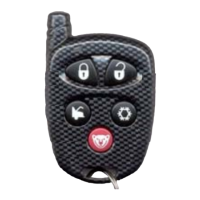
To program a transmitter on the second vehicle for multi-car operation, you must press the
TRUNK button (instead of LOCK
or UNLOCK) in step 3 of the transmitter programming procedure:
Entering Programming Options
1. Enter programming mode (see on page 2)


 To Next Page
 Loading...