Installation Guide http://www.autostart.ca/ P. 3
a. Turn the ignition ON; The parking lights will turn OFF
b. After 4 seconds the parking lights will turn ON and then press the brake.
LOCK ................................................. to access mode 1;
UNLOCK ............................................ to access mode 2;
TRUNK ............................................... to access mode 3; or
START .............................................. to access mode 4.
3. The parking lights will flash and the horn will honk (if programmed) once, twice, three or four times to confirm entry into a
mode.
4. Release the brake pedal.
Once the desired mode has been selected, the unit will fall (by default) into function #1 of that mode; you can now select the
option you want in function 1. Once this option has been chosen, the unit will move on to function 2 of the mode selected, and
so on.
LOCK for Option 1,
UNLOCK for Option 2,
TRUNK for Option 3;
START for Option 4.
Programming Options
MODE 1
* INDICATES DEFAULT SETTING
FUNCTION 1 – Ignition-controlled door locks
OPTION 1* Ignition lock DISABLED
OPTION 2 Ignition lock ENABLED
OPTION 3 Ignition unlock only
OPTION 4 Ignition lock only
FUNCTION 2 – Secure Lock
OPTION 1* Secure lock DISABLED
OPTION 2 Standard secure lock ENABLED
OPTION 3 Smart secure lock ENABLED
FUNCTION 3 – Starter Kill arming mode
OPTION 1* Passive arming (60 sec.)
OPTION 2 Active arming
OPTION 3 Passive arming (3 min.)
FUNCTION 4 – Door lock / unlock pulse timing
OPTION 1* 7/10-sec. lock/unlock pulses
OPTION 2 4-sec. lock/unlock pulses
OPTION 3 7/10-sec. lock pulse and two ¼-sec. unlock pulses
OPTION 4 1/10-sec. lock/unlock pulses
FUNCTION 5 – LED flashing
OPTION 1* ENABLED (without starter kill
will flash only when ignition is OFF)
OPTION 2 DISABLED
OPTION 3 ENABLED (with starter kill Æ will ONLY flash when the starter kill engages.
This option should be selected ONLY if the starter kill is installed.)
MODE 2
* INDICATES DEFAULT SETTING
FUNCTION 1 – Safe Start
OPTION 1 Safe Start ENABLED
OPTION 2* Safe Start DISABLED
OPTION 3 “Swap Start” – enhanced safe start mode with extended safety: To start the engine: press
the LOCK and UNLOCK buttons simultaneously. To trigger AUX 2: press START button.
FUNCTION 2 – Engine Run Time
OPTION 1 Run Time = 3 minutes in gas mode / 8 minutes diesel mode
OPTION 2* Run Time = 15 minutes in gas mode / 20 minutes diesel mode
OPTION 3 Run Time = 25 minutes in gas mode / 30 minutes diesel mode
FUNCTION 3 – Idle Mode & Turbo Mode (auto) / Turbo Mode (manual)
OPTION 1 Idle mode & turbo mode DISABLED (AUTO) / turbo mode DISABLED (MANUAL)
OPTION 2* Idle mode & turbo mode ENABLED (AUTO) / turbo mode DISABLED (MANUAL)
OPTION 3 Idle mode & turbo mode ENABLED (AUTO) / turbo mode ENABLED (MANUAL)
FUNCTION 4 – Engine type and Cold Weather Mode
OPTION 1 Diesel mode with 20-minute run time in cold weather mode (30-sec. wait to start delay)
OPTION 2* Gas mode with 3-minute run time in cold weather mode
OPTION 3 Diesel mode with 8-minute run time in cold weather mode (18-sec. wait to start delay)
OPTION 4 Diesel mode with 8-minute run time in cold weather mode (7-sec. wait to start delay)
FUNCTION 5 – Ignition Valet
OPTION 1 Ignition valet DISABLEDOPTION 2* Ignition valet ENABLED
P. 10 http://www.autostart.ca Installation Guide
Testing
Before putting back the vehicle together, it is recommended to check that the system operates properly. The
following testing procedures should be used to verify proper installation and operation of the system. Before
testing, make sure that all connections are soldered and that the unit is plugged in.
Remote-Starting Your Vehicle
Setting Your Vehicle Into Ready Mode
If the vehicle has a manual transmission
you must read the following indications. The unit must first be set to
Ready Mode in order to start the vehicle by remote. If the unit is not set to Ready Mode, it cannot remote start
the vehicle.
Please note that Ready Mode can be enabled by the remote or the handbrake, depending on the option that
was selected. Therefore, you must follow the appropriate procedure between the two described below in order
to set the vehicle into Ready Mode.
Once the system is set to Ready Mode, the vehicle can be remote started and stopped at any time. The system
will exit Ready Mode if a door, the hood or the trunk is opened, if the brake pedal is pressed, if the parking
brake is disengaged or if the ignition key is turned to the IGNITION ON (RUN) position.
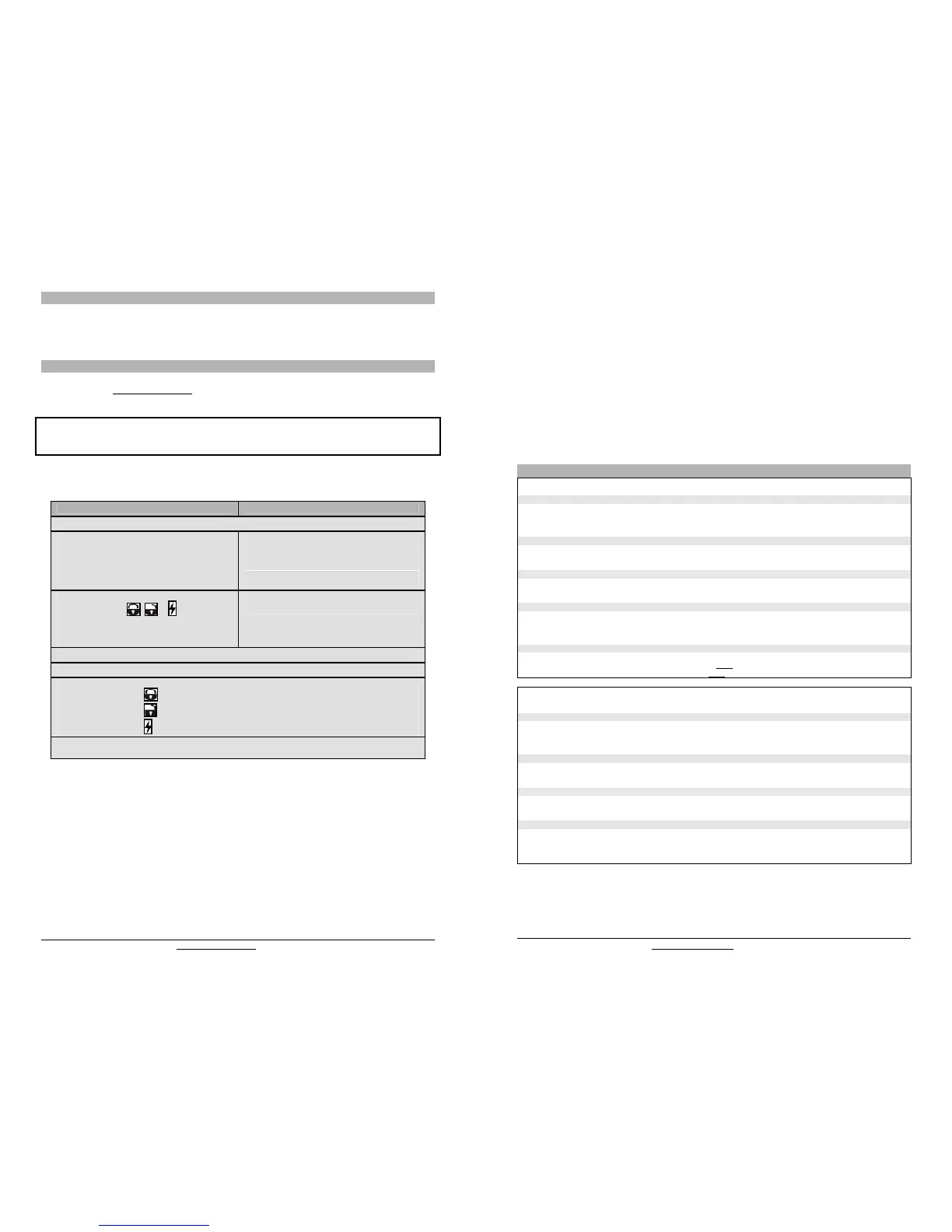
To set the system to Ready Mode:
If Ready Mode is enabled by remote If Ready Mode is enabled by handbrake
1. Ensure that all the doors, hood and trunk are closed. Make sure that the gear selector is in the neutral position.
2. With the engine already running, apply the
parking brake once and release the brake pedal.
2. With the engine already running, apply the parking
brake twice within 10sec.
Make sure to release the brake pedal.
The parking lights will flash 3 times quickly and
remain lit.
Skip to step 4.
3. Within 20 sec. of engaging the parking brake,
press and hold , or on the
transmitter.
The parking lights will flash 3 times quickly and
remain lit.
-
4. Remove the key: the engine will continue running.
5. Exit the vehicle and close all doors, hood and trunk.
6. Press for approx. 1 second either:
x to lock the doors and shut down the engine;
x to unlock the doors and shut down the engine;
x to shut down the engine without affecting the doors.
7. The parking lights will flash twice to confirm ready mode activation.
Remote-start the engine and listen for starter drag. If the starter cranks for too long, carry out another tach
programming procedure.
Hood switch shutdown. With the vehicle running under the remote car starter, open the hood; the vehicle
should shut down. If it does not shut down, check the hood pin-switch and its connector.
Brakes shutdown circuit. With the vehicle running under the remote car starter, press and release the brake
pedal. The engine should shut down immediately. If the engine continues to run, check the brakes switch
connection.
OEM alarm control. Make sure the module is able to arm and disarm the oem alarm (if applicable).
Door locks and trunk testing. Make sure each of these options respond to the transmitter (if installed).
Starter kill option. Sit inside the vehicle with all doors closed. Arm the vehicle, then try to start the engine with
the key. The engine should not start. If the engine starts, rewire the starter kill to reach proper operation.


 To Next Page
 Loading...