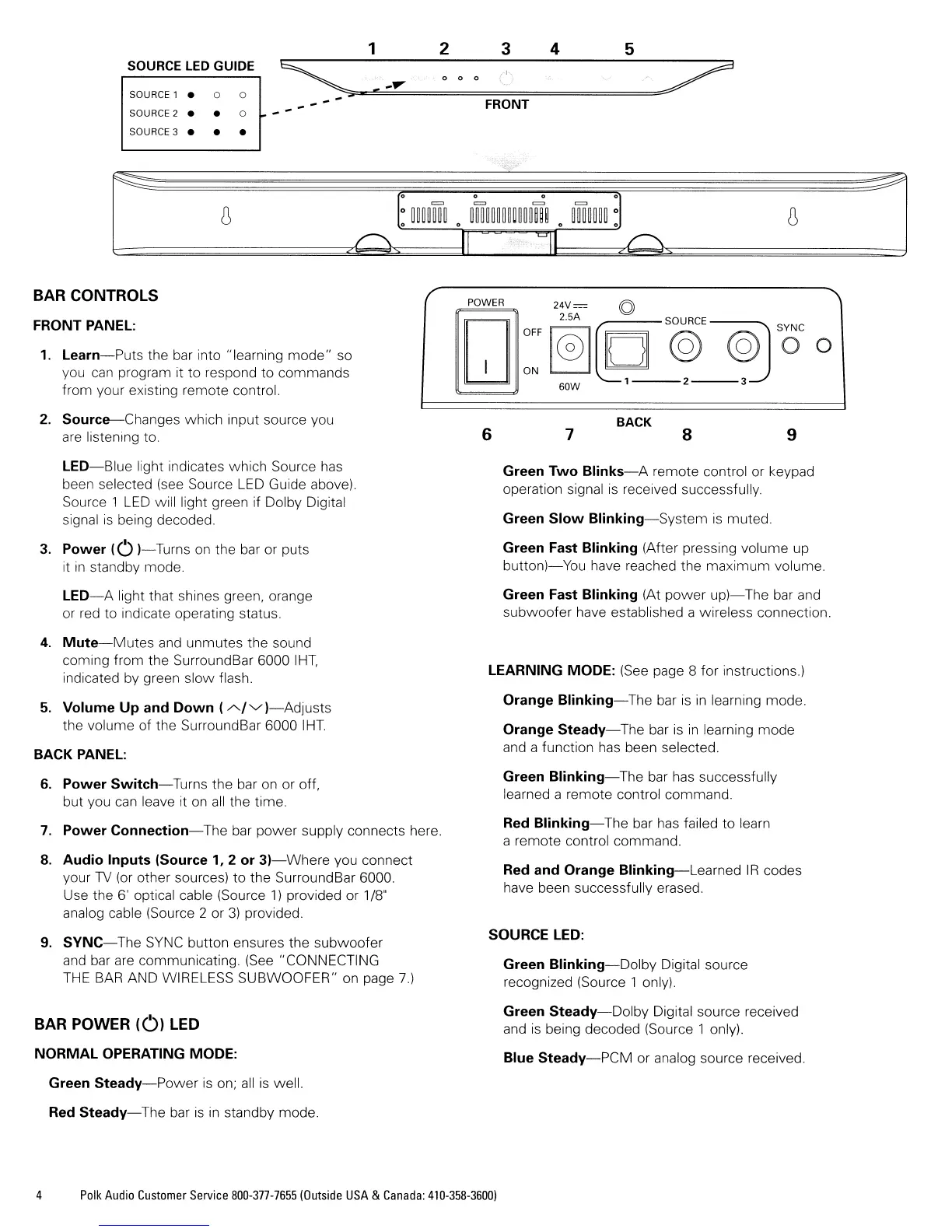
1 2
3
4
5
SOURCE LED GUIDE
~
(1\
~
0 0 0
~
....
y
'-
SOURCE 1
•
0 0
....
FRONT
SOURCE 2
• •
0
....
SOURCE 3
• • •
o 0
=
~
I
LJII
BAR CONTROLS
FRONT PANEL:
1.
Learn-Puts
the
bar
into "learning mode" so
you
can
program it to respond to commands
from your existing remote control.
/
'\
POWER
24V=
©
:~
@]~'@'~
'0'
0
I
60W 1
2---3
2.
Source-Changes
which input source you
are
listening to.
6
7
BACK
8
9
LED-Blue
light indicates which Source
has
been selected
(see
Source
LED
Guide above).
Source 1
LED
will light green if Dolby Digital
signal
is
being decoded.
3.
Power
(0
)-Turns
on
the
bar
or puts
it
in
standby mode.
LED-A
light that shines green, orange
or
red
to indicate operating status.
4.
Mute-Mutes
and
unmutes the sound
coming from the Surround
Bar
6000
IHT,
indicated
by
green slow flash.
5.
Volume
Up
and
Down
(-"'/'V)-Adjusts
the volume of the SurroundBar 6000
IHT.
BACK PANEL:
6.
Power
Switch-Turns
the bar
on
or off,
but you
can
leave it
on
all
the time.
7.
Power
Connection-The
bar power supply connects here.
8.
Audio
Inputs
(Source 1, 2
or
3)-Where
you connect
your
TV
(or
other sources) to the SurroundBar 6000.
Use the 6' optical cable (Source
1)
provided or
1/8"
analog cable (Source 2 or
3)
provided
9.
SYNC-The
SYNC
button ensures the subwoofer
and
bar
are
communicating.
(See
"CONNECTING
THE
BAR
AND WIRELESS SUBWOOFER"
on
page
7)
BAR POWER
(01
LED
NORMAL
OPERATING MODE:
Green
Steady-Power
is
on;
all
is
well.
Red
Steady-The
bar
is
in
standby mode.
Green
Two
Blinks-A
remote control or keypad
operation signal
is
received successfully.
Green
Slow
Blinking-System
is
muted.
Green Fast
Blinking
(After pressing volume up
button}-You
have reached the maximum volume.
Green Fast
Blinking
(At power
up)-
The bar
and
subwoofer have established a wireless connection.
LEARNING MODE:
(See
page 8 for instructions.)
Orange
Blinking-The
bar
is
in
learning mode
Orange
Steady-The
bar
is
in
learning mode
and
a function
has
been selected.
Green
Blinking-The
bar
has
successfully
learned a remote control command.
Red
Blinking-The
bar
has
failed to learn
a remote control command.
Red and Orange
Blinking-Learned
IR
codes
have been successfully erased.
SOURCE LED:
Green
Blinking-Dolby
Digital source
recognized (Source 1 only).
Green
Steady-Dolby
Digital source received
and
is
being decoded (Source 1 only).
Blue
Steady-PCM
or analog source received.
4
Polk
Audio
Customer
Service
800-377-7655IOutside
USA
&
Canada:
410-358-3600)







 To Next Page