DESCRIPTION OF THE REMOTE CONTROL
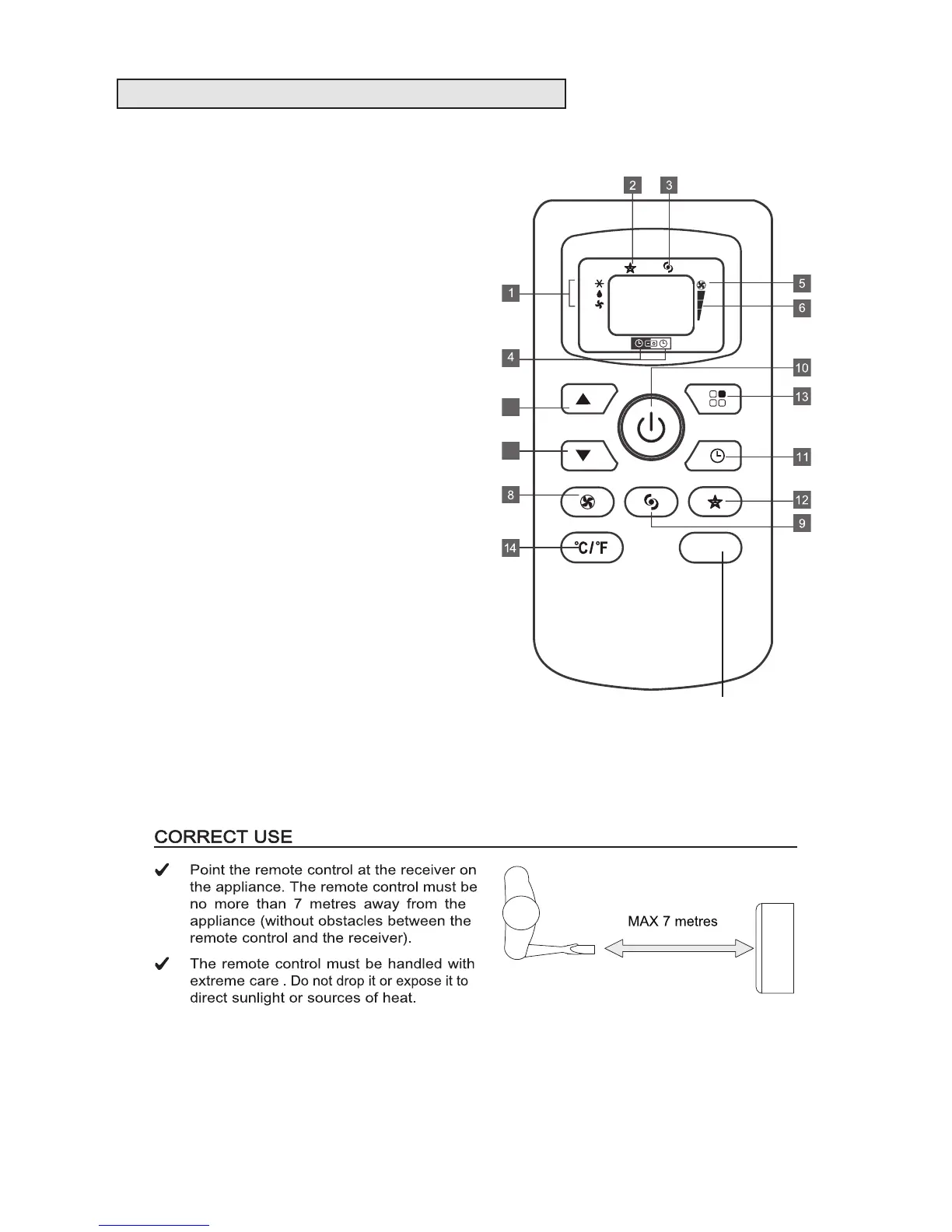
1. Mode indicator
2. Sleep indicator
3. Powerful indicator
4. Timer selection
5. Auto-speed indicator
6. Fan Speed indicator
7. (a) Increase (+) temperature button
. (b) Decrease (-) temperature button
8. FAN button
- Press this button to select fan speed of
HIGH/MED/LOW/AUTO
9. POWERFUL button
10. ON/OFF button
- Press this button to switch on/off the appliance
11. TIMER button
-Press this button to set automatic
startup/shutdown
12. SLEEP button
-Press this button to on/off sleep function
13. MODE button
-Press this button to select the modes of
COOL / DRY (Dehumidify) / FAN
14. °C/°F button
-Press this button to select the “°C” or “°F” (set
temperature in degrees centigrade or fahrenheit)
7a
7b
Spare button - does not
perform any function



 To Next Page