SWITCHING BETWEEN AUTOMATIC AND MANUAL GEAR SHIFTING
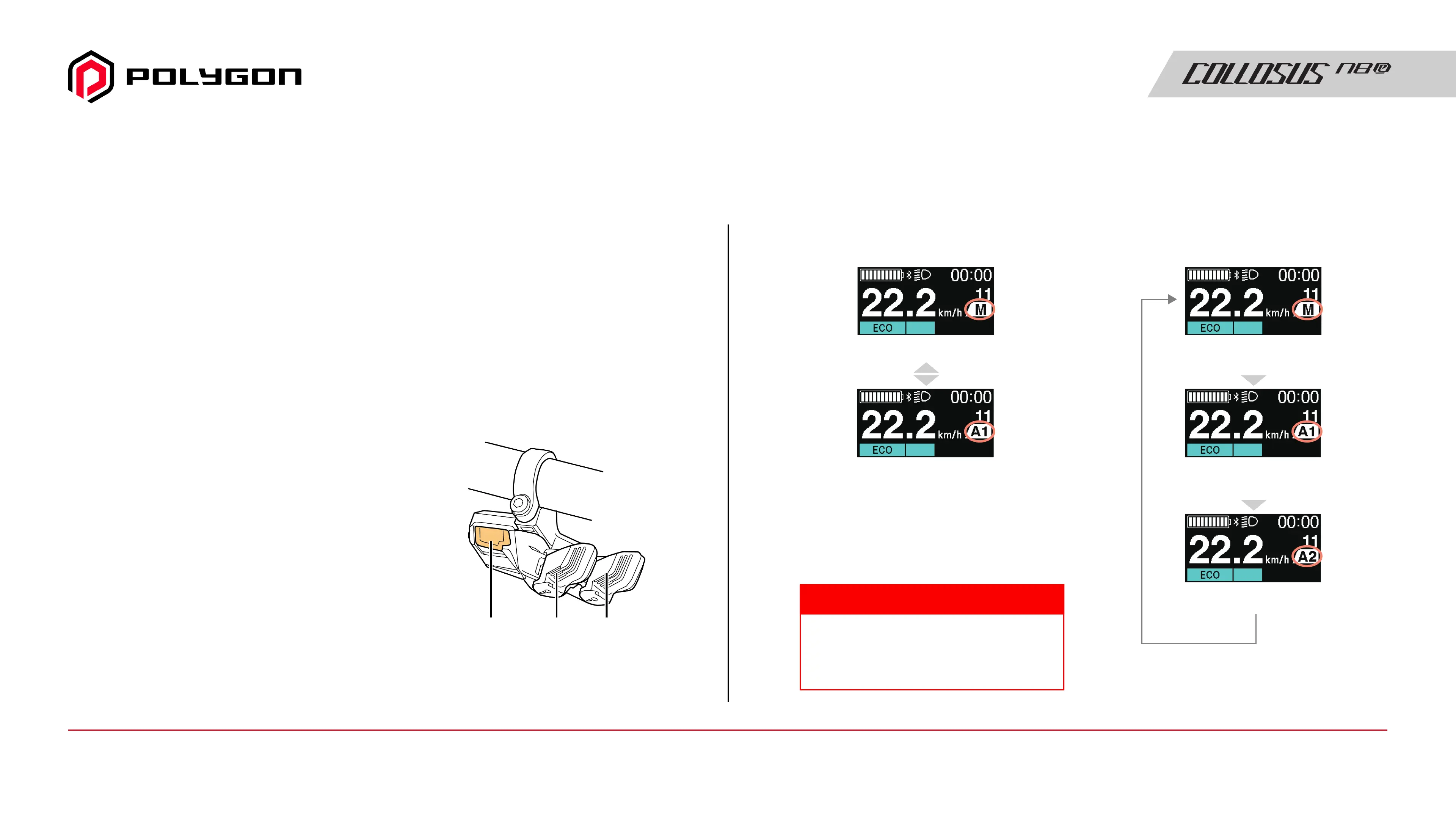
The shift switch (right side of the
handlebar) is operated as follows,
depending on the type.
• 3-switch type or MTB type shift switch:
Press the A button
• 2-switch type shift switch: Press and
hold X and Y until the display of the
cycle computer switches
Shifting switches between automatic and
manual gear shifting as shown aside.
Depending on the assist bicycle used, you may be able to switch
between automatic and manual gear shifting.
• Automatic gear shifting: Automatically shifts gears based on riding
conditions. Manual gear shifting operations are possible even when
automatic gear shifting is set.
• Manual gear shifting: This is standard electronic gear shifting.
Gears are shifted by operating the shift switch.
The display will differ depending on the
model of cycle computer. Refer to the
user's manual of your cycle computer.
TECH TIPS
QUICK GUIDE
When there is one automatic
gear shifting setting
Manual gear shifting
Automatic gear shifting
When there are two automatic
gear shifting settings
Manual gear shifting
Automatic gear shifting (AUTO1)
Automatic gear shifting (AUTO2)
XA Y
MTB type
Manual Guide18 / Quick Guide - Switching Between Automatic and Manual



 To Next Page