12
FUNCTION TABLE
POWER /MODE
TIMER
(HOURS)
10
8
6
4
2
CELL STATUS
SALT LEVEL
WATER FLOW
POWER /MODE
TIMER
(HOURS)
10
8
6
4
2
CELL STATUS
SALT LEVEL
WATER FLOW
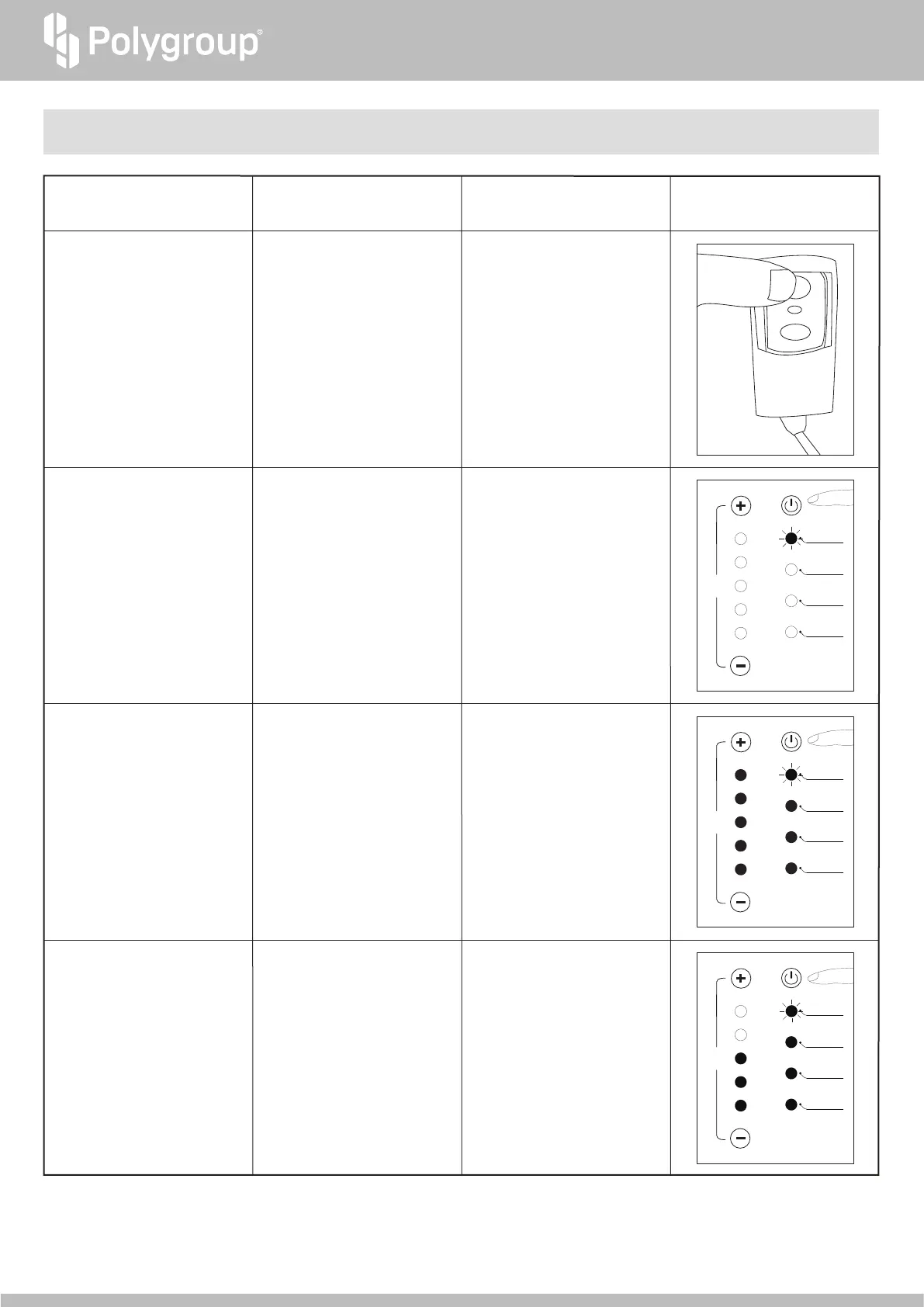
Short press to change between
AUTO and BOOST modes.
When in BOOST mode, the
System will default to run 2X
faster, continuously for 6 hours.
This timer can be adjusted
between 2 to 10 hours.
Power/Mode Button
8
(BOOST mode)
Press and hold for 2 seconds to
change between STANDBY and
AUTO modes.
When in AUTO mode, the System
will default to run continuously for
10 hours. This timer setting is
unchangeable.
Power/Mode Button
8
(AUTO mode)
Green Power/Mode Indicator
7
blinks every second.
Timer Indicators
2
will show how
many hours left.
Orange Power/Mode Indicator
7
blinks every second.
Timer Indicators
2
will show
how many hours left.
Button Function/Action
GFCI indicator turns red
LED Light Indication Image
Press to launch the System
RESET button on the GFCI
Power Cord Set
k
(while
plugged to power)
TEST
TEST
TIMER
(HOURS)
10
8
6
4
2
CELL STATUS
SALT LEVEL
WATER FLOW
Indicates the power is on and the
System is ready
Red Power/Mode Indicator
7
blinks every 3 seconds.
Power/Mode Button
8
(STANDBY mode)
POWER /MODE


 To Next Page