18
ELECTROLYTIC CELL REPLACEMENT
13
24
27
To replace the Cell
s
:
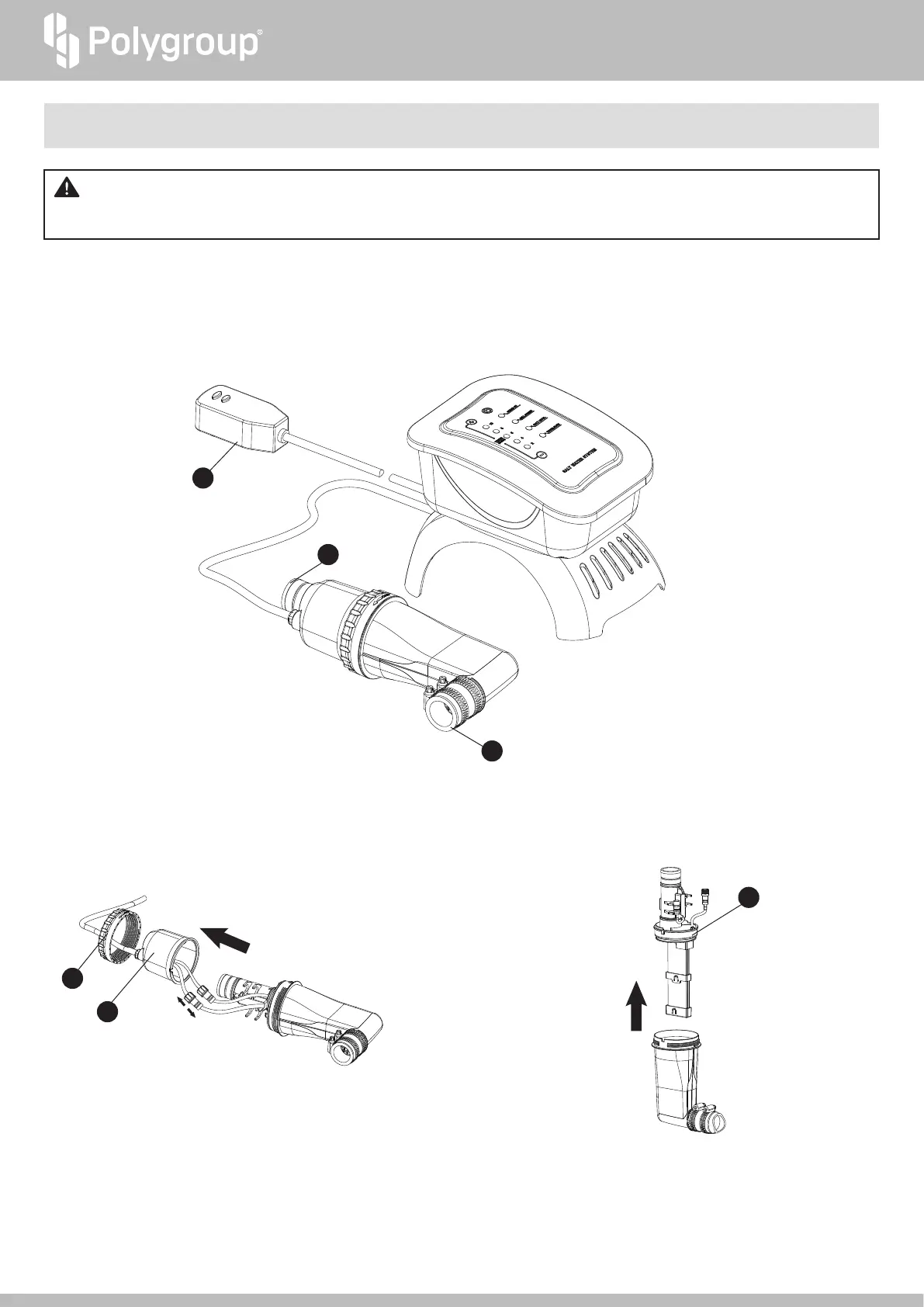
1. If the pool is filled with water, use the Service Plugs provided with Polygroup
®
aboveground pool filter pumps to block the pool’s inlet and outlet.
2. Press the TEST button on the GFCI Power Cord Set
k
to switch off the System. Then unplug from the power outlet.
3. Detach the Cell Outlet
g
from the hose, and the Cell Inlet Connecting Tube 13 from the filter pump.
IMPORTANT! The Electrolytic Cell
s
is programmed to automatically self-clean and check on the operational efficiency. If the Cell
Status Indicator
6
turns orange or red (see FUNCTION TABLE, p. 13), first check the pool water quality. If the water quality is good but the
Indicator remains orange or red, replace the Cell.
5. Remove the old Cell
s
.
21
25
26
4. Unscrew the Cell Lock Nut
j
, lift the Cell Cover
h
up,
and disconnect the cord connectors.


 To Next Page