48/POMCube
Grid connection
External breaker is installed.
The appropriate breaker is installed as specified.
The breaker is turned OFF.
N, L2, L1 are wired correctly.
Voltage is within the allowed range.
Generator connection
External breaker is installed.
The appropriate breaker is installed as specified.
The breaker is turned OFF.
N, L2, L1 are wired correctly.
Voltage is within the allowed range.
Wiring All cables are wired tightly.
Wiring box covers All wiring covers are sc
rewed tightly.
Conduit All conduits are tightly installed and sealed.
Wire protection
Insulated cover of wires is not at risk of being cut
or damaged.
DANGER:
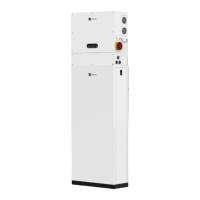
Strictly follow the procedure to boot the system.
DANGER: Proceed to the following steps only after installation checklist is
completed.
(1)
Switch on the POWER switch on the BCMS module, press START button for
1 second and release. W
ait approximately 60 seconds for the BCMS and
Battery Modules to initialize. All LED indicators on battery modules shall be
solid green and you will hear the beep of contactor closing.
(2)
Press the ON/OFF button on Universal PCS, and then wait approximately 60
seconds for the system to initialize.
(3)
Network indicator shall be solid red then blinking red. If it’s already
connected to a router or extender via cable or Wi-Fi, the network indicator
6.1 Boot System


 To Next Page