The Pond Pro CA-Series Compressor is a dual-voltage electric motor-powered air compressor designed for various applications, excluding the supply of breathing air. It is an oil-free unit, emphasizing clean air delivery.
Function Description:
The CA-Series Compressor is designed to generate compressed air for a range of uses. It operates by drawing in ambient air, compressing it, and delivering it through an outlet. The compressor is equipped with a pressure release valve for safety and a filter assembly to ensure clean air intake. It is intended for use in well-ventilated, clean, and dry environments, and is not suitable for pumping flammable or explosive gases or operating in atmospheres containing such gases. The unit is designed for air only, and corrosive gases, particulate material, water vapor, oil-based contaminants, or other liquids must be filtered out before entering the compressor.
Important Technical Specifications:
- Maximum Working Pressure: 50 psig
- Pressure Restart Capability: 0 psig (all pressure must be released from the outlet air line to start the compressor; this capability is optional).
- Lubrication: None (oil-free operation).
- Electrical Input: Dual voltage motors (120V/240V), 60Hz, Single Phase, AC. Specific amp data is provided in a table on page 9 of the manual, varying with pressure and compressor model (CA-55, CA-65, CA-125, CA-150). For example, at 0 pressure, the CA-55 draws 2.35 amps, while the CA-150 draws 3.03 amps. At 15 pressure, the CA-55 draws 2.89 amps, and the CA-150 draws 4.45 amps.
- Minimum Circuit Requirement: 15A
- Net Weight: 18 lbs.
- Duty Cycle: 100%
- No Load Speed: Approximately 1750 rpm (this speed is not constant and will decrease under load and/or with lower voltage).
- Ambient Temperature Limit: Should not exceed 40°C (104°F) to prevent overheating. Forced fan cooling in a ventilated building is recommended for optimal operation.
- Air Delivery (CFM): Varies by model and pressure. For instance, at 0 pressure, the CA-55 delivers 4.50 CFM, and the CA-150 delivers 7.80 CFM. At 15 pressure, the CA-55 delivers 2.60 CFM, and the CA-150 delivers 5.75 CFM.
Usage Features:
- Placement: The compressor must be placed in an upright, level position on a stable, rigid surface. It should be secured on a wall-mounted, fan-cooled shelf or in a fan-cooled post-mount cabinet. A minimum distance of 18 inches from walls or objects is required to ensure adequate cooling airflow.
- Electrical Connections: The compressor is available in 120V or 240V configurations. The 240V wiring should be done by a qualified electrician. It must be connected to an appropriate grounding plug and outlet in accordance with local codes. The use of extension cords is generally not recommended; a longer air hose is preferred. If an extension cord is necessary, it must be a 3-wire, 3-prong grounding type, heavy enough to carry the current, and not longer than 50 ft. (e.g., 25 ft requires 18 AWG, 50 ft requires 14 AWG).
- Air Intake Filter Installation: The intake filter must be threaded into one of the inlet/intake ports, with the other port remaining plugged.
- Hose/Piping Attachment: Thread sealant should be applied to the ½” NPT hose barb or fitting before installing it into the compressor outlet port. A ¼” NPT pressure release valve must be installed into the other outlet port.
- Start-Up: Before starting, visually inspect air lines, power cords, and extension cords for damage. Ensure no pressure is in the air line unless the compressor has optional pressure restart capabilities. The compressor turns on automatically when plugged into a proper receptacle.
- Safety Precautions: Always wear safety glasses when operating. Avoid loose clothing or jewelry. Keep hair, clothing, and gloves away from moving parts. Do not touch exposed metal parts during or immediately after operation until the compressor has cooled. Never direct compressed air towards people or animals. Do not use the compressor if it lacks a legible warning label or if any parts are damaged or missing. Do not modify the compressor or use it at pressures exceeding its maximum rated pressure. The compressor is equipped with a thermal overload protector that will shut off the motor if it overheats; it will restart once cooled.
Maintenance Features:
- General Cleaning: Use clean cloths to remove dirt, dust, and grease. Avoid solvents on plastic parts.
- Inlet Filter Maintenance: The inlet filter should be inspected monthly and cleaned or replaced every 3 months minimum. To clean, unplug the compressor and allow it to cool, then unthread the filter from the compressor head. Unsnap the cover, remove components, blow compressed air through them to remove dust/debris, and wash the housing assembly in soapy water. Dry all parts thoroughly before reassembling and reinstalling. A clogged inlet filter can lead to overheating or compressor failure.
- Storage: When not in use, store the compressor in a cool, dry place. Disconnect air hoses and hang open ends down to allow moisture to drain.
- Troubleshooting: The manual provides a troubleshooting guide for common issues such as low pressure, pressure relief valve popping, pump overheating, failure to start, excess noise, and frequent fuse/circuit trips. Solutions include cleaning/replacing the filter or muffler, checking/replacing valves or capacitors, verifying wiring and extension cord specifications, inspecting pressure lines, checking power supply/voltage, and replacing worn components like cups/pistons or head gaskets.
- Service and Repairs: Any servicing beyond routine maintenance should be performed by Pond Pro or a qualified service technician. Only proper Pond Pro CA-Series parts should be used for repairs. For repairs or replacement parts, contact Pond Pro at 1-855-414-7663 or sales@pondpro.ca. Pond Pro Canada staffs qualified service technicians to assist with troubleshooting and repairs. Always disconnect power and release all pressure before performing any maintenance or repairs.

 Need help?
 General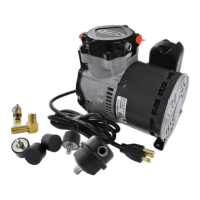

 To Next Page