15
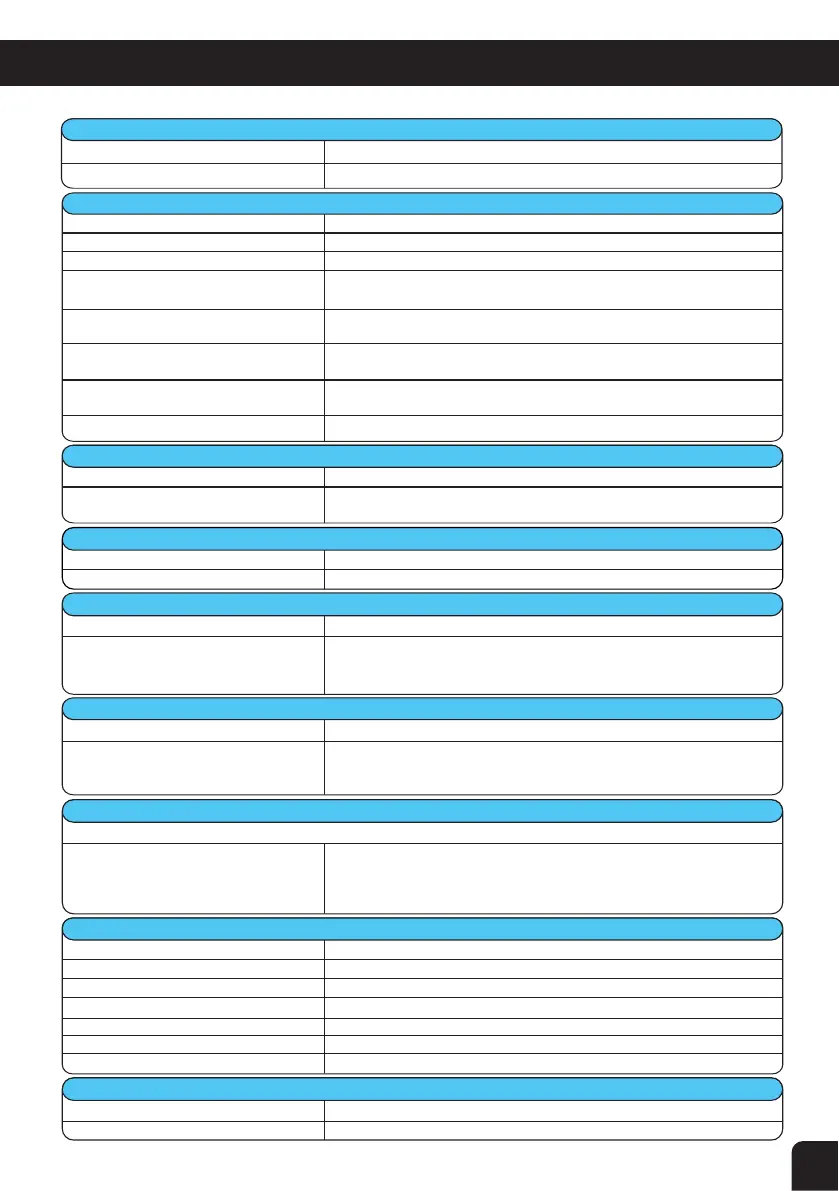
Output Control Knob not turned up
Low salt level
Build up of calcium on the Cell plates
Water temperature is low
Insufficient water flow through the Cell
Cell could be damaged or at the end of
its life
Level low in 1 direction but OK in other
Screws not adequately tightened
during installation
Turn the Knob clockwise,the reading should increase
Check salt level (sec. 3)
Calcium acts as an insulator and needs to be removed.
See Cleaning of Cell Electrode (sec. 7.2)
Winter water temperature can be very low. For every 1
o
C below 28
o
C
the output can drop 2-3%
Check water flow and ensure a full chamber of water is passing over
the Cell. You may need to backwash your filter
Damaged coating will reduce Cell life and reduce output. If all conditions
are correct then Cell could be at the end of its life
Clean the cell (sec. 7 .2) or Cell may have run its life in 1 direction
If melted then return for service, otherwise tighten as required.
Make sure Timer Switch is set to AUTO and black lever in the centre of
Timer is set to time clock position and not “I” or “O”. Refer to Timer
Setting in this manual (sec. 6)
Pump not plugged into chlorinator
Check pump is plugged into the bottom of the Power Pack and not
directly in to the wall outlet. Make sure you are set in AUTO mode and
not MANUAL for normal running
Excessively high calcium, change of
direction time set too high or
faulty PCB
1. See Calcium Hardness (sec. 3 ) and adjust water accordingly
2. Change Water Hardness Switch to IF HIGH (sec. 5.9)
3. Manually reverse direction (sec. 5.2 - Cell Switch Changing Direction).
Failure for this to work could indicate a faulty PCB - return for service
Unit not working correctly Go through Troubleshooting from 8.2
Unit not set correctly
Check basic settings such as Output Control and Timer running hours
Salt level is to o low Check Salt (sec. 3)
pH is too high
Check pH (sec. 3)
Stabiliser is too low Check Stabiliser (sec. 3 )
Cell at the ends of its life If full output is not reached then it could be a failing Cell
Battery life expired
Replace Timer - return for service
l
J
Incorrect timer settings
Return unit for service
Faulty Rectifiers, Transformer or PCB
9.3 Green LED near the SoHard switch ashing
This is not a fault but purely an indicator
This indicates power is supplied to the PCB and is normal
8
. CHLORINATOR TROUBLESHOOTING


 To Next Page