9
5
. POWER PACK OPERATION
5
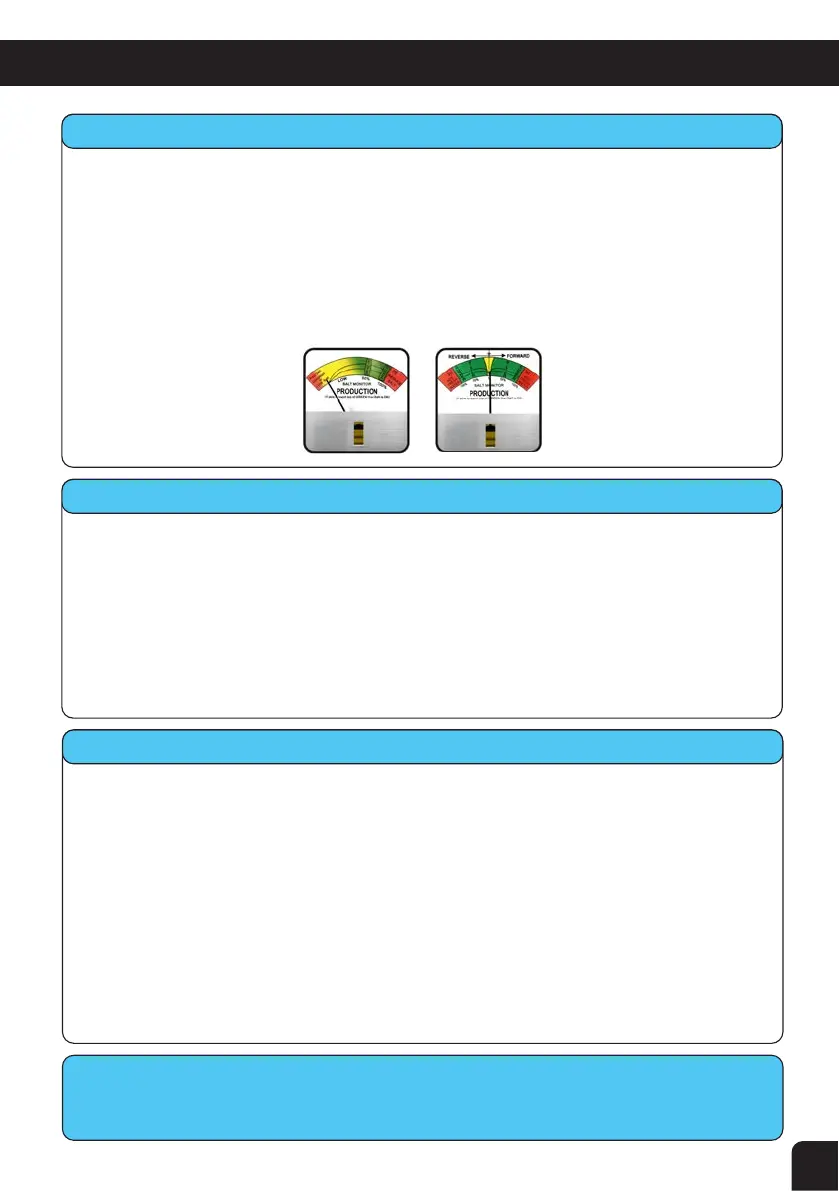
.8 Producon Output Display Meter
• When the unit is turned on full (Black Output Control Knob fully clockwise) the needle
should reach the top of the GREEN, this shows that the water has the correct conductivity
and the salt level is correct.
• If the needle is slightly low (in the GREEN area below 90% mark), it may be that the water is
very cold, more salt may be needed or possibly a faulty Cell (see Troubleshooting). In cold
months it is normal to operate as low as 50% and more salt is not needed.
• If the needle reaches the RED then you have either just enough salt (if just reaches RED) or
too much salt (if it goes in to the RED). If unsure refer to your nearest Pool Pro Professional
for a water test before adding more salt.
CPP (STD) Meter
CPPS (REV) Meter
5
.9
W
ater Hardness Switch (
C
PPS model only)
• This switch is only available in the reverse polarity models (self cleaning). The micro-
processor will automatically change direction of the current flow approximately every 10
hours (in the IF NORMAL position) and 6 hours (in the IF HIGH position) approximately, even
if the power is interrupted.
• You should always start off by running on the IF NORMAL position but if you have hard
water (high calcium) and the build-up on your electrode takes place too quickly, then you
can shorten the reversing hours by setting the switch to the IF HIGH position.
• The platinum coating on the Cell plates may not last as long on the hard setting as a
percentage of the wear on the coating is related to the number of current switches.
5
.10 Start Up Procedure
• Ensure 10amp wall outlet supply switch is turned "OFF".
• Water Hardness Switch in "IF NORMAL" position (or "IF HIGH" if required - see 5.9).
• "OUTPUT" Control Knob turned fully counter clockwise.
• Cell Switch in the "OFF" position.
• Timer Switch in the "MANUAL" position.
• Turn the 10amp wall outlet supply switch "ON".
• The pump should start up and prime.
• Allow the pump to run for 2 minutes and repair any leaks if needed.
• Turn the Cell Switch to "ON" and slowly turn the "OUTPUT" Control Knob clockwise until the
meter needle reaches the top of the GREEN indicator.
• Set the Timer to run 6-10 hours in the summer and 3-6 hours in the winter. Refer to section
6 Timer Setting for further details.
• Now turn the Timer Switch to "AUTO" and leave it here to run automatically.
All
P
ool
P
ro S
elf Cleaning models are controlled by a Micro-Chip controller
that
performs
several funcons, including t
he change of current direcon and water sensing.


 To Next Page