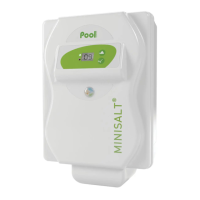
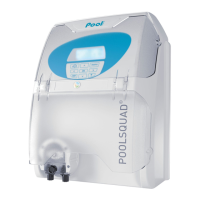
This document describes the MINISALT Salt Chlorinator, a device designed for the automatic cleaning and disinfection of family swimming pools. It is available in multiple models, including those for pools with automatic covers.
Function Description
The MINISALT Salt Chlorinator is an electronic device that generates chlorine through the electrolysis of salt in the pool water. This process automatically disinfects the pool, reducing the need for manual chemical treatments. The device is equipped with a self-cleaning function for the electrolysis cell, which reverses polarity to prevent scale buildup. It also includes safety features such as alarms for low salt levels, lack of water flow, and electronic control box issues.
Important Technical Specifications
- Salt Concentration: Ideal starting concentration is 5 kg/m³.
- Water Temperature: Operates effectively above 15°C.
- pH Range: Optimal performance when pH is stabilized between 7.0 and 7.4.
- Stabilizer Level: Should be less than 50 ppm (parts per million).
- Free Chlorine Rate: Should be maintained between 0.5 and 1 ppm (mg/l).
- Maximum Water Pressure: The cell should not exceed 3 bars.
- Power Supply: 230 V.
- Differential Circuit Breaker: The filtration electrical box must be protected by a 30mA maximum differential circuit breaker with a contact opening distance of at least 3 mm on all poles.
- Pool Volume Capacity: The device's treatment capacity must be adapted to the pool volume and local climate. For example, a device designed for 30 m³ in a temperate climate should be limited to 20 m³ in a hot climate or with well water; a 50 m³ device to 40 m³; and a 70 m³ device to 50 m³.
- Warranty:
- Electronic control box: 2 years.
- Electrolysis cell: 2 years (with a possible extension of up to 2 additional years).
- Repairs and spare parts: 1 month.
- The warranty covers manufacturing defects under normal use in family pools. Use in public pools voids the warranty.
- Exclusions: Installation, maintenance, and interventions by non-qualified personnel; use of non-original parts; damages from non-conforming installation, alteration, accident, abusive treatment, negligence, unauthorized repairs, fire, floods, lightning, frost, armed conflict, or other force majeure.
Usage Features
- Control Panel: Features a main display with alarm and power indicators, and navigation keys for adjusting settings.
- Setting Menu: Accessible by pressing the "V" key for 3 seconds. Allows adjustment of:
- Polarity Inversion Time (In): Adjusts the frequency of cell cleaning based on water hardness (from Off to 16 hours).
- Automatic Pool Cover Function (Co): Modulates chlorine production when an automatic pool cover is closed (On/Off).
- Alarm Security (AL): Activates or deactivates alarms for low salt, no water, or no flow (On/Off).
- On/Off Function: The device can be turned off by setting the production to 0% using the navigation keys. It will enter standby mode, turning off the screen and LEDs.
- Boost Mode: Allows for super chlorination (100% production) for 24 hours in cases of high pool usage, heavy rain, cloudy water, or increased chlorine demand. Activated by pressing the "V" key once. The device displays "bo." This mode is preventive, not curative, and cannot replace classic shock treatment for unsuitable pool water.
- Chlorine Production Regulation: Adjustable from 0% to 100% using the navigation keys. Initial adjustment recommendations are provided based on pool volume and desired free chlorine levels.
- Water Parameter Check: Before initial startup or at the beginning of each season, it is crucial to check and correct water parameters: clarity, temperature (above 15°C), pH (7.0-7.4), stabilizer (less than 50 ppm), and free chlorine (greater than 1 ppm).
- Salt Addition: Initial salt concentration should be 5 kg/m³. Salt should be added directly to the pool, and the filtration system should run manually for 24 hours with the chlorinator off. Use standard quality salt (pellet or granular form), not necessarily stabilized salt.
Maintenance Features
- Winterizing: Below 15°C water temperature, the chlorinator cell can experience premature wear. It is mandatory to switch off the device (set production to 0%). If the cell is not powered by the control box, it can remain on the tubing.
- Cell Cleaning: The device has an automatic self-cleaning function via polarity inversion. However, if scale deposits occur, manual cleaning is required.
- Remove the cell and visually inspect for scale on the electrodes.
- Use a "special cell cleaner" or contact a professional to remove scale.
- Rinse and reassemble the cell.
- Adjust the polarity inversion frequency downwards if necessary.
- Security Alarms (AL): The device displays "AL" to indicate an anomaly.
- Lack of Water: Chlorine production is stopped. Check for water flow in the cell.
- Lack of Salt: Chlorine production is stopped. Check the salt level with a test kit.
- Controller Problem: Chlorine production is stopped. Contact a professional for repair of the electronic control box.
- Cell Problem: Chlorine production is stopped. Visually check for scale, ensure connections are tight and not oxidized. If the cell is worn out, contact a professional for replacement.
- Alarms can be deactivated in the setting menu if they trigger inappropriately.
- Warning: Shock chlorination or strong pH correction (adding acid or soda to skimmers) may trigger false alarms.
Installation
- Location: The electronic control box should be easily accessible, within 2 meters of the pump timer, and far enough from the pool to comply with local regulations. Install vertically.
- Electrical Connection: Connect the control box permanently to the filtration electrical box, controlled by the pump sensor. Do not use extension cords. Ensure the control box switches off when the filter pump stops.
- Chlorinator Cell Installation: Install the cell horizontally after all other treatment, cleaning, or heating devices (just before the water jet).
- In-line cell: Install seals, collars, and hand-tighten nuts.
- T-cell: Glue the cell vase, then insert electrodes, seals, and hand-tighten nuts.
- Use supplied reducers (63/50 mm or 63/40 mm with barbed fittings for flexible pipes).
- Ensure all glued connections are completely dry before pressurizing the pipes.
- Connect the cell cable to the control box. Position the two terminals (brown and blue) interchangeably on the cell.
- Install washers and nuts, then tighten nuts (with a 10 spanner) gently until locked.
- Pool Cover Connection (optional): Connect the dry contact of the automatic pool cover to the connection box of the chlorinator.
- Pool Earth Grounding Kit (optional): Position clamps on the pipe, screw the electrode onto the clamps, and connect the electrode to a ground stake (not supplied) according to local installation standards. This kit helps evacuate static electricity from the pool water, preventing oxidation of metallic parts.

 Need help?
 General

 To Next Page