L0311 Rev 3 6-21 © Latham Pool Products, Inc. 2021. All rights reserved. Page 2 of 9
Touch Controller Operaon:
This device unlocks by entering a 4 number passcode congured by
the installer or user. The touch controller can operate covers directly
through high voltage power, indirectly via a control board (low
power), or wirelessly through another touch controller. The device
will stop the motor if 1) The operaon buon is released 2) Motor
current exceeds the set limit or 3) A limit switch is triggered (with
control board).
If motor current is exceeded, the buon for the direcon operated will turn red and the cover will stop. Aer the buon is
released, the cover can be operated in either direcon.
If the limit switch is triggered, movement in that direcon will be disabled unl the cover is operated in the opposite direcon.
With 121 control boards, the buon in the tripped limit direcon will disappear unl the cover is ran in the opposite direcon.
With the high voltage limit board the cover will stop, but the touch controller will display as if it’s operang.
Product Summary:
The touch screen pool cover controller is designed to operate all of
Latham’s 3 wire motor oerings either directly or through a control
board. It is compable with the 121 Motor Controls and the 3 Wire
Limit control board assemblies. It also has built in Latham mesh
capability to support wireless communicaon with mulple touch
pads. In addion, the product has support for Wi-Fi nocaons
which can nofy via text or email when your cover is operated.
Product Applicaons:
Electric 3 Wire motor oerings
Hydraulic systems (with compable control board)
Switch upgrades for premium features
Torque sensive applicaons (Prevent rope breakage/
system damage)
Mulple control locaons without addional wiring
Mulple covers controlled from a touch pad
Key Features:
Touch screen with simplied operaon and setup
Mesh network to wirelessly communicate with up to 4
touch controllers
Current liming with setup wizard
Wi-Fi nocaons when cover is operated or le open.
4 users with unique passcodes
Zero power motor acvaon and deacvaon
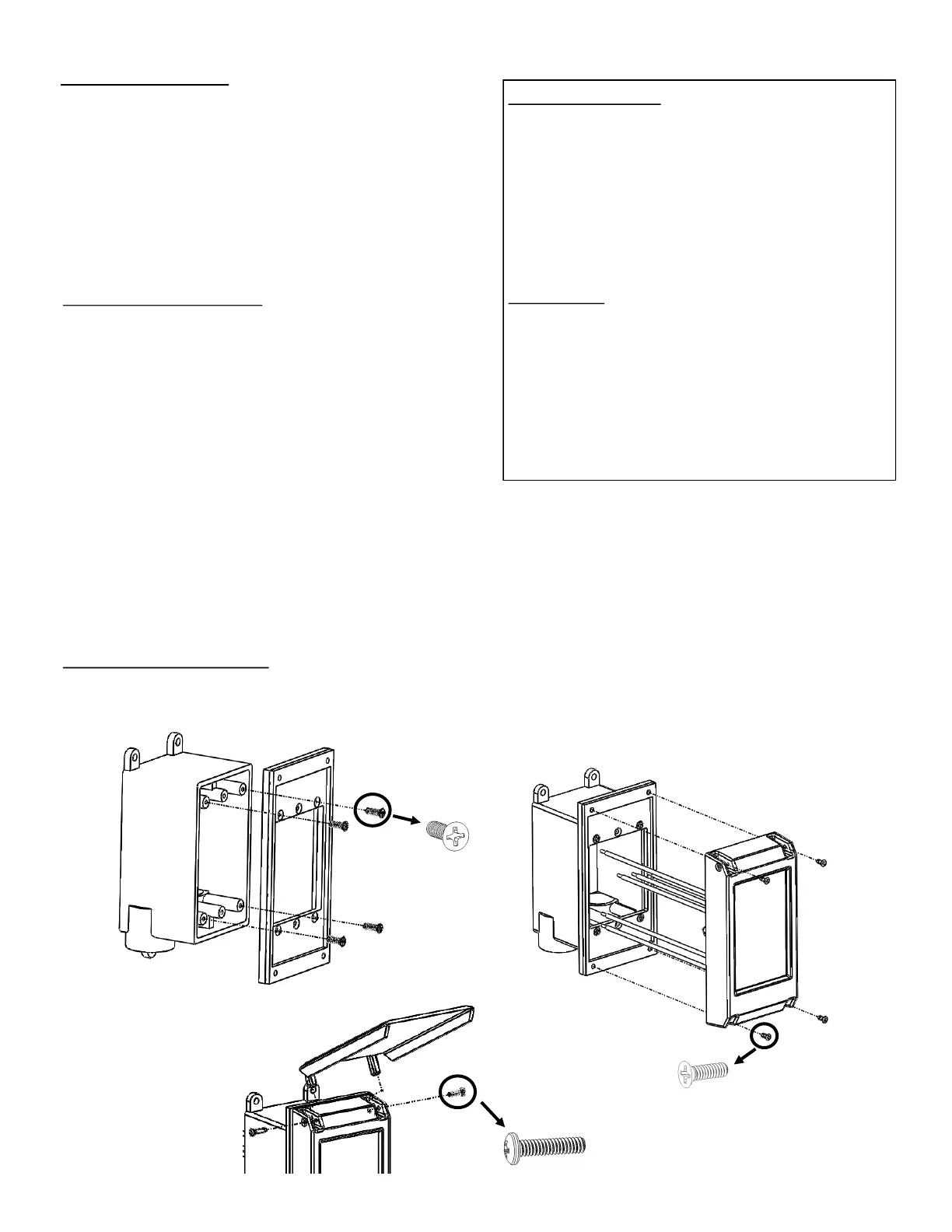
Mounng instrucons:
1) Aach M1146 adapter plate to juncon box using
provided hardware.
2) Connect wiring according to schemac.
3) Carefully feed connected wires into juncon box and secure
the E1146 touch controller to the M1146 adapter plate.
4) Aach M1147 lid to E1146 controller
using 2 supplied hinge screws.
Marked
A
Marked
B
Marked
B
M1146
E1146
M1147


 To Next Page