/6
STARPUMP 9
VII. INFLATION OPERATION
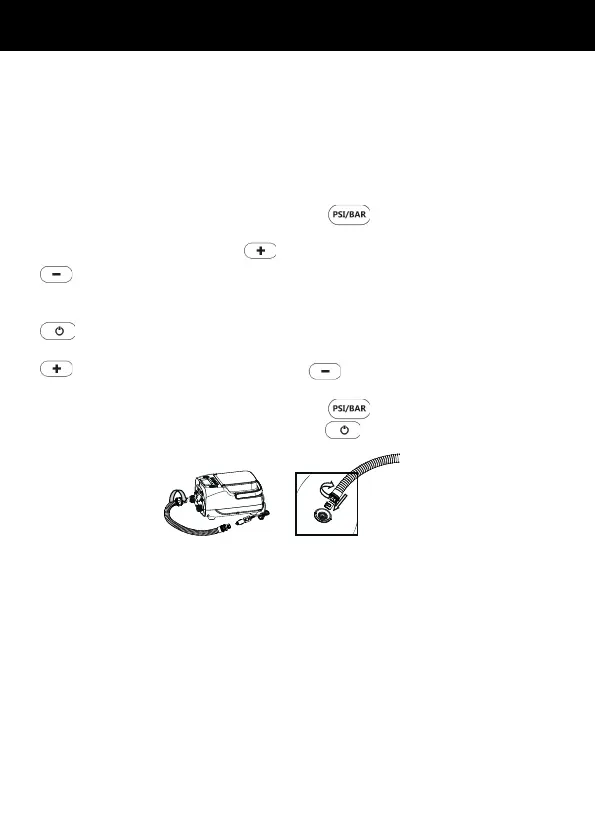
• Connect the end with exible conduit adaptor (5)of the hose with the air
pump ination inlet (5), and twist clockwise to tighten it, as Figure 5.
• Connect the other end of the hose with the air nozzle that matches the air
bag, and insert the ination valve of the air bag. Turn it clockwise to x it
as shown in Figure 6.
• Press the pressure unit switching button and select the unit you
need.
• Press the pressure increase
button or pressure reduction button
to set the desired pressure value. The pressure range is from 0 to
16 PSI (1 PSI = 0.0689 bar = 6.89KPA).
• Upon the completion of the above steps, press the power on/o button
to start ination.
• In the process of ination, you can press the pressure increase button
or the pressure reduction button to increase or decrease the
pressure value.
• Press the pressure unit switching button to switch between the
units, and press the power on/o button to stop.
• When the pressure reaches the set value, the air pump will stop working
automatically.
• Upon the completion of ination, it will turn o automatically without other
operations within 2 minutes.
• After pulling out the DC plug, please take down the hose from the air
pump and air bag and store it.
• Notice: The factory set pressure value of the air pump is 10PSI (10PSI=0.
689BAR), and at the time of the secondary use, the set pressure value
for the last time use will be displayed by default.
• Notice: After powered on, if there is no operation within 2 minutes, the
air pump will enter standby mode, and the machine can be initiated by
pressing the power switch button
(Figure 5) (Figure 6)


 To Next Page