Multi-Purpose Display and Instruments 171
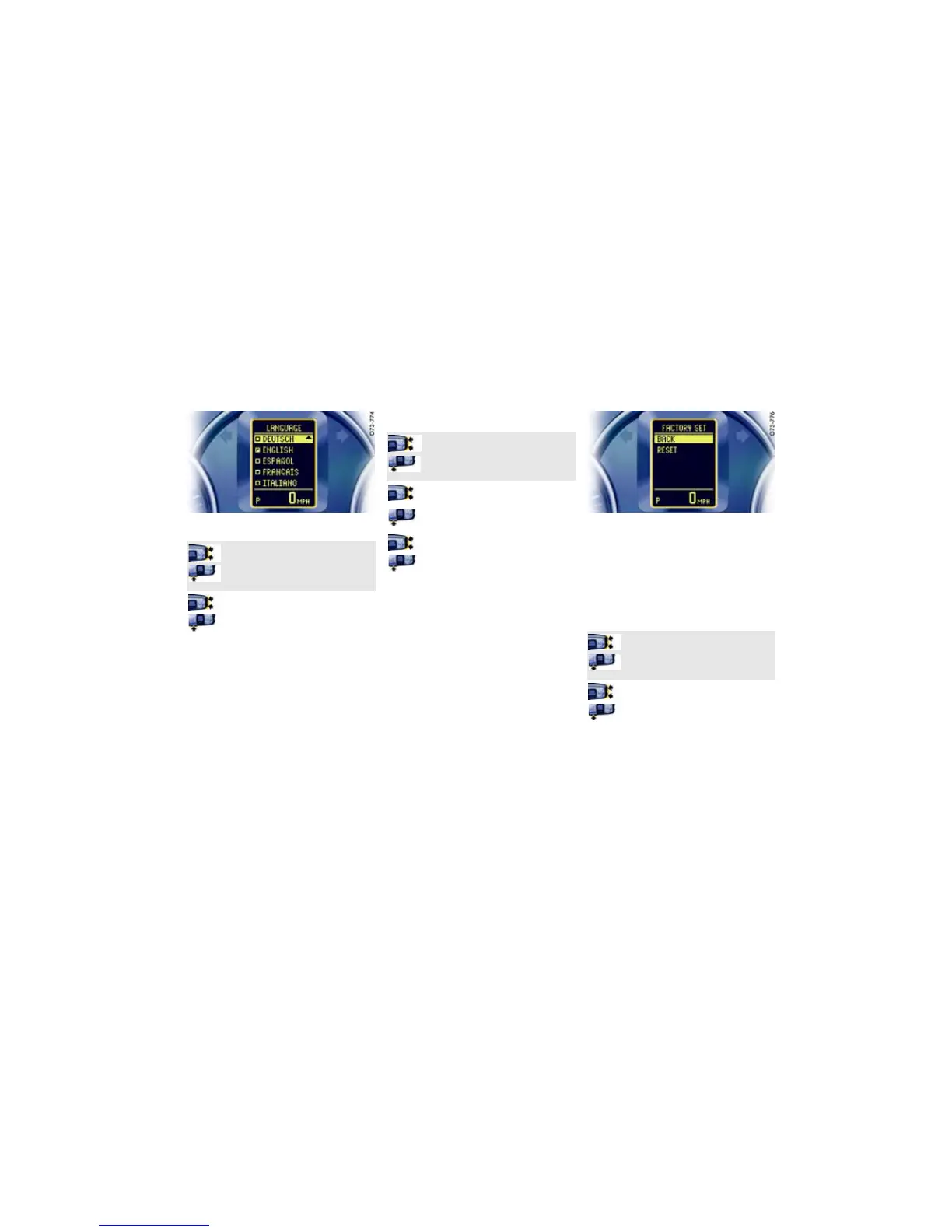
Changing language for displays
Note
Changing the language will affect the entire multi-
purpose display.
Changing units for displays
Available categories and units
– Speedometer:
km/h - km, mph - mls
– Consumption:
l/100 km, km/l, MPG (UK),
MPG (US)
–Temperature:
°C - CELSIUS, °F - FAHRENHEIT
– Tire pressure:
bar, psi
Resetting display to factory
settings
All settings made (Clock, Comfort, Lights, Units,
Language) can be reset to the factory settings.
Note
All personal settings made up to this point will be
deleted by resetting to the factory settings.
1. MAIN MENU
>SETTINGS
> LANGUAGE
Select and confirm.
2. Select the desired language.
3. Confirm selection.
1. MAIN MENU
>SETTINGS
> UNITS
Select and confirm.
2. Select the desired category (e.g.
SPEEDOMETER).
3. Confirm selection.
4. Select the desired unit (e.g. MPH).
5. Confirm selection.
1. MAIN MENU
>SETTINGS
> FACTORY SET
Select and confirm.
2. Select RESET.
3. Confirm selection.


 To Next Page
 Loading...