12
PAINT REMOVER ATTACHMENT
DISCONNECT TOOL FROM POWER SOURCE.
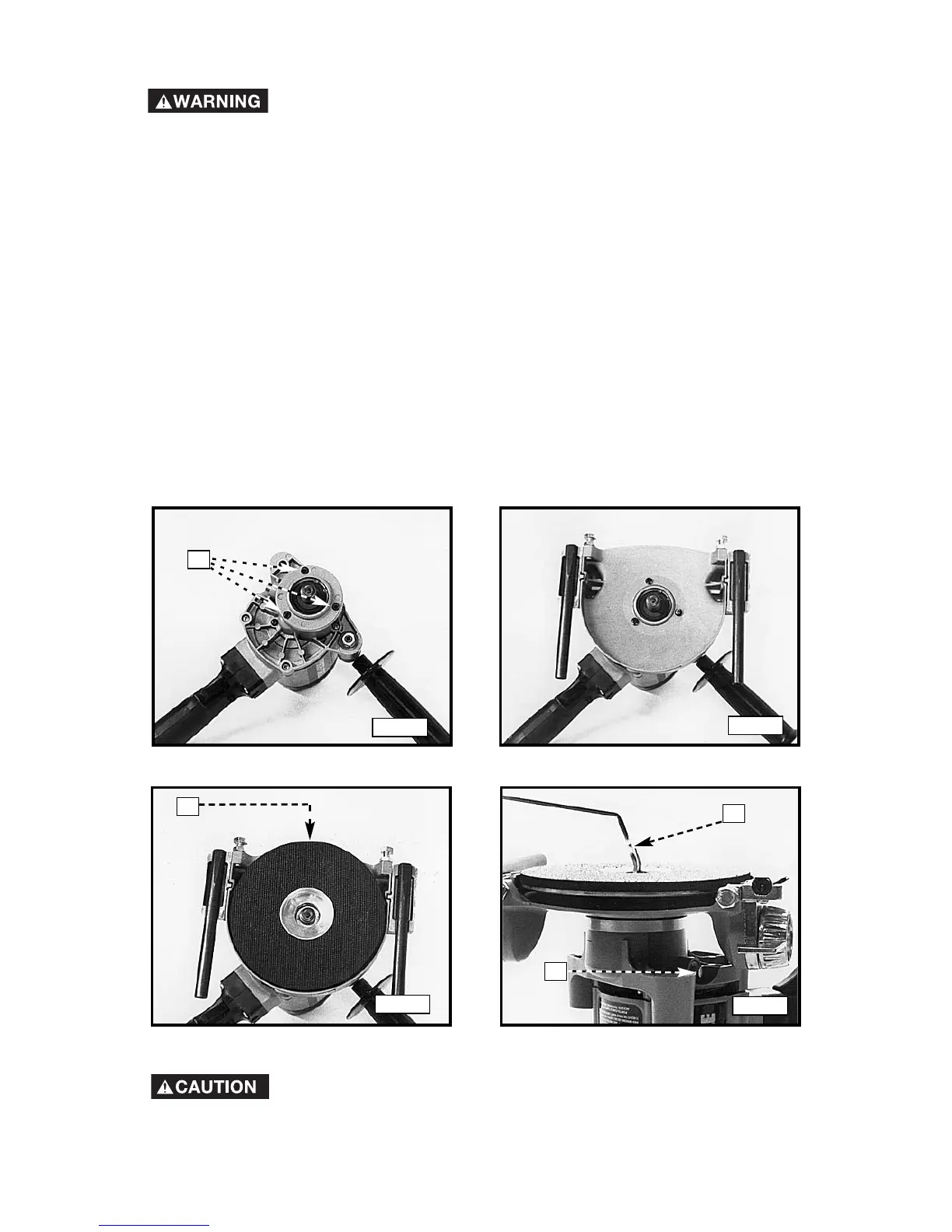
1. Remove the three gear case cover screws (B) Fig. 5 counter-clockwise
with a 9/64" hex wrench.
NOTE: Retain the screws in case you want to use the power unit without the
paint remover attachment. (Using the the longer screws without the paint
remover attachment will damage the internal gears).
2. Attach the paint remover attachment on the power unit (Fig. 6). Secure it
with three round head machine screws (supplied). Tighten the screws
firmly.
3. Thread the aluminum and sponge rubber back-up pad (A) Fig. 7 on the
machine spindle. Hand tighten.
4. Select the Porter-Cable tungsten carbide disc with grit size best suited
for the job. Center the disc on the back-up pad (Fig. 8) and thread the
disc retaining nut on the spindle. Depress the spindle lock pin (A) Fig. 8
and rotate pad by hand until the lock engages and stops the pad rotation.
Hold the spindle lock pin down while using the spanner wrench (B) Fig. 8
to firmly tighten the disc retaining nut.
B
The Model 7403 is designed for use with specific discs and
pads. The use of any other back-up pads or discs could be
hazardous.
Fig. 5
Fig. 6
Fig. 7
Fig. 8
A
B
A




 To Next Page