6
Sliding mounting stud
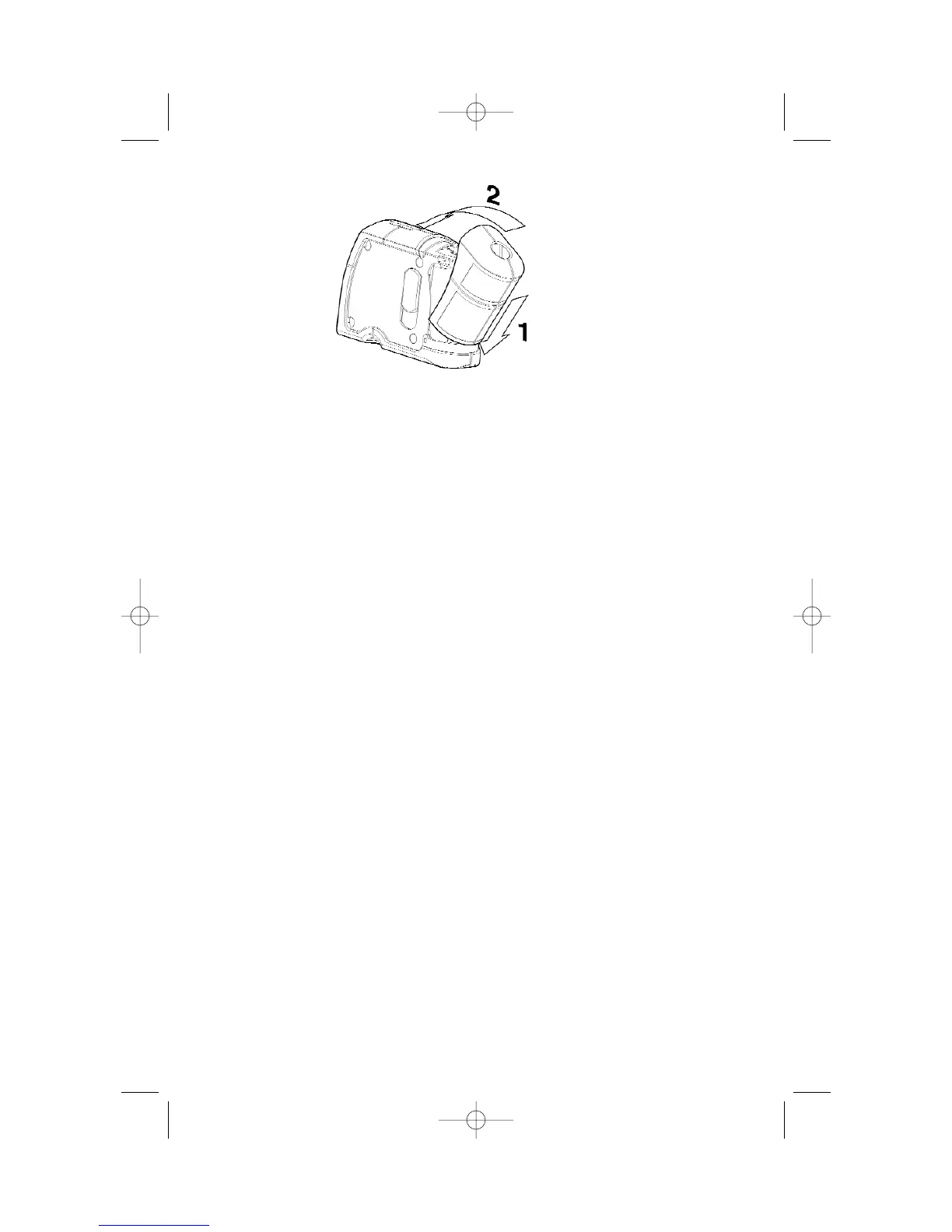
• Mount laser square to the accessory using the sliding mounting stud.
• Use the sliding/rotating action of the sliding mounting stud to:
1. Cantilever laser square over the accessory.
2. Rotate laser square around the mounting stud to change the location
of the horizontal leveling beam without changing the elevation of the
beam.
1/4"-20 Tripod mount
• Use this threaded hole, located on the bottom of the accessory, to mount the
accessory and the attached laser square to a camera tripod.
5/8"-11 Tripod mount
• Use this threaded hole, which continues through the accessory, to mount the
accessory and the attached laser square to a surveyor’s tripod.
Screw mounting holes
• Use the screw mounting holes to fasten the accessory and the attached
laser square to walls with drywall screws (at least 2" long).
Strap raceways
• Use the strap raceways to fasten the accessory and the attached laser
square to objects such as pipes and wooden studs with a diameter of
approximately 6" or less.
Magnets
• Use the magnets to fasten the accessory and the attached laser square to
steel objects such as steel studs.
5. How to use the mounting accessory


 To Next Page