6
SWITCHING ON AND OFF
-Toswitchthetoolon,squeezethetriggerswitch(1).
-Forcontinuousoperation,squeezethetriggerswitchthendepressthelock-onbutton
(2).Oncelock-onbuttonisdepressed,releasethetriggerswitch.
-Toswitchthetooloff,releasethetriggerswitch.Toswitchthetooloff,whenin
continuousoperation,squeezethetriggerandthelockwilldisengage.
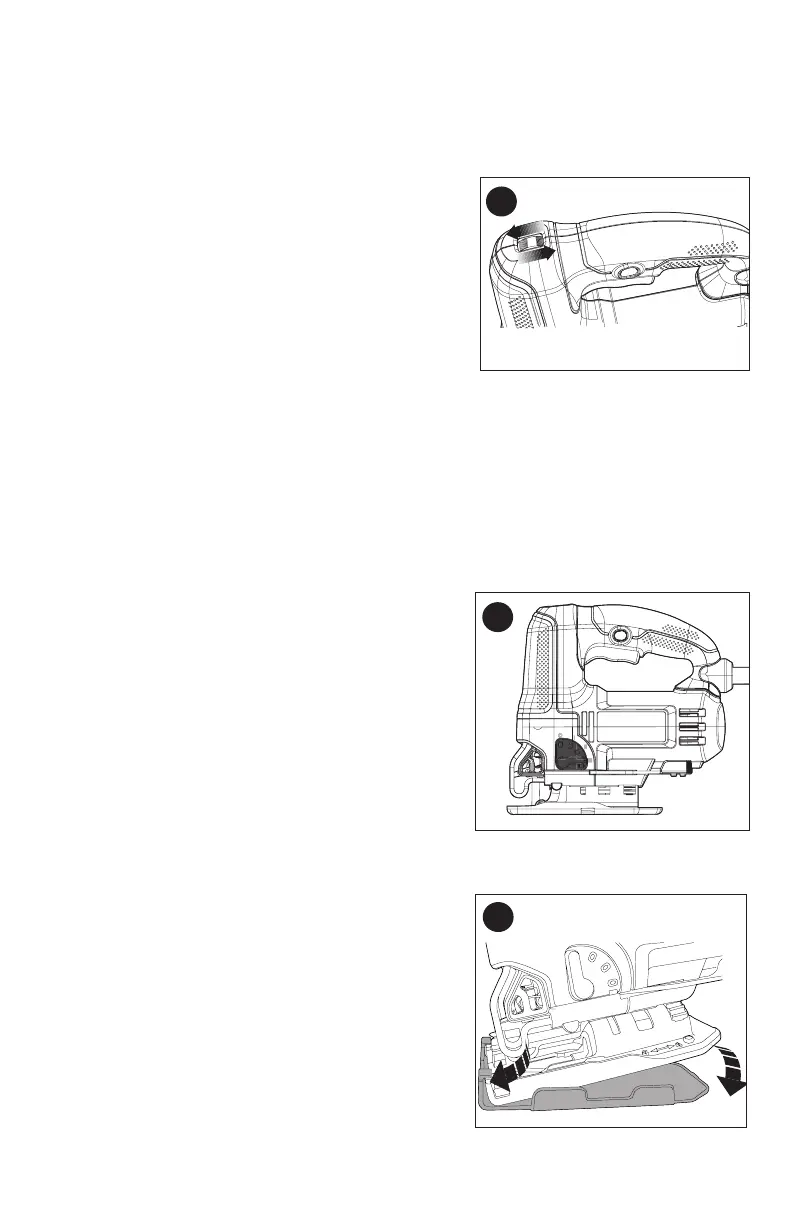
VARIABLE SPEED CONTROL (FIGURE D)
Aspeedcontrolwheel(8)islocatedonthetopof
the saw. The speed increases as the wheel is turned
from a low speed setting of 1 to a high speed setting
of7.
CUTTING ACTION – ORBITAL OR STRAIGHT (FIGURE E)
Check that the tool is not locked on before connecting it to a power supply. If the
trigger switch is locked on when the tool is connected to the power supply, it will start
immediately. Damage to your tool or personal injury may result.
Thisjigsawisequippedwithfourcuttingactions,threeorbitalandonestraight.Orbital
action has a more aggressive blade motion and is designed for cutting in soft materials
likewoodorplastic.Orbitalactionprovidesafastercut,butwithalesssmoothcut
acrossthematerial.Inorbitalaction,theblademovesforwardduringthecuttingstroke
in addition to the up and down motion.
NOTE: Metal or hardwoods should never be cut in
orbital action.
To adjust the cutting action:
-Movethecuttingactionlever(9)betweenthefour
cuttingpositions:0,1,2,and3.
-Position0isstraightcutting.
-Positions1,2,and3areorbitalcutting.
-Theaggressivenessofthecutincreasesasthe
lever is adjusted from one to three, with three being
the most aggressive cut.
LED LIGHT
Thejigsawisequippedwithalightwhichprojects
on the cutting path.
-Thelightwillcomeonwhenthetriggerswitchisdepressedandwillgooffwhenthe
trigger switch is released.
REMOVABLE SHOE SLEEVE (FIGURE F)
Thenon-marringshoesleeve(5)shouldbeused
when cutting surfaces that scratch easily, such as
laminate, veneer, or paint. It can also be used to
protect the shoe surface during transportation and
storage.
To attach shoe sleeve, place the front of the shoe
(6)intothefrontoftheshoesleeve(5)andlowerthe
jig saw as shown in figure F. The shoe sleeve will
clicksecurelyontotherearoftheshoe.
To remove shoe sleeve, grasp the sleeve from the
bottom at the two rear tabs and pull down and away
from the shoe.
D
E
F





 To Next Page