4
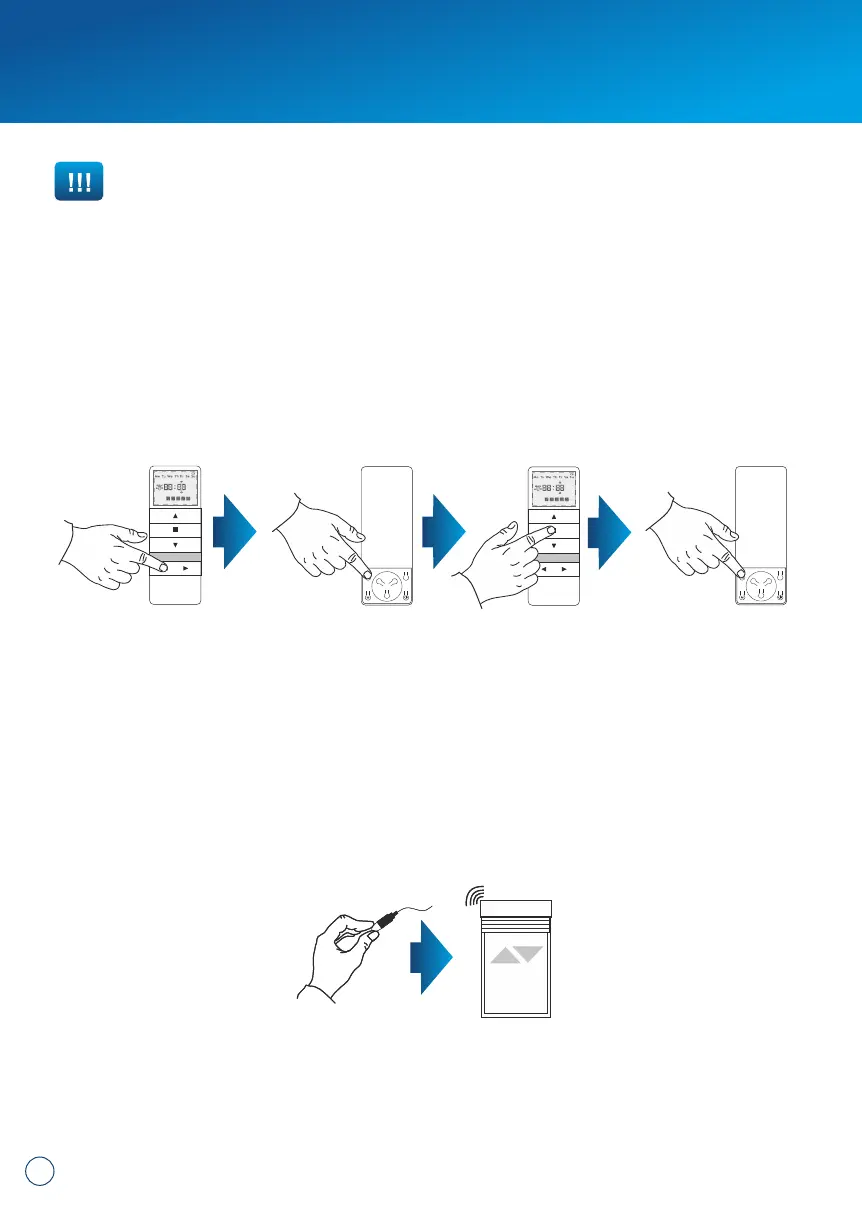
METHOD 1:
1. Select a previously programmed channel on the display:
2. Press P2, the motor will make a single beep sound and move briefly up and
down.
3. Press STOP, the motor will make a single beep sound.
4. Press P2 again, you will hear 4 beeps and the roller shutter will move briefly up
and down.
METHOD 2:
Using the microswitch located on the lead emerging from the head of the drive, you
can delete a previously programmed transmitter channel. To do so, you should:
1. Press the microswitch down for at least 15 seconds.
2. After 1 second, the motor will make a short beep sound and move up and down,
whereas after the next 5 seconds, the motor will confirm with 3 beeps and the
roller shutter will move UP and DOWN twice, and finally after 15 seconds the
motor will make 3 beeps and the roller shutter will move UP and DOWN once.
METHOD 3:
Reprogramming the radio drive on a given channel (point 1 of this manual)
automatically deletes previous settings.
IMPORTANT!!!
If you delete the settings of a particular channel, drives assigned to that channel
will be completely deleted from other channels as well.
min. 15 seconds
4. Channel deletion (deleting all channel settings).


 To Next Page
 Loading...