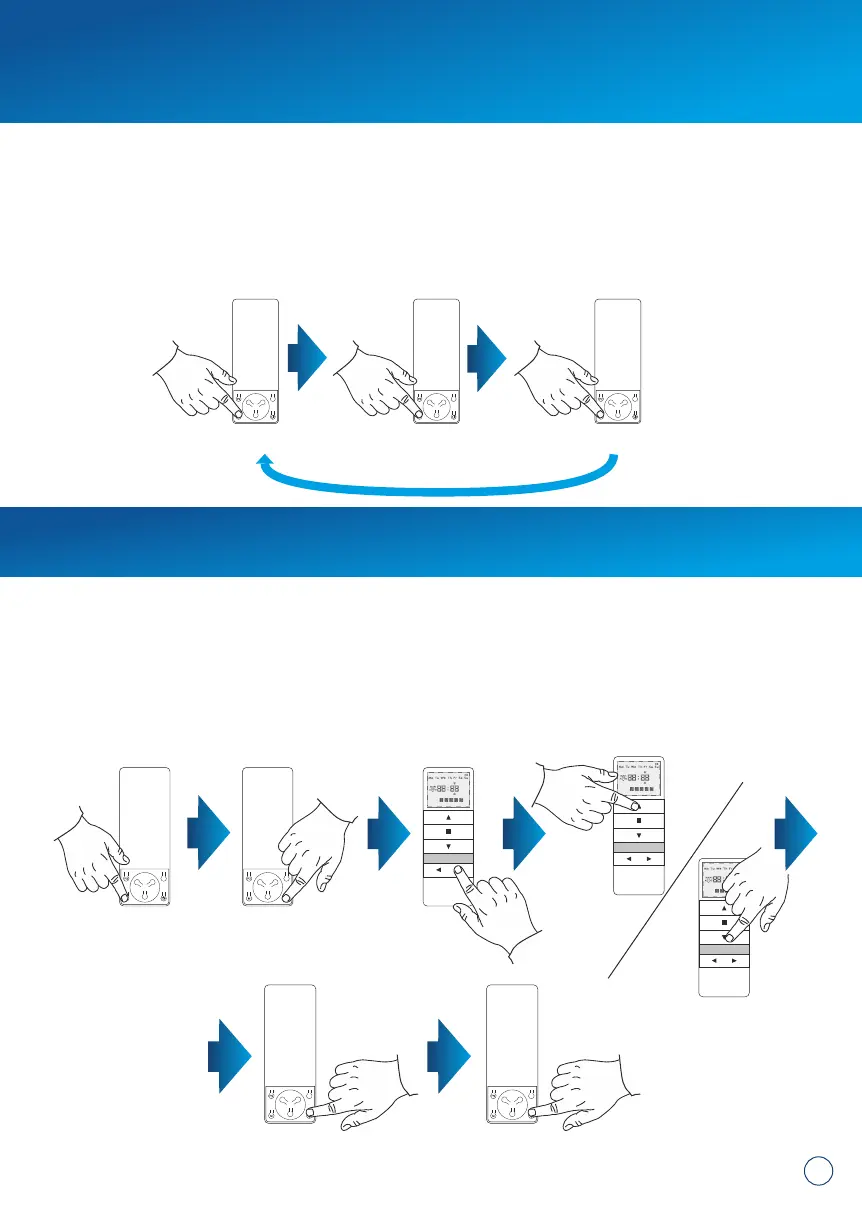
The transmitter can operate in three modes:
MAN – manual mode – manual lifting available only
AUTO – automatic mode – activates both: timer's functions and manual operation
RANDOMLY – random mode – manual operating available , whereas automatic
functions are booted with +/- 15 minutes offset
CHANGE OF THE MODES: To change the operation mode of the device press M button.
9. Device functions:
7
1x = MANUAL 1x = AUTO 1x = RANDOMLY
10. Setting the time and day of the week:
1. Briefly press M button and switch to MANUAL mode.
2. Press the CLOCK button for at least 3 seconds.
3. Press the CHANNEL + button to select the option of changing hours, minutes
or days of the week.
4. Press UP and DOWN buttons to set the required value.
5. Confirm applied changes by holding The CLOCK button for 3 seconds (time set
will start flashing).
6. Briefly hold the CLOCK button to activate the clock
1x = MANUAL 3 seconds
min. 3 seconds


 To Next Page