Smart RTH
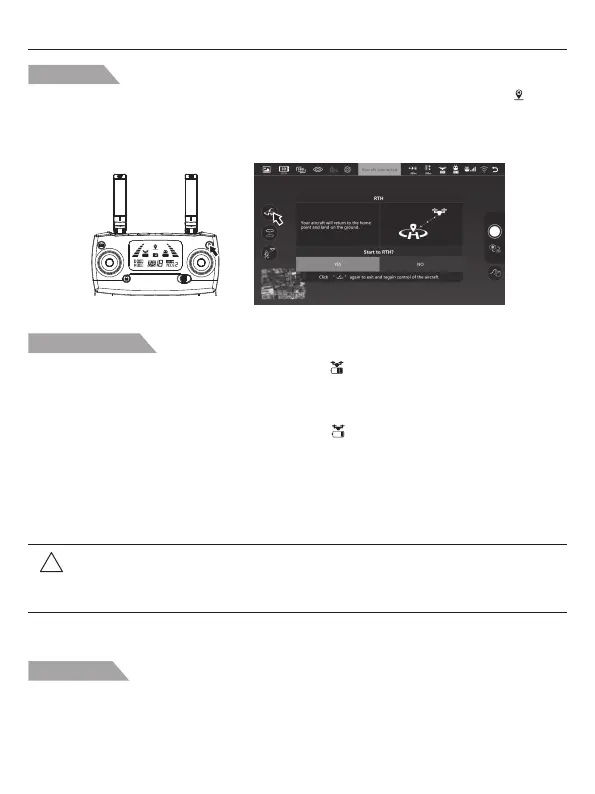
When the GPS signal is available (more than 7 satellites is presented), use the RTH button on the
remote controller (Pic. 1) or tap the RTH button on the App (Pic. 2) and then follow the
on-screen instructions to initiate Smart RTH. During the smart RTH, you can operate the joystick to
control your drone to avoid obstacle. You can press the RTH button again to exit RTH
procedure and regain control of the aircraft.
Low Battery RTH
Failsafe RTH
If the Home Point was successfully recorded and the compass is functioning normally, Failsafe RTH
will be automatically activated if the remote controller signal is lost beyond 6 seconds. Return-to-Home
can be cancelled by the pilot, allowing them to regain control when the remote controller signal
connection is reconnected during the returning.
!
Attention: When the aircraft is automatically return home with Low Battery RTH
function will be activated, you can not cancel the RTH procedure by
pressing the RTH button to regain control of the aircraft.
1. When the aircraft rear lights flash slowly, battery icon “ ” is shown on the remote controller or
on the APP. And steady “beep beep beep... beep beep beep” sound is heard. At this moment,
the aircraft will automatically return to the Home Point if the flying altitude is beyond 50 meters
or the flying distance against the home point is beyond 100 meters.
2. When the aircraft rear lights flash slowly, battery icon “ ” is shown on the remote controller or on
the APP. And steady “beep..beep...beep” sound is heard. At this moment, the aircraft will
automatically return to the Home Point if the flying altitude is beyond 15 meters or the flying
distance against the home point is beyond 15 meters. If the distance is within 15m, the drone will
land on the ground.
Pic. 1 Pic. 2
Potenstic D88 User Manual
-8-



 To Next Page